Create a video

Required photos3
Settings
Mode
Video length15s
Resolution

Dame Hombro Dance AI Video Generator

Create a Dame Hombro Dance AI trio from three photos. Photo 1 becomes the center lead, Photo 2 stays on the viewer’s left and Photo 3 stays on the viewer’s right through the synchronized shoulder dance.

0:00 / —:—

What is Dame Hombro Dance AI?

Dame Hombro Dance AI is a three-person vertical dance template built around synchronized shoulder bounces, squats, arm movements and steps. You upload three separate people. Photo 1 casts the center lead, Photo 2 casts the dancer on the viewer’s left and Photo 3 casts the dancer on the viewer’s right. The Dame Hombro Dance AI reference supplies the gray shutter, street setting, formation, choreography, timing, camera and soundtrack. You do not need to record the dance or align three clips by hand. This page uses the shoulder-dance trio version associated with the Dame Hombro phrase. It stays separate from the Bulin 47 street performance that features a performer carrying a portable speaker.

Dame Hombro Dance AI

How to make a Dame Hombro Dance AI video

Cast the center, left and right performers in order, then inspect the synchronized trio.

  1. STEP 1

    Choose the center lead

    Upload the lead performer as Photo 1. A full-body view helps with the shoulder motion, squats and clothing consistency.

  2. STEP 2

    Add the left and right dancers

    Use Photo 2 for the viewer’s left and Photo 3 for the viewer’s right. Keep one person in each image and do not reverse their order.

  3. STEP 3

    Generate and check the formation

    All modes keep the 15-second Dame Hombro Dance AI routine. Review identities, limbs, overlaps, timing and sound before downloading.

Three assigned performers in one shoulder-dance formation

This community example shows the Dame Hombro Dance AI trio version. Each uploaded photo stays assigned to the center, left or right role.

Keep all three Dame Hombro Dance AI positions clear

Choose three full-body photos with one person in each image. Put the intended lead in Photo 1, the left-side dancer in Photo 2 and the right-side dancer in Photo 3. Visible legs, arms and clothing give the generator more information for the repeated squats and synchronized arm positions. The template asks each person to keep the same location and identity throughout the routine, even when bodies overlap. Dame Hombro Dance AI does not use a one-photo clone mode on this page. It also has no optional fourth dancer. Avoid group images because the generator needs a direct image-to-position assignment for the trio.
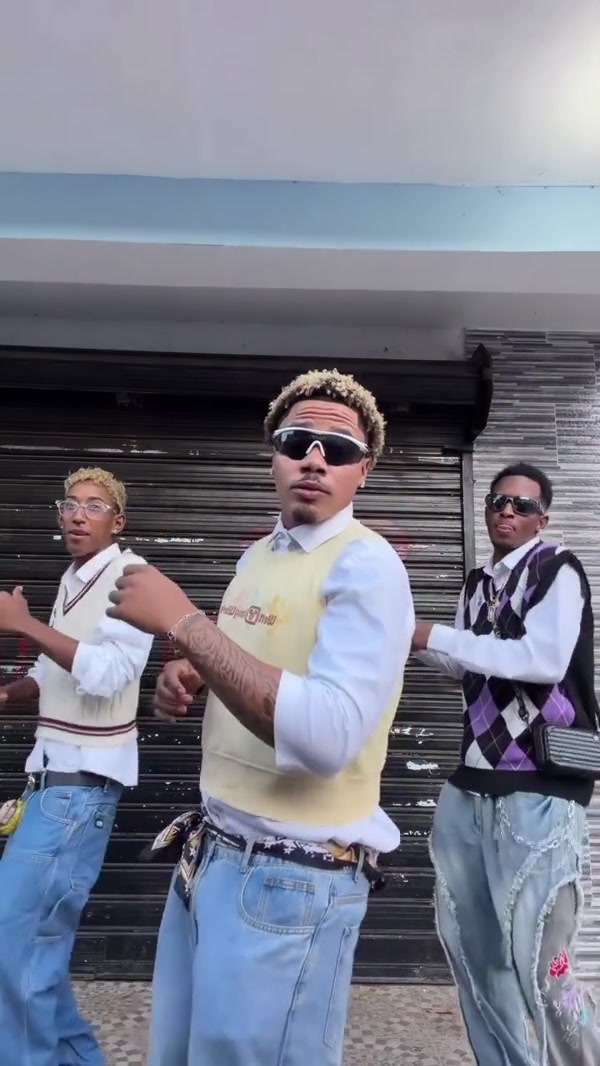
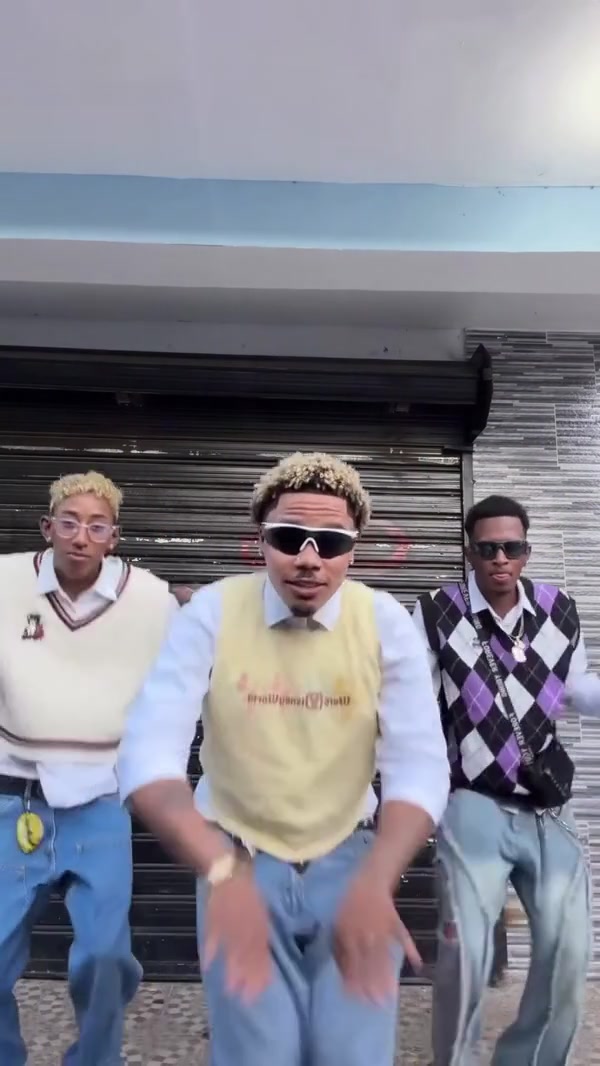
The center, left and right positions in Dame Hombro Dance AI

Follow the synchronized shoulder-dance routine

The Dame Hombro Dance AI reference keeps the three dancers in a compact row in front of the shutter. It follows their shoulder rhythm, drops into the lower poses, arm patterns, small steps and recovery to standing. The camera and vertical framing remain fixed so the group movement stays readable. There is no choreography picker, background upload or individual timing control. Your photos change the performers, while the reference determines what they do together. The community example shows the intended rhythm and spacing, though generated hands, feet, faces and contact edges can vary. Review moments where bodies overlap and where all three dancers move low in the frame.

Follow the synchronized shoulder-dance routine

Use the full Dame Hombro Dance AI routine

The prepared Dame Hombro Dance AI reference runs 15 seconds. Economy, Standard and Original all use the complete routine and restore its reference audio. A lower-cost mode does not remove a dancer or shorten the ending; compare the modes by resolution and the displayed credit estimate. The soundtrack is fixed for this template, with no song upload or voice replacement field. After generation, play the complete result and check all three assigned people from the first shoulder bounce through the final pose. Confirm you have permission to use the uploaded photos and the resulting audio in the place where you plan to share it.

A lower synchronized pose in the Dame Hombro Dance AI trio

What you control in Dame Hombro Dance AI

Your three photos cast the trio. The Dame Hombro Dance AI reference keeps the positions, choreography, shutter setting, camera and audio.

Three fixed dancer roles

Photo 1 is center, Photo 2 is left and Photo 3 is right. Each position keeps its assigned identity.

One synchronized routine

The shoulder bounces, squats, arm movements and steps follow the prepared choreography and timing.

Complete 15-second output

Economy, Standard and Original all use the full routine with reference audio restored.

Dame Hombro Dance AI questions

Three-person casting, formation, routine, duration, audio and output checks.

How many photos does Dame Hombro Dance AI need?

Dame Hombro Dance AI requires exactly three person photos. Photo 1 is the center lead, Photo 2 is the dancer on the viewer’s left and Photo 3 is the dancer on the viewer’s right.

Can Dame Hombro Dance AI use one photo three times?

This page is configured for three uploaded roles and does not provide a one-photo clone mode. Use three authorized images, even if you choose three different looks of the same character.

Can I swap the left and right dancers?

Choose their positions through upload order. Put the desired left dancer in Photo 2 and the desired right dancer in Photo 3. The page has no separate role-swap button.

Is Dame Hombro Dance AI the same as Bulin 47 AI?

This page uses the three-person shoulder-dance formation in front of a shutter. The Bulin 47 AI page uses a different street performance centered on a portable speaker. Preview each page before choosing.

How long is the Dame Hombro Dance AI video?

The complete routine is 15 seconds. Economy, Standard and Original all use the full reference. Resolution and the displayed credit estimate can differ by mode.

Does Dame Hombro Dance AI include sound?

Yes. The reference audio is restored after generation in every mode. The fixed page does not offer a song upload or audio replacement control.

Can I change the dance or shutter background?

The choreography, formation and setting belong to the Dame Hombro Dance AI reference. Use a custom motion-reference workflow when you need another routine, location or camera setup.

Will all three people stay consistent?

The recipe asks the model to preserve each assigned person, though faces, clothes, hands or limbs can drift when the dancers overlap or squat. Check each position throughout the finished clip.

Is the Dame Hombro Dance AI preview a paid result?

The preview is a community example used to identify the routine. It was not generated here as a paid acceptance test, and display or soundtrack rights are unconfirmed. Use authorized photos and permissions.

Where do I download Dame Hombro Dance AI?

Open My creations after the task finishes. Watch the complete trio with sound, inspect every role and use the download control on the result.

Create your Dame Hombro Dance AI trio

Add the center, left and right dancers, review the Dame Hombro Dance AI estimate and start from the generator.

Dame Hombro Dance AI