
Create a video

Required photos2
Settings
Mode
Video length24s
Resolution

I Love the Smiths AI Video Generator

Create an I Love the Smiths AI elevator video from two photos. Photo 1 becomes the headphones person on the left, while Photo 2 becomes the person on the right who starts the conversation and leaves. Preview the full community example before choosing a mode.

0:00 / —:—

What is I Love the Smiths AI?

I Love the Smiths AI is a two-person elevator scene built from a prepared video and two character photos. The setup is commonly searched as the I Love the Smiths elevator scene or a 500 Days of Summer elevator scene AI remake. Photo 1 supplies the person standing on the left with headphones. Photo 2 supplies the person on the right who speaks, reacts and leaves the elevator. I Love the Smiths AI keeps the elevator, the glances, the mouth movements, the exit, the cuts and the reference soundtrack. You do not need to act out the exchange, film an elevator or write a shot-by-shot prompt. The page prepares the casting and timing for you, while the finished faces, clothing and small lip details can still vary because the result is generated.

I Love the Smiths AI

How to make an I Love the Smiths AI video

Assign the two people in order, choose the scene length, then review both identities across every cut.

  1. STEP 1

    Upload the headphones person

    Add Photo 1 for the person on the left. Choose a clear face and the clothing you want I Love the Smiths AI to carry through the elevator shots.

  2. STEP 2

    Upload the speaking person

    Add Photo 2 for the person on the right who reacts, speaks and leaves. Keep this person separate from Photo 1.

  3. STEP 3

    Choose a mode and check both roles

    Use Economy or Standard for the opening highlight, or Original for the complete scene. After generation, watch the shared shots, close views and exit before downloading.

A two-person elevator encounter with fixed roles

This is one community example of I Love the Smiths AI. Your two uploaded people replace the featured roles while the prepared elevator sequence stays.

Cast both I Love the Smiths AI roles clearly

Use two separate photos with one recognizable person in each image. Photo 1 is always the headphones person on the left. Photo 2 is always the speaking person on the right. Those assignments matter across the close views, shared elevator shots and exit. A front-facing portrait helps with facial identity, while a wider crop can provide more clothing detail. Avoid putting both people in one photo because I Love the Smiths AI does not infer a cast order from a group image. Accessories visible in the uploads may influence the result, yet the headphones and elevator props come from the reference. The template asks the model to keep each identity in the same role and avoid swapping or merging the two people.
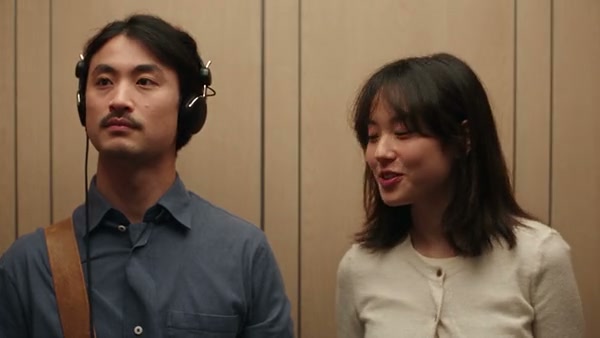
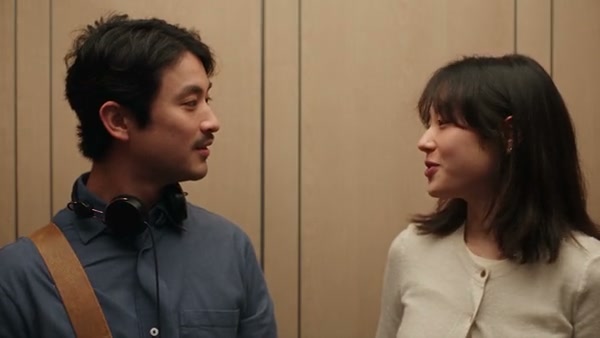
The two assigned character positions in the I Love the Smiths AI elevator scene

Keep the elevator exchange and its pacing

The I Love the Smiths AI reference owns the location and performance. It supplies the elevator interior, where each person stands, the looks between them, the conversational mouth movement, the headphone interaction and the moment the second person leaves. The generator follows that shot order instead of inventing a new conversation. There is no location picker, dialogue field or third-person upload on this page. Your photos change the two featured people; the elevator and background remain part of the prepared scene. The community preview demonstrates the sequence and framing, though it is a display example rather than a guarantee that every generated face, hand or mouth shape will match its frame exactly.

Keep the elevator exchange and its pacing

Choose the I Love the Smiths AI highlight or full scene

The complete I Love the Smiths AI reference runs about 24 seconds. Economy and Standard use the opening 14.9-second prepared highlight, which stays within the short reference limit. Original follows the complete scene and the duration control can display 25 seconds because output duration is rounded up. Every mode restores audio from the matching reference segment after generation. You do not upload a song or record dialogue on this page. Check the duration and credit estimate beside Generate before submitting. If the exit at the end matters to your edit, choose Original; if the opening encounter is enough, compare the two shorter modes by resolution and displayed cost.

A later frame from the I Love the Smiths AI elevator exchange

What you control in I Love the Smiths AI

Your photos cast the two featured people. The prepared I Love the Smiths AI reference controls the elevator, shot sequence, actions and source audio.

Two ordered photo roles

Photo 1 is the headphones person on the left. Photo 2 is the speaking person on the right. The order stays fixed.

Short highlight or complete scene

Economy and Standard use the opening 14.9 seconds. Original follows the roughly 24-second reference.

Prepared performance and sound

The elevator exchange and reference audio remain attached to the selected segment. There is no custom dialogue control.

I Love the Smiths AI questions

Photo order, scene length, audio, limitations and the finished file.

How many photos does I Love the Smiths AI need?

I Love the Smiths AI needs exactly two person photos. Photo 1 casts the headphones person on the left. Photo 2 casts the speaking person on the right. There is no optional third role.

Can I reverse the two I Love the Smiths AI roles?

Use the upload order to choose who plays each part: put the desired left-side headphones person in Photo 1 and the desired right-side speaking person in Photo 2. The I Love the Smiths AI page does not include a separate swap switch.

Is I Love the Smiths AI a face swap?

The generator uses each upload for the complete featured person, including visible face, hair, body, clothing and accessories. It follows a video-edit recipe rather than placing a flat face crop over the reference.

How long is the I Love the Smiths AI video?

The full reference is about 24 seconds. Economy and Standard use a 14.9-second opening highlight. Original follows the full reference and can show 25 seconds in the duration control because the output value rounds up.

Does I Love the Smiths AI include audio?

Yes. The selected reference segment supplies the audio restored after generation. The page has no song upload, recording tool or custom dialogue field. Confirm that you have the rights needed for your intended use.

Can I change the elevator or write new dialogue?

This fixed I Love the Smiths AI page keeps the prepared elevator, performance and timing. Use the general Motion Transfer workflow with your own video when you need another location or a different sequence.

Will I Love the Smiths AI reproduce every lip movement exactly?

The recipe follows the visible mouth movements and timing, though generated lips, faces, hands and clothing can drift. Review both people across the close shots and shared shots before sharing the result.

Is this an official movie page?

No. I Love the Smiths AI is a community-style recreation template and has no stated endorsement from a film studio, performer or music rightsholder. The page name describes the commonly searched scene format.

Is the preview a Motion Transfer paid generation?

The preview is a community example used to show the scene. It was not generated here as a paid acceptance test, and display or soundtrack rights are unconfirmed. Use photos and audio only when you have permission.

Where can I download my I Love the Smiths AI result?

Open My creations after the task finishes. Play the complete file, inspect both assigned people and the audio, then use the download control on that result.

Create your I Love the Smiths AI video

Add the headphones person and speaking person, review the duration and start I Love the Smiths AI from the generator.

I Love the Smiths AI