Create a video

Required photos1
Settings
Mode
Video length25s
Resolution

Podium Speech AI Video Generator

Create a Podium Speech AI Video from one person photo. The featured speaker gestures behind a podium and microphones while the prepared edit cuts to a seated audience and returns for the closing reactions.

0:00 / —:—

What is a Podium Speech AI Video?

A Podium Speech AI Video turns one person photo into the featured speaker in a prepared stage sequence. The character stands behind a podium and several microphones, makes expressive hand and arm gestures, reacts toward the room and appears around cutaways to the seated crowd. The Podium Speech AI Video reference supplies the formal clothing style, stage, microphones, audience, camera angles, editing, timing and soundtrack. You do not need to write a speech, record your voice or film a venue. This is a visual performance recreation with fixed audio, rather than a talking-avatar tool for delivering custom words. The source template is called Podium Speech; current search evidence supports a descriptive task name and does not establish a separate viral trend phrase.

Podium Speech AI Video

How to make a Podium Speech AI Video

Choose the speaker, select the scene length and review the identity after every cut.

  1. STEP 1

    Upload the featured speaker

    Add one clear person photo. You do not need a podium, suit, microphone or speaking pose in the image.

  2. STEP 2

    Choose the highlight or full scene

    Economy and Standard use the opening 14.9 seconds. Original keeps the complete Podium Speech AI Video reference at about 25 seconds.

  3. STEP 3

    Check gestures, cuts and sound

    Watch the hands, mouth, microphones, audience cutaways and returning speaker identity before downloading the finished result.

One speaker, a prepared podium and responsive audience

This community example shows the Podium Speech AI Video gestures, audience cutaways and landscape stage framing. Your photo replaces the featured speaker.

Use one clear Podium Speech AI Video speaker

Upload one image with a single recognizable person. A clear face and visible hair help across the medium shots, while a waist-up or wider image can give the generator more body and clothing information for the raised arms and clapping. The podium and formal suit styling come from the reference, so your photo does not need to include a microphone, lectern or speaking pose. The Podium Speech AI Video page has one required role and no optional audience uploads. People visible in a group photo will not become separate cast members. The recipe replaces only the featured speaker and keeps the seated audience as part of the prepared scene.
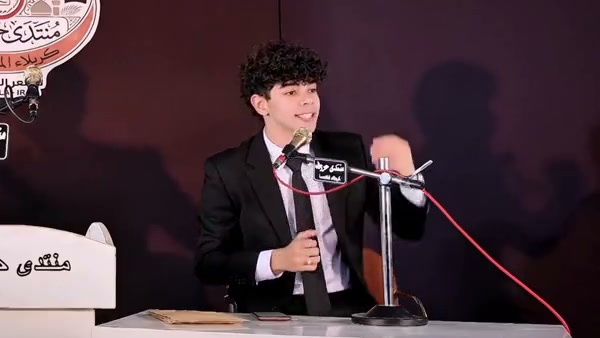
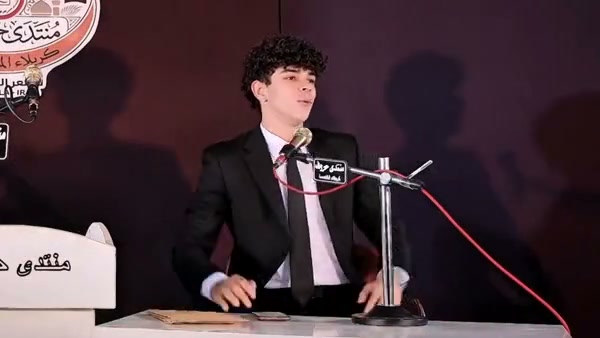
The single featured speaker role in a Podium Speech AI Video

Keep the gestures and audience cutaways

The Podium Speech AI Video reference follows an expressive performance from the podium. The speaker points, raises an arm, brings both hands together and changes expression while the edit briefly shows the audience responding. Those cuts remain in the same order, and the camera returns to the same assigned speaker. There is no gesture menu, custom crowd field or shot editor. Your photo changes the person at the podium; venue graphics, microphones, cables, desk details and audience remain. Visible signs and lettering belong to the source footage and may be imperfect in a generated result. Inspect the hands, microphone edges, mouth, podium contact and the identity after each audience cut.

Keep the gestures and audience cutaways

Choose a Podium Speech AI Video highlight or full performance

The complete reference runs about 25 seconds. Economy and Standard use a prepared 14.9-second opening highlight. Original follows the full reference and the duration control can display 26 seconds because the source slightly exceeds 25 seconds and the output value rounds up. Every mode restores audio from its matching reference segment. The uploaded face does not create a new voice and the page cannot make the speaker say your script. Choose Original when the later gestures and closing reaction matter, or compare the shorter modes when the opening performance is enough. Review the displayed duration, resolution and credit estimate before submitting.

A closing raised-arm gesture in the Podium Speech AI Video sequence

What you control in Podium Speech AI Video

Your photo controls the featured identity. The Podium Speech AI Video reference keeps the stage, formal styling, gestures, crowd, edit and audio.

One speaker photo

A single authorized person replaces the podium speaker. Audience members remain part of the reference.

Opening highlight or complete sequence

The shorter modes use 14.9 seconds. Original includes the later audience and closing gesture sequence.

Fixed audio and performance

The mouth movement follows the source performance. There is no custom script, voice clone or soundtrack upload.

Podium Speech AI Video questions

Photo requirements, speech and audio limits, duration, audience and result checks.

How many photos does Podium Speech AI Video need?

Podium Speech AI Video requires exactly one person photo. That person replaces the featured podium speaker. The audience and other visible scene elements stay with the prepared reference.

Do I need a speaking or podium photo?

No. Use a clear single-person image. The template supplies the podium, microphones, formal stage styling, hand gestures and audience cutaways.

Can Podium Speech AI Video say my script?

No. This fixed template follows the source mouth movements and reference audio. It has no script field, text-to-speech control or voice-cloning input. Use a talking-avatar tool for custom spoken content.

How long is Podium Speech AI Video?

The complete source is about 25 seconds. Economy and Standard use the opening 14.9 seconds. Original follows the full source and can display 26 seconds because the output duration rounds upward.

Does Podium Speech AI Video include audio?

Yes. Audio from the selected reference segment is restored after generation. The uploaded person does not receive a newly generated voice, and there is no music replacement field.

Can I replace the audience or stage?

The audience, podium, microphones, venue graphics and camera cuts belong to the fixed Podium Speech AI Video reference. Use a general motion-reference workflow for a different venue or cast.

Is Podium Speech AI Video a verified trend name?

Podium Speech is the source template name and Podium Speech AI Video describes the supported task. Current research did not establish a broader independent viral phrase or reliable keyword volume for it.

Will the mouth, hands and microphones remain exact?

The recipe follows the timing and gestures, though generated mouths, fingers, microphone edges, clothing and visible text can shift. Inspect every return from the audience cutaways before sharing.

Is the preview a paid Motion Transfer result?

The preview is a community example used to identify the sequence. It was not generated here as a paid acceptance test, and display or audio rights are unconfirmed. Upload only authorized photos.

Where do I download my Podium Speech AI Video?

Open My creations after generation. Play the selected duration with sound, check the speaker after each cut and use the download control on that result.

Create your Podium Speech AI Video

Add the speaker photo, review the Podium Speech AI Video duration and estimate, then start from the generator.

Podium Speech AI Video