
Create a video

Required photos2
Settings
Mode
Video length10s
Resolution

Parisian Stroll AI Fashion Video Generator

Create a Parisian Stroll AI fashion video with one person photo and one outfit reference. The prepared vertical clip moves the same styled character through a lit night street and a café table with pastries and coffee.

0:00 / —:—

What is Parisian Stroll AI?

Parisian Stroll AI is a short AI fashion video that combines a person reference with a separate outfit reference. Photo 1 defines the featured person. Photo 2 defines the clothes and accessories that person should wear. The Parisian Stroll AI reference then carries one consistent character through a lit city street and a restaurant or café moment with pastries and coffee. It supplies the walk, turns, hand gestures, seated action, camera movement, cuts, timing and soundtrack. You can use the page as an AI outfit video or fashion-character showcase without filming two locations. Parisian Stroll is the source template name; current evidence does not establish it as a broad independent trend, so the page describes the actual fashion-video task directly.

Parisian Stroll AI

How to make a Parisian Stroll AI fashion video

Choose a person, add the outfit separately and review the complete ten-second look.

  1. STEP 1

    Upload the featured person

    Use Photo 1 for identity. Choose a clear face and hairstyle so Parisian Stroll AI can follow one person across both locations.

  2. STEP 2

    Upload the outfit reference

    Use Photo 2 for the clothing and accessories. Show the whole look where possible; this photo does not create another character.

  3. STEP 3

    Generate and review the full look

    All modes keep the ten-second sequence. Check the face, outfit, street walk, café scene and reference audio before downloading.

One person and one outfit across two fashion settings

This community example shows the Parisian Stroll AI street-to-café structure. Your first photo casts the person and your second photo supplies the outfit.

Separate the person from the outfit reference

Parisian Stroll AI uses each upload for a different job. Photo 1 should clearly show the face and hair of the person who will appear in the video. Photo 2 should clearly show the desired outfit, including silhouette, colors and visible accessories. The outfit image can show another model because its role is clothing guidance, though simple backgrounds and an unobstructed garment make the assignment easier to interpret. The page asks the generator to apply that look to the person from Photo 1 and keep it stable across the street and café shots. Parisian Stroll AI does not treat Photo 2 as a second character and does not provide an extra cast slot.
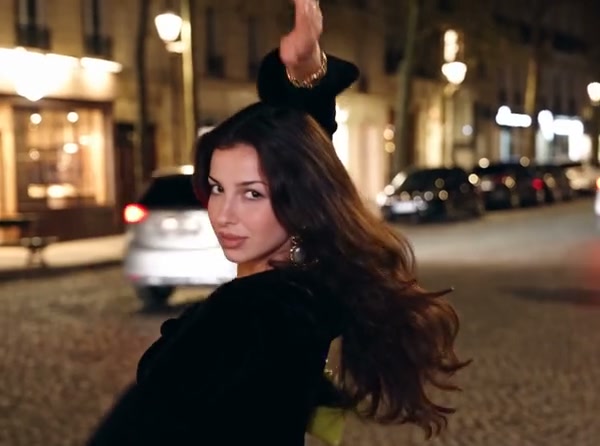
The featured person and outfit in a Parisian Stroll AI street frame

Show one look across the street and café

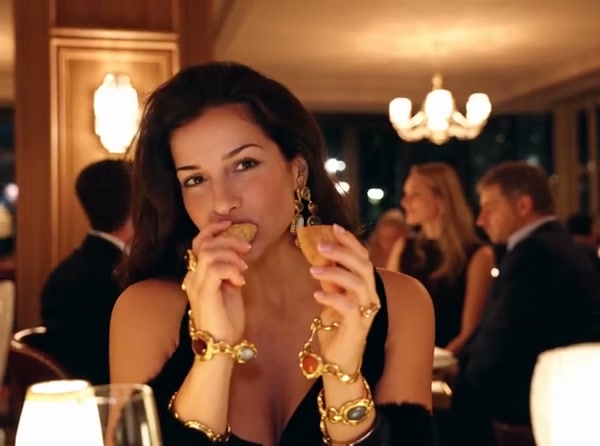
The Parisian Stroll AI sequence opens outdoors at night and continues into a table scene. The same person walks, turns and gestures before appearing with pastries and coffee. That transition gives an outfit more context than a static try-on image: viewers can see the silhouette while moving and then see closer styling at the table. The location, food, drink, camera and edit remain prepared. You cannot select another city, replace the coffee with a product or rearrange the shots from this fixed page. Use a custom reference workflow when you need a different fashion story. The displayed clip is a community example, so its person and clothing demonstrate the structure without promising an identical render from your uploads.

Show one look across the street and café

Use the complete Parisian Stroll AI clip

The prepared Parisian Stroll AI reference runs 10 seconds. Economy, Standard and Original all use the complete sequence and restore the same reference audio. A lower-cost mode does not remove the café ending, though resolution and the current credit estimate can differ. The public generation example has a landscape display frame, while the generation reference is a vertical fashion clip; preview cards may crop it according to their container. Review the actual reference inside the generator before submitting, then inspect identity and clothing consistency after generation. Fine garment patterns, jewelry, fingers and table details can drift during movement, so use the downloaded result only after checking the complete video.

The café table with pastries and coffee in Parisian Stroll AI

What you control in Parisian Stroll AI

Your two references define the person and styling. The Parisian Stroll AI clip supplies the movement, settings, food, camera and sound.

Person identity

Photo 1 supplies the featured face, hair and body. It remains the same character in the street and café shots.

Outfit styling

Photo 2 supplies the clothing and accessories. It is an outfit reference rather than a second person role.

Fixed ten-second fashion story

Every mode uses the complete walk and café sequence with the prepared reference audio.

Parisian Stroll AI questions

Person and outfit roles, scene structure, duration, sound and fashion-video limits.

What images does Parisian Stroll AI need?

Parisian Stroll AI needs exactly two images. Photo 1 is the person reference. Photo 2 is the outfit reference. The second image supplies clothing and does not create another featured person.

Can the outfit photo show a different model?

Yes. Parisian Stroll AI uses Photo 2 for outfit guidance. Choose an image where the garments are easy to see and where another person or busy background is unlikely to obscure the look.

Is Parisian Stroll AI an AI outfit video?

Yes. The page applies a separate clothing reference to one featured person and shows that styled character moving through two prepared settings. It does not provide virtual fitting measurements or shopping links.

Is Parisian Stroll AI a confirmed viral trend?

Parisian Stroll is the template name attached to the source clip. Current research did not confirm a broad independent trend under that exact phrase. The page focuses on the supported AI fashion video task.

How long is a Parisian Stroll AI video?

The complete reference is 10 seconds. Economy, Standard and Original all use the full street and café sequence. The generator shows the current resolution and credit estimate for each available mode.

Does Parisian Stroll AI include sound?

Yes. The fixed reference audio is restored after generation in every mode. The page does not include a music upload or voice-recording control.

Can I change the city, café, food or coffee?

Those elements belong to the prepared Parisian Stroll AI reference. Use a general motion-reference workflow with your own video when you need another location, product or shot order.

Will every outfit detail remain exact?

The outfit image gives the model visual guidance, though small patterns, jewelry, hems and other details can shift during movement or between cuts. Inspect the street and café shots before using the result.

Is the preview a paid Motion Transfer result?

The preview is a community example used to show the scene. It was not generated here as a paid acceptance test, and its display or soundtrack rights are unconfirmed. Upload only references you are allowed to use.

Where do I download my Parisian Stroll AI video?

Open My creations after generation. Play the full ten-second result, compare the person and outfit across both settings, then use the download control.

Create your Parisian Stroll AI fashion video

Add the featured person and outfit reference, review the Parisian Stroll AI estimate and start from the generator.

Parisian Stroll AI