
Create a video

Required photos2
Settings
Mode
Video length15s
Resolution

Elevator Couple Selfie AI Video Generator

Create an Elevator Couple Selfie AI video from two person photos. Photo 1 becomes the phone holder and carrier; Photo 2 becomes the person positioned over their shoulder in the gold-elevator mirror selfie.

0:00 / —:—

What is Elevator Couple Selfie AI?

Elevator Couple Selfie AI is a two-person vertical video built around a playful mirror selfie and shoulder-carry pose. You upload one person for the phone holder and another for the person positioned over that person’s shoulder. The Elevator Couple Selfie AI reference supplies the gold elevator, mirror, phone, handbag, pose, movements, expressions, camera, timing and soundtrack. You can recreate the scene without filming in an elevator or balancing someone for a real photo. The template keeps the two roles distinct across the roughly 15-second interaction. It is a separate setup from the one-person Elevator Mirror Selfie AI page, which casts a single person and has no over-shoulder partner role.

Elevator Couple Selfie AI

How to make an Elevator Couple Selfie AI video

Choose the phone holder, add the over-shoulder person and inspect the carry throughout the result.

  1. STEP 1

    Upload the phone holder

    Put the carrier in Photo 1. Choose a clear face and outfit for the person who holds the phone through the mirror selfie.

  2. STEP 2

    Upload the over-shoulder person

    Put the second person in Photo 2. This person stays positioned across the carrier’s shoulder and does not hold the phone.

  3. STEP 3

    Generate and check the contact points

    Watch faces, arms, shoulder contact, phone, reflection and audio from beginning to end before downloading the Elevator Couple Selfie AI result.

Two assigned people in one playful elevator selfie

This community example shows the Elevator Couple Selfie AI pose and mirror interaction. Your photos cast the phone holder and over-shoulder person.

Assign both Elevator Couple Selfie AI roles

Photo 1 must be the person who holds the phone and carries the other person. Photo 2 must be the person who appears across the phone holder’s shoulder. Use separate images with a clear face, hair and clothing in each. A wider view can help the model infer body proportions and outfits during the carry, while a sharp portrait can help facial identity. The fixed assignment continues while both people gesture and react to the mirror. Elevator Couple Selfie AI does not infer the order from a couple photo, provide a role-swap switch or add a third person. Choose the upload order before you generate.
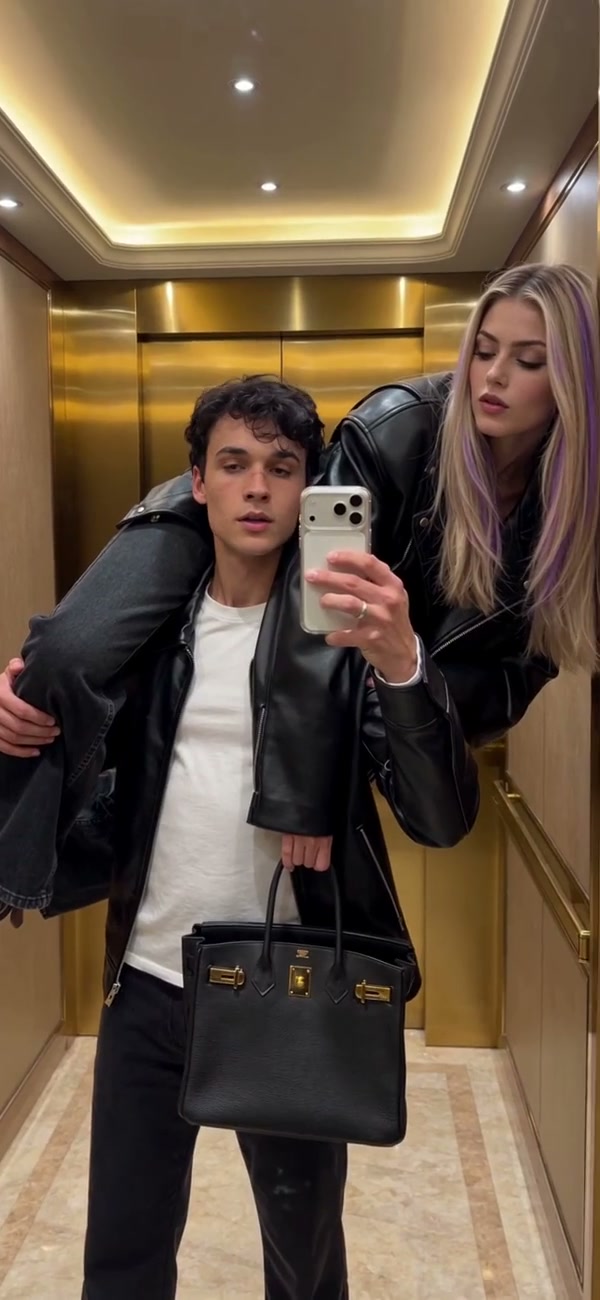
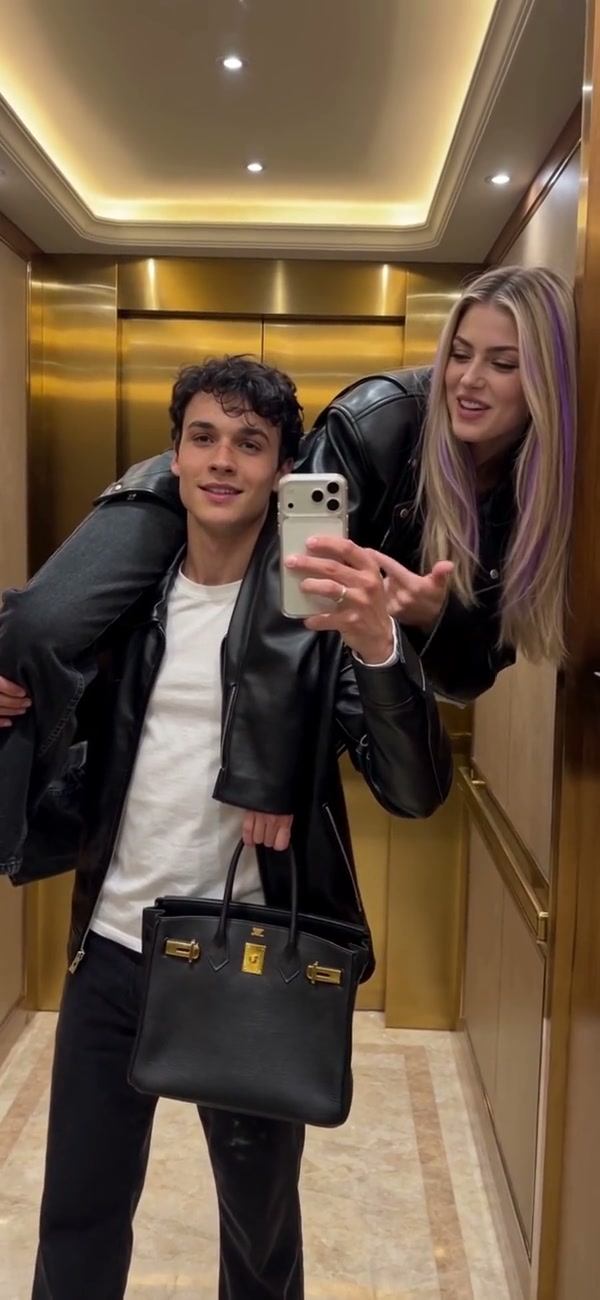
The phone-holder and over-shoulder roles in Elevator Couple Selfie AI

Keep the gold-elevator mirror performance

The Elevator Couple Selfie AI clip stays inside the gold elevator and follows one continuous mirror-facing interaction. The phone remains with the carrier, the second person remains over the shoulder and the handbag remains part of the prepared scene. Both characters move with the music, gesture and change expressions while the vertical camera keeps the mirror framing. There is no background selector, pose control or prop upload. Your photos replace the two featured people; the mirror, elevator and choreography stay fixed. Generated reflections, fingers, shoulder contact and occluded clothing can be difficult details, so inspect the points where bodies overlap instead of judging only the opening frame.

Keep the gold-elevator mirror performance

Use the complete Elevator Couple Selfie AI sequence

The reference runs just over 15 seconds. Economy and Standard use the prepared 14.9-second segment, while Original follows the complete reference and the duration control can display 16 seconds because it rounds the output value upward. The visual difference at the end is small, so compare the displayed duration, resolution and credit estimate before submitting. Every mode restores audio from its matching reference segment. Elevator Couple Selfie AI has no custom music upload or dialogue field. After generation, play the full result with sound and confirm that both people stay in their assigned roles through the final movement.

A later mirror pose in the Elevator Couple Selfie AI sequence

What you control in Elevator Couple Selfie AI

Your photos cast the couple. The Elevator Couple Selfie AI reference keeps the pose, gold elevator, mirror, props, motion and source audio.

Two ordered people

Photo 1 is the phone holder and carrier. Photo 2 is the over-shoulder person. The assignments stay fixed.

Prepared mirror choreography

The shoulder carry, gestures, expressions and phone movement follow the reference rather than a custom pose field.

Short segment or complete ending

Economy and Standard use 14.9 seconds. Original follows the source just over 15 seconds and can display 16 seconds.

Elevator Couple Selfie AI questions

Photo roles, shoulder pose, duration, audio, reflections and output checks.

How many photos does Elevator Couple Selfie AI need?

Elevator Couple Selfie AI requires exactly two person photos. Photo 1 is the phone holder and carrier. Photo 2 is the person positioned over the carrier’s shoulder.

Can I swap the Elevator Couple Selfie AI roles?

Choose the roles through upload order. Put the desired phone holder in Photo 1 and the desired over-shoulder person in Photo 2. There is no separate swap switch.

Can I upload one couple photo?

Use two separate images so each person maps directly to one role. A group photo does not provide a reliable order and this page expects exactly two assigned image inputs.

Is Elevator Couple Selfie AI the same as Elevator Mirror Selfie AI?

No. Elevator Couple Selfie AI uses two people and a shoulder-carry interaction. Elevator Mirror Selfie AI uses one person in another prepared elevator sequence. Preview the page that matches your desired cast.

How long is Elevator Couple Selfie AI?

The source is just over 15 seconds. Economy and Standard use 14.9 seconds. Original follows the complete source and can display 16 seconds because the duration value rounds upward.

Does Elevator Couple Selfie AI include sound?

Yes. Audio from the matching reference segment is restored after generation. The fixed page has no custom music upload, voice recording or dialogue control.

Can I change the elevator, pose or handbag?

Those details belong to the fixed Elevator Couple Selfie AI reference. Use a general reference-video workflow with your own clip when you need another location, pose, prop or sequence.

Will the mirror reflection and shoulder contact be perfect?

The recipe preserves the scene, though AI video can distort reflections, fingers, limbs, contact edges or hidden clothing. Inspect the complete carry and mirror view before sharing the result.

Is the preview a Motion Transfer paid generation?

The preview is a community example used to show the scene. It was not generated here as a paid acceptance test, and display or soundtrack rights are unconfirmed. Use only authorized photos and permissions.

Where do I download Elevator Couple Selfie AI?

Open My creations when the task finishes. Play the entire result, inspect both assigned people and use the download control on that result.

Create your Elevator Couple Selfie AI video

Add the phone holder and over-shoulder person, review the Elevator Couple Selfie AI estimate and start from the generator.

Elevator Couple Selfie AI