
Create a video

Featured character · Photo 1

Elevator Dance AI Video Generator

Turn one character photo into an expressive elevator performance. Elevator Dance AI carries your full look through mirror images, repeated figures, chair poses and quick cuts, with the reference sound.

0:00 / —:—

What is Elevator Dance AI?

Elevator Dance AI is a photo-to-video template for a short performance edited inside a mirrored elevator. The prepared sequence combines close views, chair poses, repeated appearances of the lead and quick changes in camera angle. On Motion Transfer, one person photo supplies the complete face, hair, body, clothing, shoes and accessories for every featured appearance and reflection. The result follows an approximately 11-second vertical reference with its audio. This version is a multi-shot character performance, rather than one continuous full-body dance. The footage shown here is a community-generated reference reused to explain the effect; new results still need checking.

Community elevator performance with repeated figures, mirrors and seated poses

How to create an Elevator Dance AI video

One image defines the featured character across the entire performance.

  1. STEP 1

    Choose your Elevator Dance AI photo

    Upload one clear person image with the full outfit and accessories you want. Use one character rather than a group or a collage of several looks.

  2. STEP 2

    Preview and check your quote

    Watch Elevator Dance AI with sound and review the repeated figures. Choose an available resolution in Settings, check the quote on Generate and sign in to submit when ready.

  3. STEP 3

    Inspect your Elevator Dance AI result

    Open My creations and compare the character across close-ups, seated poses and reflections. Check hands and outfit edges before downloading. Viewing an existing result starts no new generation.

Give your character an Elevator Dance AI spotlight

Repeat your complete look, borrow the staged performance and create a compact vertical edit.

Make every Elevator Dance AI appearance your own

Elevator Dance AI lets the same chosen look fill several positions in the composition. A close view and a seated figure can share your character’s hair, clothing and accessories, giving a personal style reveal a playful repeated-person effect. Upload one clear full-person image with the outfit you want throughout the sequence. Elevator Dance AI treats the featured figures as appearances of that one character, including their reflections. You cannot assign different people to the repeated positions or choose a new outfit for each shot. Review both prominent and smaller appearances after generation, since glasses, hairstyles and fine clothing details can vary between cuts.
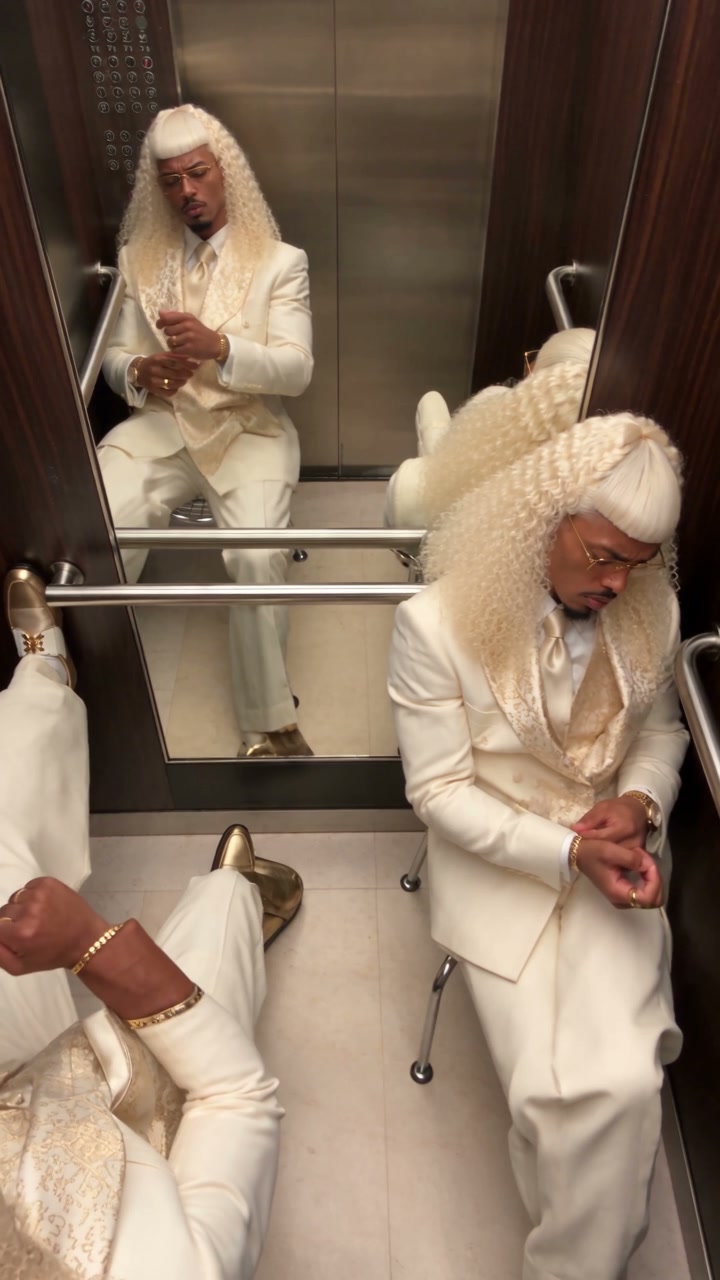
Make every Elevator Dance AI appearance your own

Get a staged performance without filming in an elevator

The Elevator Dance AI reference supplies the gestures, chair movements and expressive close-ups, so your still photo can take part without a location shoot. The changing camera angles and poses create energy inside a compact space. Preview the entire clip to decide whether that style fits a character introduction, an outfit post or a humorous edit. Elevator Dance AI follows the supplied staging; it does not create custom choreography or offer a choice of elevators. The chair and mirrored setting remain part of the scene. For a continuous dance with visible footwork, choose another prepared trend or bring your own motion reference.

Get a staged performance without filming in an elevator

Create a short vertical edit with its own rhythm

Elevator Dance AI follows an approximately 11-second, 9:16 reference, keeping the performance compact and the character close to the viewer. The finished clip includes the reference sound, so the prepared shot changes and audio can be reviewed together before you download. Use your Elevator Dance AI result as a short standalone character post or a section of a longer edit. Keep added captions away from the face and hands, where much of the performance happens. There is no timeline editor or soundtrack picker in this template. A different shot order, speed or audio track needs a separate edit after download.

Create a short vertical edit with its own rhythm

Is Elevator Dance AI right for your idea?

Choose this template for the specific mirrored performance you can preview.

A playful character reveal

Elevator Dance AI suits a character or outfit introduction built around expressions and repeated appearances. One photo defines the entire featured cast of that character.

A short edited performance

The quick cuts give Elevator Dance AI a different pace from a continuous dance recording. The reference supplies the timing, camera angles and arrangement.

Choose another motion when needed

Use the Motion Transfer homepage for your own dance reference. Browse AI Trends for a full-body solo or a separately cast duo when those roles better fit your idea.

Elevator Dance AI credits and plans

Generation requires an account and enough credits for the displayed quote. The selected resolution and reference duration affect that quote. General plan examples may use other models or video lengths.

Starter

For your first ideas.

$8.3/month

$100.0 charged yearly

2,400 credits/year

Up to 400 images

GPT Image 2Nano Banana Pro

Up to 133 videos

Seedance 2.5Kling 3.0 Motion Control
  • Up to 4K images and HD videos, depending on the model
  • Image editing, video creation & motion transfer
  • Watermark-free image & video downloads
  • Generation history in your account
Popular40% OFFSave $238.8

Pro

For a steady creative flow.

$30.0/month$49.9/month

$360.0 charged yearly

21,600 credits/year

Up to 3,600 images

GPT Image 2Nano Banana Pro

Up to 1,200 videos

Seedance 2.5Kling 3.0 Motion Control
  • Up to 4K images and HD videos, depending on the model
  • Image editing, video creation & motion transfer
  • Watermark-free image & video downloads
  • Generation history in your account
  • Use credits across image and video models
Best Value50% OFFSave $599.8

Business

For more creations, more often.

$49.9/month$99.9/month

$599.0 charged yearly

48,000 credits/year

Up to 8,000 images

GPT Image 2Nano Banana Pro

Up to 2,666 videos

Seedance 2.5Kling 3.0 Motion Control
  • Up to 4K images and HD videos, depending on the model
  • Image editing, video creation & motion transfer
  • Watermark-free image & video downloads
  • Generation history in your account
  • Use credits across image and video models

Basic

$0

Try before you subscribe

  • 18 one-time signup credits
  • Generation history included
  • Watermarked previews & downloads
  • Up to 3 images or 1 video
  • Watermark-free downloads require payment

Prices in USD; taxes and total shown at checkout. Subscriptions renew automatically; cancel in Billing settings. Subscription credits expire each period; one-time credits never expire.

Refunds: request within 72 hours. Used purchased credits and applicable non-refundable processing costs (up to 6%) are deducted. Terms · Refund Policy

Elevator Dance AI questions

Photo requirements, output choices and what to expect before generating.

How many photos does Elevator Dance AI need?

Elevator Dance AI uses one photo of one character. That image supplies the complete appearance and outfit for every featured figure and mirror image. The repeated figures do not create additional upload slots.

Can Elevator Dance AI use different people in each position?

This fixed template requests the same person across the featured appearances. It has no separate casting controls for the repeated figures. For a duet or group with distinct people, choose a template that provides the corresponding photo roles.

Does Elevator Dance AI replace the outfit too?

Yes. Include your intended clothing, shoes and accessories in the uploaded image. The source figure’s pale suit and hairstyle identify the reference version, but the prompt requests your complete look. Small details may vary and should be reviewed.

Does Elevator Dance AI include sound?

The completed Elevator Dance AI clip includes the supplied reference audio. Enable sound in the preview before generating. There is no music picker or custom audio upload in this template; check permissions for the way you plan to share the result.

Can I change the Elevator Dance AI length or framing?

Elevator Dance AI follows the approximately 11.04-second, 9:16 source. Settings offers available output resolutions, while duration, camera angles and shot order follow the reference. Use your own editor for a different crop or a shorter cut.

What should I check in an Elevator Dance AI result?

Compare faces, hair and outfits across the repeated figures and mirrors. Inspect hand gestures, contact with the chair and the body as poses change. The template requests a coherent character, but it cannot guarantee perfect reflections or anatomy in every frame.

Is Elevator Dance AI free to generate?

You can preview Elevator Dance AI without starting a paid job. Creating a video requires an account and enough credits for the quote on Generate. Resolution and reference length affect the quote. Each fresh submission creates a separate job; replaying an existing result does not.

Can I share Elevator Dance AI commercially?

Check permission for the person, your photo, the reference footage and its audio before commercial use. Review any branded details in the result. This is a creative performance effect, without a guarantee of garment accuracy or endorsement by anyone shown in the reference.

Create your Elevator Dance AI video

Choose one photo with your complete look and take every featured role in the mirrored performance.

Community elevator performance with repeated figures, mirrors and seated poses