
Noir Edit AI Video Generator
Give your character a black-and-white screen presence. Noir Edit AI carries one complete look through a prepared montage of pool-cue gestures, portraits, running and mirror shots, with reference sound.
0:00 / —:—
Noir Edit AI video ideas
Explore community remixes of this performance. Open a video for a closer look.
What is Noir Edit AI?
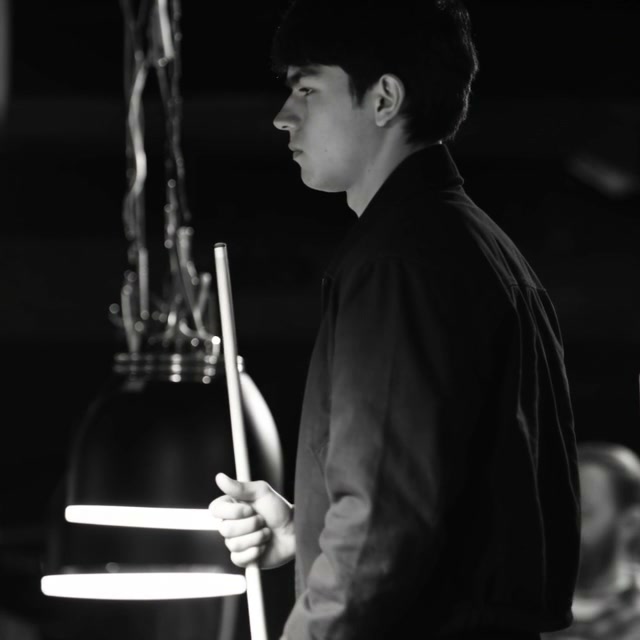
Noir Edit AI is a photo-to-video effect that places the same character across a fixed black-and-white montage. The sequence moves through pool-cue gestures, close portraits, running, mirror appearances, a car scene and a bathroom ending. On Motion Transfer, one person photo defines the lead’s complete face, hair, body, clothing, shoes and accessories across those cuts. Other people and backgrounds remain part of the scene. The result follows an approximately 20-second square reference and includes its audio. The reference defines the black-and-white sequence. The labeled stylized community example is an external interpretation with some color and scenery changes, not a verified output from this page.
How to create a Noir Edit AI video
One character photo supplies the recurring lead across the prepared cuts.
STEP 1
Choose your Noir Edit AI character
Upload a clear single-person image showing the full look you want across the montage. Avoid group photos or separate outfit collages.
STEP 2
Review the scenes and quote
Play the Noir Edit AI reference with sound. Choose an available resolution in Settings, check the quote on Generate, then sign in and submit when ready.
STEP 3
Check your Noir Edit AI montage
Open My creations and watch each cut, including the cue grip and mirror scenes. Download after reviewing the character and outfit throughout; replaying an existing result starts no new job.
Build a character montage with Noir Edit AI
Carry one complete look across scenes, use monochrome expression and keep the edit’s established rhythm.
Give your character more than one pose with Noir Edit AI
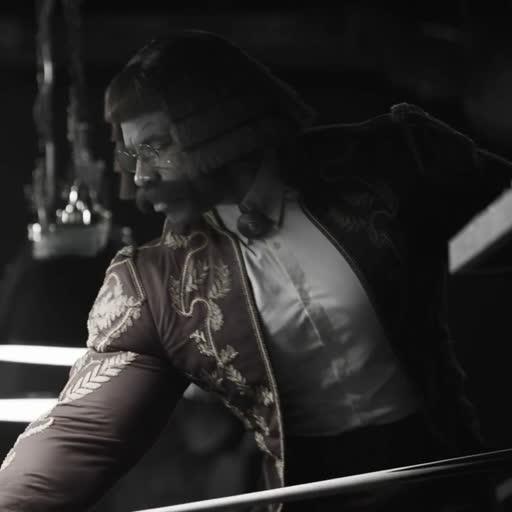
Noir Edit AI lets one chosen look appear in several situations, creating a fuller character introduction than a single animated portrait. Your person moves from concentrated pool-cue gestures to direct glances, running and quieter expressions. Supply a clear photo with the whole intended outfit visible so the same appearance can carry through the montage. Noir Edit AI uses one character reference for every featured shot, including reflections. There are no separate outfit slots or per-scene casting controls. Choose the look before generating, then check the transitions for changes to hair, clothing edges and proportions. A repeated identity is the goal, and rapid cuts still need individual review. This stylized community variant keeps the pool-table opening and portrait montage while adding a theatrical character, colored clothing and some changed scenery. It does not demonstrate an entirely monochrome result.
Use the black-and-white mood to focus on expression
The Noir Edit AI scene removes color from the final presentation, bringing attention to light, silhouette and the lead’s expressions. This can suit a character teaser, a personal mood edit or an outfit introduction where shape matters more than exact fabric color. You can upload a color photo; the prepared footage supplies the monochrome treatment. In Noir Edit AI, a bright jacket will be interpreted within that black-and-white scene, so it will not function as a reliable color showcase. Preview the darker shots first. If preserving a product’s precise color is central to your idea, a different reference will be a better starting point.
Create a sequence without assembling every cut
Noir Edit AI already has a shot order, changes in scale and a soundtrack. You supply the character while the reference establishes when the view moves from the cue to a portrait or reflection. The approximately 20-second square clip can stand alone as a short introduction or join a longer edit. Play your Noir Edit AI result through once for the overall rhythm, then review the hand grips and mirrored appearances. The template has no timeline editor or scene-reordering controls. Download the checked result for further editing if you need captions, a different sequence or a crop for another format.
Is Noir Edit AI right for your idea?
Use this template when a prepared monochrome character sequence fits your story.
One character, several moods
Noir Edit AI works for a short personal or fictional character introduction with several expressions. One photo defines the lead through the different settings.
Shape over garment color
The black-and-white treatment makes Noir Edit AI useful for silhouettes and mood. Choose a color reference when the exact shade of an outfit is the main point.
Keep the supplied shot order
Start on the Motion Transfer homepage with your own video if you need a different montage. This page keeps the reference cuts and supporting people.
Noir Edit AI credits and plans
Generation requires an account and enough credits for the displayed quote. The selected resolution and reference duration affect that quote. General plan examples may use other models or video lengths.
Starter
For your first ideas.
$8.3/month
$100.0 charged yearly
2,400 credits/year
Up to 400 images
GPT Image 2Nano Banana Pro
Up to 133 videos
Seedance 2.5Kling 3.0 Motion Control
- Up to 4K images and HD videos, depending on the model
- Image editing, video creation & motion transfer
- Watermark-free image & video downloads
- Generation history in your account
Popular40% OFFSave $238.8
Pro
For a steady creative flow.
$30.0/month$49.9/month
$360.0 charged yearly
21,600 credits/year
Up to 3,600 images
GPT Image 2Nano Banana Pro
Up to 1,200 videos
Seedance 2.5Kling 3.0 Motion Control
- Up to 4K images and HD videos, depending on the model
- Image editing, video creation & motion transfer
- Watermark-free image & video downloads
- Generation history in your account
- Use credits across image and video models
Best Value50% OFFSave $599.8
Business
For more creations, more often.
$49.9/month$99.9/month
$599.0 charged yearly
48,000 credits/year
Up to 8,000 images
GPT Image 2Nano Banana Pro
Up to 2,666 videos
Seedance 2.5Kling 3.0 Motion Control
- Up to 4K images and HD videos, depending on the model
- Image editing, video creation & motion transfer
- Watermark-free image & video downloads
- Generation history in your account
- Use credits across image and video models
Basic
$0Try before you subscribe
- 18 one-time signup credits
- Generation history included
- Watermarked previews & downloads
- Up to 3 images or 1 video
- Watermark-free downloads require payment
Prices in USD; taxes and total shown at checkout. Subscriptions renew automatically; cancel in Billing settings. Subscription credits expire each period; one-time credits never expire.
Refunds: request within 72 hours. Used purchased credits and applicable non-refundable processing costs (up to 6%) are deducted. Terms · Refund Policy
Noir Edit AI questions
Photo requirements, output choices and what to expect before generating.
How many photos does Noir Edit AI need?
Noir Edit AI uses one person photo. It defines the complete recurring character, including visible hair, body, clothing, shoes and accessories. The same identity is requested across each featured shot and mirror appearance; other people retain their original roles.
Can Noir Edit AI use a color photo?
Yes. Your image supplies the person and outfit, while the reference supplies the black-and-white presentation. Use clear lighting and visible clothing shapes. A result can retain the idea of your look without reproducing its original colors.
Does Noir Edit AI replace clothing and reflections?
The template requests the complete uploaded look across the lead’s shots and reflections. Mirror appearances should show that same character. There is no separate mirror-photo slot or control to keep the source performer’s clothes while changing only their face.
Does Noir Edit AI include sound?
The finished Noir Edit AI video includes the supplied reference audio. Enable sound in the preview before generating. This page has no music picker or custom audio upload, and you should check the permissions needed for your intended use.
Can I change the Noir Edit AI duration or shot order?
Noir Edit AI follows an approximately 20.04-second, 1:1 reference. You can select an available output resolution, while the length, framing and cuts follow the source. Reordering scenes or making a portrait crop requires your own editor after download.
What should I inspect in a Noir Edit AI result?
Check the pool cue stays straight and the hand grips look natural. Compare the lead before and after each cut, especially hair, outfit and mirror appearances. The supplied community reference includes some motion softness, and the new output may introduce additional variation.
Is Noir Edit AI free to generate?
You can watch Noir Edit AI before spending credits. Creating a video requires an account and enough credits for the displayed quote. Resolution and source length affect pricing. A new submission is separately charged; replaying or downloading an existing result creates no new generation.
Can I use Noir Edit AI for a commercial post?
Check permission for the person, your photo, the reference footage and the audio before commercial use. A creative montage does not verify garment fit, material accuracy or product claims. Review the entire result before sharing, including less prominent background details.
Create your Noir Edit AI montage
Choose one photo with your complete look and carry it through the prepared black-and-white scenes.