
Street Walk AI Video Generator
Put your complete look in motion. Street Walk AI turns one person photo into a short city walk, following the prepared footsteps, head turns and camera movement. Your finished clip includes the reference sound.
0:00 / —:—
Street Walk AI video ideas
Explore community remixes of this performance. Open a video for a closer look.
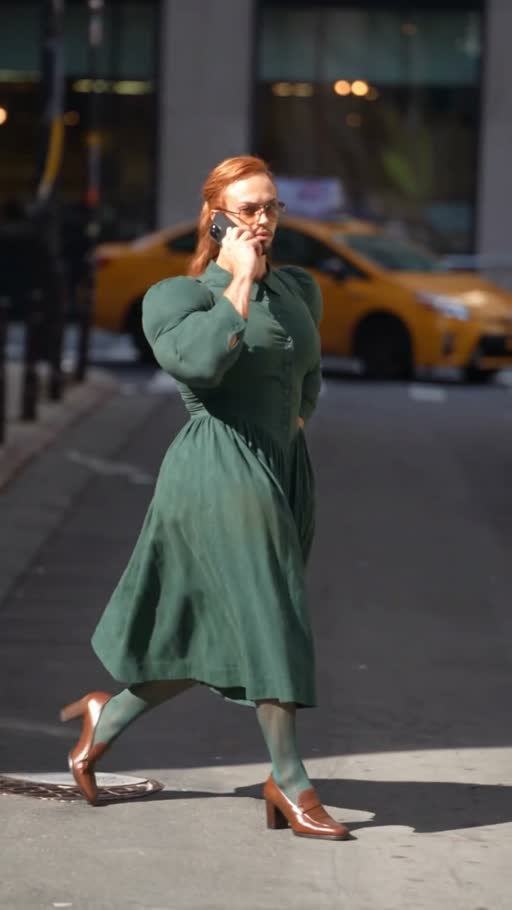
Phone-walk community variant
What is Street Walk AI?
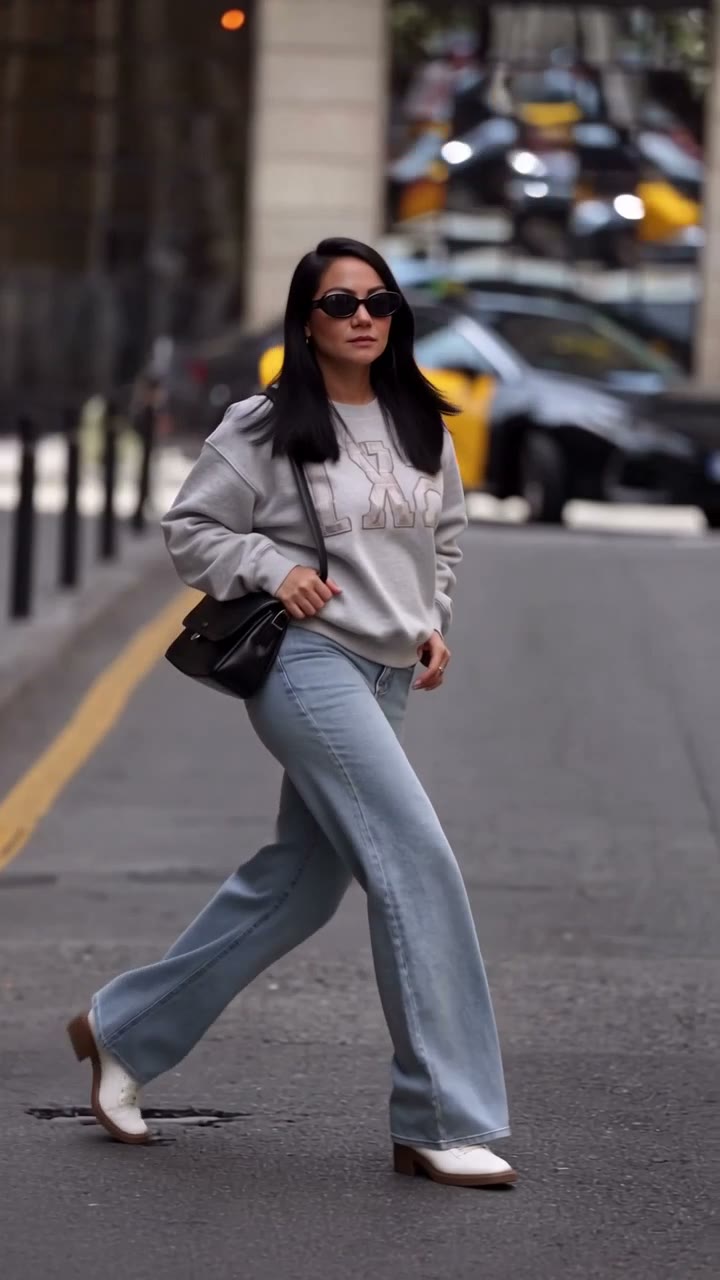
Street Walk AI turns one full-person photo into an approximately six-second vertical city walk with reference audio. Your image supplies the complete appearance, clothing, shoes and accessories, including a visible bag. The fixed reference supplies the walking rhythm, head turns and moving camera; its street, vehicles, buildings and lighting remain the prepared scene. Preview the sequence before committing credits. The reference defines the prepared effect; the labeled community examples show external interpretations. These examples are not verified Motion Transfer outputs, and your result may differ.
How to create a Street Walk AI video
One photo supplies your character; the walking reference is ready.
STEP 1
Choose your Street Walk AI photo
Upload one clear image containing one person. Include their outfit, shoes and any accessories you want represented. Avoid a collage or a group photograph that makes the intended subject unclear.
STEP 2
Review and generate
Watch the Street Walk AI reference, choose an available resolution in Settings and check the quote on Generate. Sign in and confirm the submission when you are ready; choosing a photo alone does not start a paid job.
STEP 3
Watch your Street Walk AI result
Open My creations, play the full clip with sound and inspect the steps, hands and outfit edges. Download the result after checking it. You can return to an existing creation without generating it again.
Show your style in motion with Street Walk AI
Present your complete look, skip the street shoot and create a short clip with sound.
Give your photo a Street Walk AI entrance
Street Walk AI gives your outfit a moving presentation: the silhouette changes with each step, while the camera reveals another angle. Use a clear full-body photo of yourself or someone who has agreed to the edit, wearing the complete look you want to feature. Hair, body proportions, clothing, shoes and visible accessories travel together, making this useful for a style post or character introduction. Keep the bag and shoes inside the photo frame so the model has their shapes and placement to work from. Street Walk AI has no separate garment or handbag slots. Small logos and fabric details may change, so inspect the finished clip before sharing. The city-walk example keeps the walking sequence and changes the performer’s complete look.
Get the walking performance without a street shoot
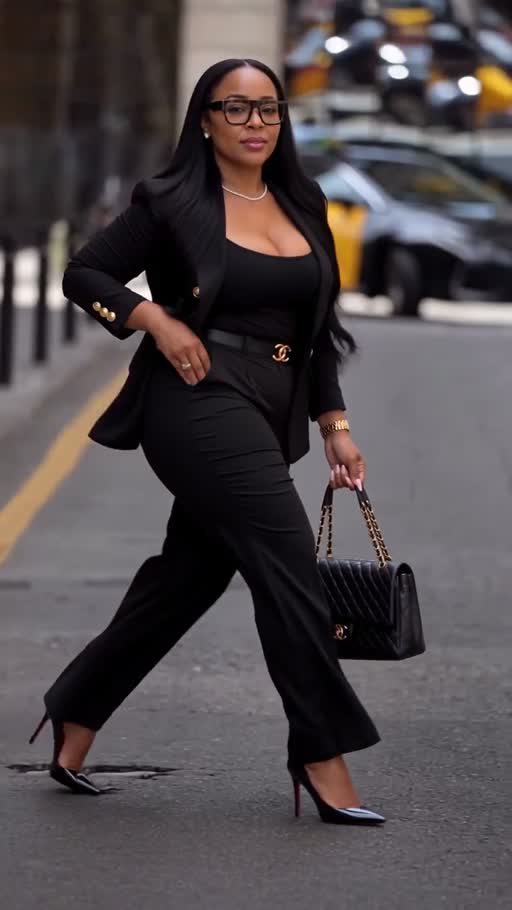
Street Walk AI carries over a sideways glance, steady steps across the street and a camera following the subject. Your photo gains a sense of arrival without recording a walk, recruiting a camera operator or finding a matching location. Watch the reference to decide whether its relaxed pace suits your image. Street Walk AI uses the same sequence for each submission, with no route planner, city selection or walking-speed control. The instructions request grounded footsteps and natural hands; check both in your result. The phone-walk community variant changes the hand gesture, lighting and background; it illustrates a variation rather than an exact scene match.
Make a compact vertical style clip with sound
Street Walk AI follows a roughly six-second portrait reference, ready to accompany an outfit photo, introduce a character or join a longer edit. Its 9:16 composition shows the walking body and surrounding street, and the finished video includes reference sound. Play your Street Walk AI result with sound before downloading. Add captions in your own editor, keeping shoes and hands visible. Duration and framing follow the source; a different length, soundtrack or location requires another workflow.
Is Street Walk AI right for your idea?
Choose this template when the prepared walk fits the story you want to tell.
Personal style and character posts
Street Walk AI suits a brief outfit reveal or a moving introduction built around one character. You supply the finished look in one photo, keeping the creative decision straightforward.
One consistent scene
The reference keeps the action in one city setting. Street Walk AI is a good fit when you want the walk you can already preview, with your own subject carried through the scene.
Choose another tool for a different motion
For your own walk recording or a different camera move, start on the Motion Transfer homepage with your own reference video. Browse AI Trends when you want a prepared dance or action sequence instead.
Street Walk AI credits and plans
Generation requires an account and enough credits for the displayed quote. The selected resolution and reference duration affect that quote. General plan examples may use other models or video lengths.
Starter
For your first ideas.
$8.3/month
$100.0 charged yearly
2,400 credits/year
Up to 400 images
GPT Image 2Nano Banana Pro
Up to 133 videos
Seedance 2.5Kling 3.0 Motion Control
- Up to 4K images and HD videos, depending on the model
- Image editing, video creation & motion transfer
- Watermark-free image & video downloads
- Generation history in your account
Popular40% OFFSave $238.8
Pro
For a steady creative flow.
$30.0/month$49.9/month
$360.0 charged yearly
21,600 credits/year
Up to 3,600 images
GPT Image 2Nano Banana Pro
Up to 1,200 videos
Seedance 2.5Kling 3.0 Motion Control
- Up to 4K images and HD videos, depending on the model
- Image editing, video creation & motion transfer
- Watermark-free image & video downloads
- Generation history in your account
- Use credits across image and video models
Best Value50% OFFSave $599.8
Business
For more creations, more often.
$49.9/month$99.9/month
$599.0 charged yearly
48,000 credits/year
Up to 8,000 images
GPT Image 2Nano Banana Pro
Up to 2,666 videos
Seedance 2.5Kling 3.0 Motion Control
- Up to 4K images and HD videos, depending on the model
- Image editing, video creation & motion transfer
- Watermark-free image & video downloads
- Generation history in your account
- Use credits across image and video models
Basic
$0Try before you subscribe
- 18 one-time signup credits
- Generation history included
- Watermarked previews & downloads
- Up to 3 images or 1 video
- Watermark-free downloads require payment
Prices in USD; taxes and total shown at checkout. Subscriptions renew automatically; cancel in Billing settings. Subscription credits expire each period; one-time credits never expire.
Refunds: request within 72 hours. Used purchased credits and applicable non-refundable processing costs (up to 6%) are deducted. Terms · Refund Policy
Street Walk AI questions
Photo requirements, output choices and what to expect before generating.
How many photos does Street Walk AI need?
Street Walk AI uses one photo of one person. That image defines the complete walking subject, including visible hair, body, clothing, shoes and accessories. There are no extra slots for a second person, a background or a separate garment.
Can I use a selfie for Street Walk AI?
A selfie may leave most of the intended outfit and body outside the frame. A clear full-body image gives the model useful detail for the walking sequence. If shoes, hands or clothing are missing, those details must be inferred and may differ from what you wanted.
Does Street Walk AI replace the full person?
Yes. The template requests the complete appearance and outfit from your photo throughout the walk. This is a full-character motion transfer. It does not provide a face-swap control or keep the source performer’s body as a separate editable layer.
Does Street Walk AI include music or sound?
The finished Street Walk AI clip includes the supplied reference audio. Turn on sound in the reference player to hear the track before generating. This template has no music picker or custom audio upload; rights for your intended use still need to be checked.
Can I change the Street Walk AI duration or framing?
Street Walk AI follows the approximately 6.04-second, 9:16 source. You can choose an available output resolution, but this fixed template has no independent duration or aspect-ratio selector. Cropping or combining the downloaded clip can be done in your own editor.
What should I check in a Street Walk AI result?
Watch the feet meeting the street, the hand near the bag, the head turn and the outline of the outfit. Check that the same person remains recognizable throughout. Fine details, especially clothing text and accessory shapes, can drift. A clearer photo can help, but exact reproduction is not guaranteed.
Is Street Walk AI free to generate?
You can watch the reference before spending credits. Creating a video requires signing in and having enough credits for the quote shown on Generate. A fresh submission creates a separately charged job; replaying or downloading an existing result does not create a new one.
Can I use Street Walk AI for a fashion advertisement?
Check permission for the person, your photo, the reference footage and its audio before commercial use. Review any branded details in the output. This creative effect does not verify garment fit, material accuracy or product claims, so it should not serve as evidence of how a real item performs.
Create your Street Walk AI video
Choose one photo with your complete look and put it into the prepared city walk.