
Create a video

ModelSeedance 2.5

Configured for this template

Seaside duet reference · 28.0s

Waterfront performer
Pier partner

Raindance AI Video Generator

Create a Raindance AI video from two character photos and the ready-made 28-second motion reference. Recast the seaside Raindance AI trend by choosing the waterfront performer and pier partner.

Two performers meeting on a wooden pier beside calm water in the Raindance AI motion reference

What is the Raindance AI trend?

Raindance AI is a two-person recast inspired by the seaside sequence in Dave and Tems’ Raindance video. One role performs toward the camera; the other waits on the pier and joins the closing couple shots. The clip below is a credited Higgsfield community example by phuneralyraim1. It was not generated on Motion Transfer and cannot predict your result. This independent Raindance AI video generator supplies a muted motion reference, two photo roles, and an original prompt. Motion Transfer has no affiliation with the artists, label, original video team, or Higgsfield.

Community Raindance AI recast with two different performers beside the sea

How to make a Raindance AI video

The motion and prompt are ready. Bring two authorized character photos and review their order before generating.

  1. STEP 1

    Preview Raindance AI

    Watch the muted 28-second reference. Decide who should take the close-up-heavy waterfront role and who should become the pier partner.

  2. STEP 2

    Upload two Raindance AI photos

    Add Photo 1 for the waterfront performer and Photo 2 for the pier partner. Choose one person per image and inspect both previews.

  3. STEP 3

    Generate your Raindance AI video

    Check the 29-second, 480p, Sound off defaults and current estimate, then sign in to generate. Review both identities before downloading or adding music you can publish.

Make the Raindance AI video your own

Preview the seaside performance, then choose a separate character for each role. See how the motion and two-photo casting work together.

Two new faces, one recognizable seaside performance

Raindance AI starts from one complete 28-second motion reference, so you can focus on casting. The clip carries the gestures, timing, framing, and seaside setting from the opening through the closing scene. It gives the waterfront performer most close-ups and returns to wider shots with the pier partner. You do not need to film or upload another video. The reference is muted, Sound starts off, and the 29-second output gives the sequence room to finish.
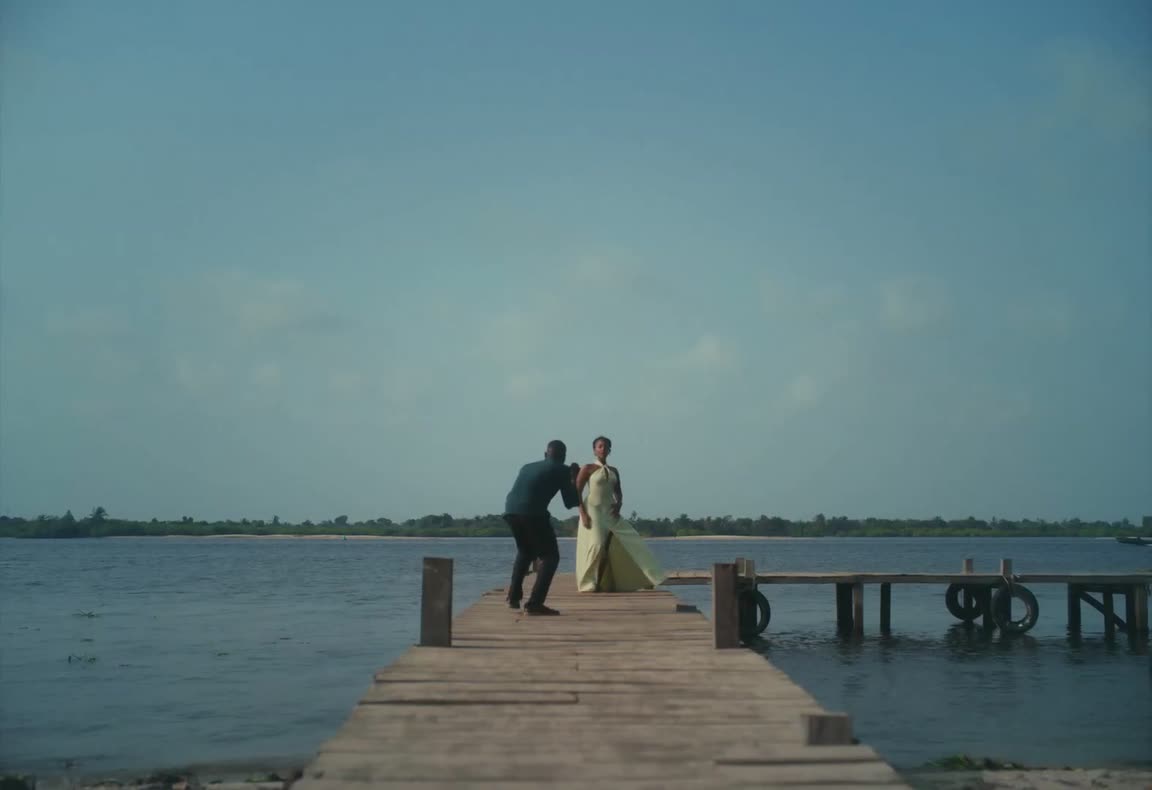
Muted motion reference · 28 seconds

Cast the Raindance AI lead

Photo 1 supplies the waterfront performer, who walks toward the pier and appears in most close-ups. Choose one adult with a clear face, visible hair, even light, and body detail to guide proportions. The Raindance AI prompt uses the photo for identity while clothing, camera, and movement follow the reference. It asks for coherent facial and mouth movement, but it cannot guarantee exact lip-sync or an exact identity match in every frame. Use Replace to try a clearer photo without changing the pier partner.

Waterfront performer approaching the pier in the Raindance AI motion reference
Photo 1: waterfront performer

Cast the Raindance AI partner

Photo 2 supplies the pier partner in the opening, seated scene, wide interaction, and closing couple shots. Use one clearly visible adult so both identities stay distinct when the performers overlap. The Raindance AI template supplies the seaside locations, so different backgrounds are fine. Check the opening, longest close-up, wide interaction, and final beach shot for swapped roles, blended faces, distorted hands, or drifting proportions. Upload yourself, a consenting adult, or an original character you can transform. Do not impersonate someone or publish misleading media.

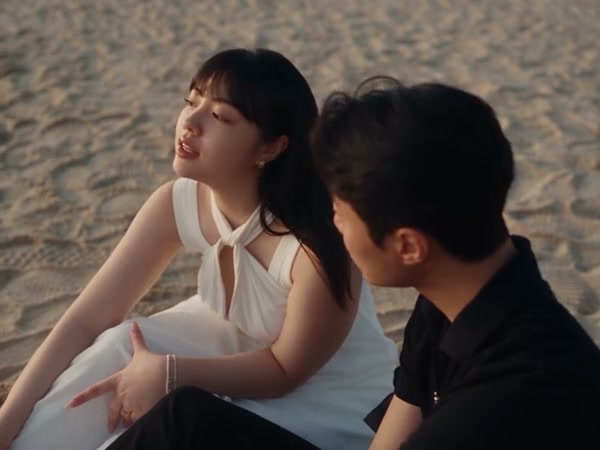
Community Raindance AI example showing two distinct performers beside the sea
Photo 2: pier partner · review both identities together

Why use this Raindance AI setup?

The page turns a fast-moving social tutorial into one reviewable workflow. You can see the motion, understand the role order, and confirm the price before submission.

The Raindance AI shot list is already loaded

The pier entrance, close-ups, seated interaction, wide photography moment, and beach ending come from the same reference. You can focus on casting instead of reconstructing every cut in text.

Two labeled Raindance AI slots reduce role mistakes

Raindance AI gives the first identity most close-up pressure and uses the second across the partner shots. Separate slots make that asymmetry visible before generation.

Raindance AI limits are visible before checkout

The page explains source wardrobe, muted audio, identity drift, supported settings, and the live estimate. You can decide whether this specific recast is worth a render.

Raindance AI controls and limits

The performance is fixed, while a few output choices remain available. Each choice changes cost or delivery more reliably than it changes identity accuracy.

Raindance AI prompt

Raindance AI prepares the role mapping, identity separation, motion, camera, and scene instructions automatically. You provide the two character photos without writing a prompt from scratch.

Full Raindance AI sequence

The default is 29 seconds for the 28.04-second prepared reference. A shorter setting can stop before the final beach shot, so compare the chosen length with the part you want to keep.

Raindance AI resolution

Choose 480p, 720p, or 1080p. Higher resolution changes the credit estimate and file detail. It does not guarantee better identity stability, hands, or mouth movement.

Raindance AI sound

Sound starts off. Turning it on asks the selected model to generate audio; it does not restore the original track or promise synchronized lyrics. Add licensed music later when needed.

Review the Raindance AI setup

Check the motion reference, role order, both photo previews, output length, resolution, sound choice, and live estimate. Uploading or changing a setting never starts a generation.

Check your Raindance AI result

After explicit submission, My creations shows the pending or completed Raindance AI result. Play the whole clip and check both identities before using its available download controls.

Plans for Raindance AI videos

Use the estimate beside Generate for this 29-second recast. Plan cards describe broader allowances; the selected duration, resolution, and current pricing rule determine this job’s estimate.

Starter

For your first ideas.

$8.3/month

$100.0 charged yearly

2,400 credits/year

Up to 600 images

GPT Image 2Nano Banana Pro

Up to 240 videos

Seedance 2.5Kling 3.0 Motion Control
  • Up to 4K images and HD videos, depending on the model
  • Image editing, video creation & motion transfer
  • Watermark-free image & video downloads
  • Generation history in your account
Popular40% OFFSave $238.8

Pro

For a steady creative flow.

$30.0/month$49.9/month

$360.0 charged yearly

21,600 credits/year

Up to 5,400 images

GPT Image 2Nano Banana Pro

Up to 2,160 videos

Seedance 2.5Kling 3.0 Motion Control
  • Up to 4K images and HD videos, depending on the model
  • Image editing, video creation & motion transfer
  • Watermark-free image & video downloads
  • Generation history in your account
  • Use credits across image and video models
Best Value50% OFFSave $599.8

Business

For more creations, more often.

$49.9/month$99.9/month

$599.0 charged yearly

48,000 credits/year

Up to 12,000 images

GPT Image 2Nano Banana Pro

Up to 4,800 videos

Seedance 2.5Kling 3.0 Motion Control
  • Up to 4K images and HD videos, depending on the model
  • Image editing, video creation & motion transfer
  • Watermark-free image & video downloads
  • Generation history in your account
  • Use credits across image and video models

Basic

$0

Try before you subscribe

  • 18 one-time signup credits
  • Generation history included
  • Watermarked previews & downloads
  • Up to 4 images or 1 video
  • Watermark-free downloads require payment

Prices in USD; taxes and total shown at checkout. Subscriptions renew automatically; cancel in Billing settings. Subscription credits expire each period; one-time credits never expire. Refund requests: within 72 hours. Eligible refunds deduct used purchased credits and, where permitted, actual non-returned processing fees. Processing fees are capped at 6% of the original purchase amount, excluding separately charged taxes. Terms · Refund Policy.

Raindance AI questions

Role order, photo choice, motion, wardrobe, audio, settings, permissions, and result review.

What is the Raindance AI trend?

A Raindance couple video is a two-person recast of the seaside sequence from Dave and Tems’ Raindance music video. New identities take the waterfront performer and pier partner roles while a generative video model follows the source actions and camera. This page is an independent tool and is not affiliated with the artists, label, original video team, or Higgsfield.

How many photos does Raindance AI need?

Upload two separate photos. Photo 1 becomes the waterfront performer seen in most close-ups. Photo 2 becomes the partner waiting on the pier and appearing in the couple shots. Both are required before Generate becomes available.

Which photos work best for Raindance AI?

Choose one adult per image, with a sharp front or three-quarter face, visible hair, even light, and no hand, phone, sunglasses, or heavy filter covering important features. Waist-up or full-body references can give the model more proportion information than a tight face crop. Use only images you have permission to transform.

Will Raindance AI keep the clothes from my photos?

The prepared prompt asks the model to keep the clothing and setting from the motion reference while using your photos for identity, hair, and defining facial features. A generated result can still alter garments or colors. Do not choose this template when copying the uploaded outfit is essential.

Does Raindance AI include the original song?

No. The motion reference and community example on this page are muted, and Sound starts off. Turning Sound on requests model-generated audio; it does not add the original recording. Add music in an editor only when you have permission for the intended use.

Will Raindance AI mouth movement match the song exactly?

Exact lip-sync is not guaranteed. The motion reference contains visible mouth movements and the prompt asks the model to follow their timing, but identity generation can change lips, expressions, or individual frames. Review every close-up before pairing the export with audio.

Can I change the Raindance AI length and resolution?

Yes. Seedance 2.5 supports the durations and resolutions shown in Settings. Raindance AI starts at 29 seconds and 480p. A shorter output can remove the ending; a higher resolution raises the estimate without guaranteeing a closer identity match.

Can I use a celebrity in a Raindance AI video?

Use yourself or another consenting adult. Do not impersonate a public figure, recast a private person without permission, or publish deceptive content. Original characters also need to be yours or licensed for this use. Review the Acceptable Use Policy before submitting.

Where do I find and download my Raindance AI video?

After you choose Generate, open My creations to follow the job. Play the completed clip and check the opening, close-ups, two-person frames, wide pier shot, and beach ending. Use the result’s available download control only after those checks. Finished jobs also appear in video history.

Cast both Raindance AI roles

Choose the waterfront performer and pier partner, check the estimate, and generate from the full seaside sequence.

Muted seaside duet motion reference used by the Raindance AI page