
Create a video

Required photos2
Settings
Mode
Video length15s
Resolution

Old Town Road AI Video Generator

Create an Old Town Road AI video from two photos. Photo 1 becomes the red-convertible driver, and Photo 2 becomes the second main performer in the storefront and singing shots. The fixed clip keeps the music-video sequence and source audio.

0:00 / —:—

What is an Old Town Road AI Video?

An Old Town Road AI Video recreates a prepared country-rap music-video sequence with two uploaded people. Photo 1 casts the driver in the red convertible. Photo 2 casts the second featured performer, including the storefront and singing views. The Old Town Road AI Video reference supplies the car, location, wardrobe styling, gestures, camera moves, cuts, timing and soundtrack. You can make the scene without filming a moving car or editing several shots together. This page targets video recreation intent, which separates it from AI cover-song tools that generate only audio. The result remains generative, so faces, hands, clothing details and mouth shapes can vary even when the template follows the requested roles and shot order.

Old Town Road AI Video

How to make an Old Town Road AI Video

Choose the driver, cast the second performer, then review the complete landscape result.

  1. STEP 1

    Upload the driver

    Put the person who should drive the red convertible in Photo 1. Use a clear face and the outfit you want represented.

  2. STEP 2

    Upload the second performer

    Put the storefront and performance character in Photo 2. Keep the image separate from the driver photo so the roles remain clear.

  3. STEP 3

    Generate and inspect every cut

    All modes keep the full 15-second Old Town Road AI Video. Check the driver, second performer, mouth movement, car shots and audio before downloading.

Two performers across one short music-video sequence

This community example shows the red convertible and storefront structure used by Old Town Road AI Video. Your two photos cast the featured roles.

Assign the two Old Town Road AI Video performers

Upload one clear person per photo. Photo 1 should be the character you want behind the wheel. Photo 2 should be the character you want in the second featured role. The same assignments continue when the framing changes, so a recognizable face and visible hair help more than a distant group crop. Clothing in the uploads guides each generated performer; the country styling and scene props still come from the reference. The Old Town Road AI Video recipe asks the model to keep the driver and second performer separate through every cut. It does not offer a one-photo duplicate mode, a role-swap toggle or extra background cast slots.
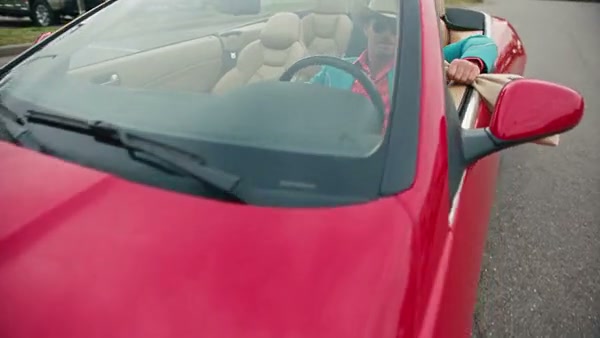
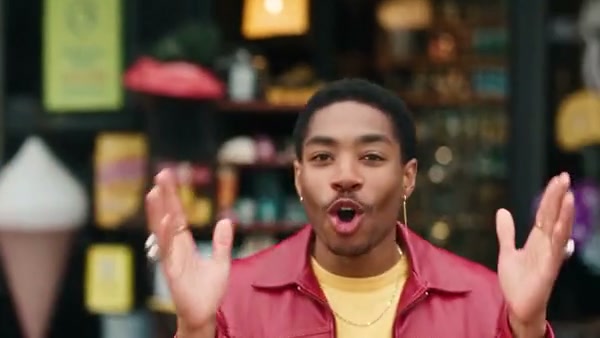
The red-convertible driver role in an Old Town Road AI Video

Follow the convertible and storefront sequence

The Old Town Road AI Video page uses one fixed landscape sequence. The reference moves between the red convertible, exterior storefront and performance shots, keeping the recognizable pacing of a short music-video edit. Your two photos replace the featured people while the car, surroundings and shot structure remain. There is no car picker, background upload or custom shot list. The template also follows the visible singing and gestures, though it cannot guarantee exact phoneme-level lip synchronization for every generated identity. Watch the complete preview before submitting so you know which character appears in each part and whether the landscape framing fits the social post or edit you plan to make.

Follow the convertible and storefront sequence

Keep the complete Old Town Road AI Video in every mode

The prepared Old Town Road AI Video reference is about 14.8 seconds, so Economy, Standard and Original all fit the entire sequence. The duration control displays 15 seconds. Choosing a lower-cost mode does not remove the final storefront or performance shot; compare the available modes by resolution and the current credit estimate. The original reference audio is restored after generation for all three modes. You do not upload a track or record a new vocal on this fixed page. Listen to the finished result and confirm that your intended use of the music and footage is permitted before publishing it.

A later storefront frame from the Old Town Road AI Video sequence

What you control in Old Town Road AI Video

Your two photos control the featured identities. The Old Town Road AI Video reference keeps the car, settings, performance, editing and source audio.

Driver and performer casting

Photo 1 remains the driver. Photo 2 remains the second main performer across the storefront and singing shots.

One complete 15-second edit

Economy, Standard and Original use the whole prepared sequence. Mode and resolution affect the displayed credit estimate.

Fixed scene and soundtrack

The red convertible, country styling, shot order and reference audio stay attached to this template.

Old Town Road AI Video questions

Required photos, role order, duration, audio, output limits and downloads.

How many photos does Old Town Road AI Video need?

Old Town Road AI Video requires exactly two photos. Photo 1 is the convertible driver. Photo 2 is the second featured performer. Use a separate, clear person image for each role.

Can I make Old Town Road AI Video with one photo?

This version uses two distinct roles and requires both uploads. It does not duplicate one photo into both performers. Add a second authorized person or choose a one-person template.

Can I swap the Old Town Road AI Video roles?

Choose the roles through upload order. Put your intended driver in Photo 1 and the other performer in Photo 2. There is no separate swap control after the photos are assigned.

Is Old Town Road AI Video an AI cover-song generator?

No. This page creates a video recreation with two visual characters and a prepared reference soundtrack. It does not synthesize a new singer voice or produce an audio-only cover.

How long is the Old Town Road AI Video?

The source runs about 14.8 seconds and the duration control shows 15 seconds. Economy, Standard and Original all use the complete reference rather than a shortened highlight.

Does Old Town Road AI Video keep the music?

The page restores audio from the prepared reference after generation. There is no track upload or audio replacement field. Confirm that your intended use of the soundtrack is permitted.

Can I replace the red convertible or storefront?

The fixed Old Town Road AI Video template keeps the car, storefront, camera and edit. Use a general reference-video workflow when you need a different vehicle, location or shot sequence.

Will the singing match every word?

The recipe follows the visible performance and timing, yet generated lips and facial details can drift between cuts. Review both close and wide shots before publishing your result.

Is this Old Town Road AI Video officially endorsed?

No endorsement is stated. This is a community-style recreation page. The preview and soundtrack rights are unconfirmed, so use the result only when you have the permissions required for your context.

Where do I download my Old Town Road AI Video?

Open My creations when generation finishes. Play the full result with sound, inspect both assigned people and use the download control on that result.

Create your Old Town Road AI Video

Add the driver and second performer, review the Old Town Road AI Video estimate and start from the generator.

Old Town Road AI Video