
Create a video

Lead performer · Photo 1

Popstar AI Video Generator

Take the lead in a mansion performance. Popstar AI uses one person photo for the complete look and outfit, following the bottle-in-hand gestures, moving camera and staircase sequence with the reference sound.

0:00 / —:—

What is Popstar AI?

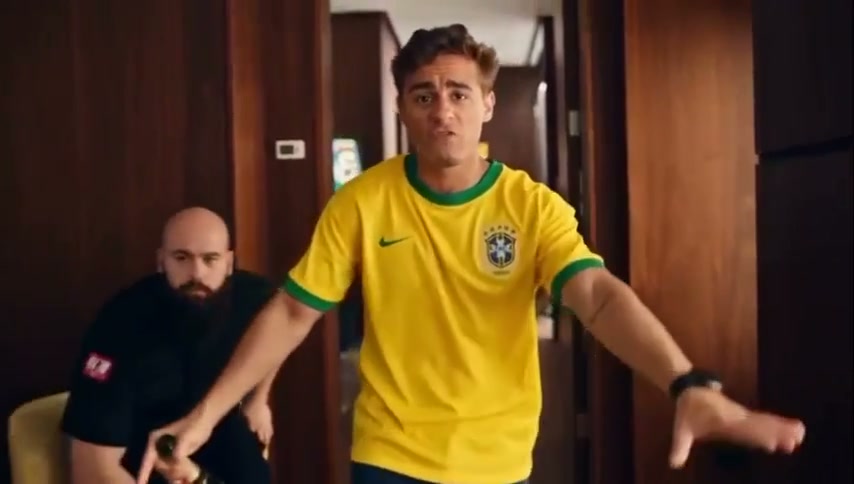
Popstar AI is a prepared performance video set inside a mansion. The lead moves toward the camera holding a champagne bottle, gestures through the hallway and turns toward the staircase while a bodyguard follows. On Motion Transfer, one person photo replaces the lead's complete appearance and outfit. Popstar AI produces a roughly fifteen-second landscape clip that follows this movement, interior and sound. Your photo determines who appears in the central role; the reference supplies the performance and the sequence of shots.

A performer holding a champagne bottle in a mansion hallway with a bodyguard behind him before walking down stairs

How to create a Popstar AI video

Choose the performer and follow the prepared sequence.

  1. STEP 1

    Choose a Popstar AI portrait

    Upload one clear person photo with a visible face, hair and outfit. Use an image you have permission to use.

  2. STEP 2

    Generate your Popstar AI performance

    Watch the reference, choose an available resolution in Settings, review the credit quote and sign in to submit.

  3. STEP 3

    Check your Popstar AI video

    Open the finished clip in My creations. Review the performer, hands, staircase motion and audio, then download.

The mansion performance

Preview the bottle gestures, bodyguard and transition to the staircase.

Step into the Popstar AI lead role

See your chosen person carry a confident performance through a luxury interior without arranging the location or a supporting cast. Popstar AI uses the face, hair, body and clothing from one image, giving the main role a coherent look as the camera moves. The bottle remains part of the action, and the bodyguard stays behind the lead. Use Popstar AI for a playful personal entrance, a birthday edit or a short character introduction that benefits from this expressive delivery.
Step into the Popstar AI lead role

Follow the camera from hallway to stairs

The changing camera position gives Popstar AI more movement than a static portrait. The lead approaches, opens their arms and turns toward the stairs before the view drops lower to follow the descent. That progression lets you build a short edit around a recognizable beginning and transition without recording each shot yourself. Popstar AI follows the supplied sequence, so watch the preview through the staircase section to check that its gestures, pace and framing suit the person you plan to feature.

Follow the camera from hallway to stairs

Make a Popstar AI clip with the reference sound

Keep the supplied soundtrack alongside the performance so the gestures and scene retain their original timing. Popstar AI creates a visual rendition of the chosen person and uses the reference audio in the completed clip. There is no lyric, singing voice or music composition input. A Popstar AI result can serve as a brief standalone performance or a segment in a longer edit; review the appearance, bottle contact and sound together before downloading and adding your own permitted captions.

Make a Popstar AI clip with the reference sound

When to choose Popstar AI

Match the supplied performance to the personal video you want to make.

One lead in an existing scene

Popstar AI assigns your single photo to the central performer. The bodyguard and other background people belong to the reference, so no additional role photo is needed for them.

A full appearance and outfit

Choose the look in your source image before generating. Popstar AI uses that person's complete appearance and clothing across the moving shots; the page has no separate wardrobe selector.

A compact moving-camera clip

The landscape performance lasts about fifteen seconds, with both a hallway and a staircase view. Popstar AI keeps that framing and duration while offering the resolutions available in Settings.

Popstar AI credits and plans

Sign in with enough credits to generate. The workspace quote reflects this reference and your resolution; plan examples may use different models or shorter videos.

Starter

For your first ideas.

$8.3/month

$100.0 charged yearly

2,400 credits/year

Up to 400 images

GPT Image 2Nano Banana Pro

Up to 133 videos

Seedance 2.5Kling 3.0 Motion Control
  • Up to 4K images and HD videos, depending on the model
  • Image editing, video creation & motion transfer
  • Watermark-free image & video downloads
  • Generation history in your account
Popular40% OFFSave $238.8

Pro

For a steady creative flow.

$30.0/month$49.9/month

$360.0 charged yearly

21,600 credits/year

Up to 3,600 images

GPT Image 2Nano Banana Pro

Up to 1,200 videos

Seedance 2.5Kling 3.0 Motion Control
  • Up to 4K images and HD videos, depending on the model
  • Image editing, video creation & motion transfer
  • Watermark-free image & video downloads
  • Generation history in your account
  • Use credits across image and video models
Best Value50% OFFSave $599.8

Business

For more creations, more often.

$49.9/month$99.9/month

$599.0 charged yearly

48,000 credits/year

Up to 8,000 images

GPT Image 2Nano Banana Pro

Up to 2,666 videos

Seedance 2.5Kling 3.0 Motion Control
  • Up to 4K images and HD videos, depending on the model
  • Image editing, video creation & motion transfer
  • Watermark-free image & video downloads
  • Generation history in your account
  • Use credits across image and video models

Basic

$0

Try before you subscribe

  • 18 one-time signup credits
  • Generation history included
  • Watermarked previews & downloads
  • Up to 3 images or 1 video
  • Watermark-free downloads require payment

Prices in USD; taxes and total shown at checkout. Subscriptions renew automatically; cancel in Billing settings. Subscription credits expire each period; one-time credits never expire.

Refunds: request within 72 hours. Used purchased credits and applicable non-refundable processing costs (up to 6%) are deducted. Terms · Refund Policy

Popstar AI questions

Your photo, the performance and what the finished video includes.

What photo works best for Popstar AI?

Use one sharp portrait with an unobstructed face, visible hair and enough of the body to establish the outfit. A wider photo can provide useful clothing information for the staircase shot. Popstar AI takes a single role image; avoid collages, crowded group photos and heavily covered faces that make the intended person unclear.

Does Popstar AI replace clothing as well as appearance?

Yes. Your image supplies the lead's whole appearance, including their clothing and shoes where visible. Choose a photo that already shows the intended look. Fine details such as jewelry, prints and fabric edges can vary through movement; there is no separate outfit upload or guarantee that every small accessory remains exact.

Can Popstar AI change the bodyguard?

This page assigns the photo only to the lead performer. The bodyguard and other people remain part of the supplied scene. It has no second role input. Review the reference to see how close the supporting performer comes to the lead before deciding whether this version fits your idea.

Does Popstar AI create a singing voice from my photo?

The finished video uses the reference audio. A person photo supplies visual appearance and cannot specify a singing voice, new lyrics or an original song through this page. Turn on the preview sound to hear the track. The generated facial movement may vary; precise word-by-word lip synchronization is not promised.

Can I change the bottle or the mansion in Popstar AI?

The held champagne bottle, interior, staircase, glass railing and camera movement come from the fixed reference. There are no separate prop or location controls. If you need an entirely different performance and have permission to use the material, the Motion Transfer homepage supports starting with your own motion reference.

How long is the Popstar AI video?

The supplied sequence is approximately fifteen seconds in landscape format. It runs from the hallway performance into the staircase shot. Duration and aspect ratio follow this reference, while Settings exposes available output resolutions. Choosing a higher resolution does not extend the story, introduce later scenes or restore details missing from your photo.

How much does Popstar AI cost?

Generation requires an account and sufficient credits. Check the quote displayed by the workspace for the selected resolution before you submit. Use that current quote for this clip, since the pricing table's general example output counts may be based on another model or a different reference duration.

What should I inspect in a Popstar AI result?

Watch the lead's identity and outfit from the hallway into the staircase view. Check fingers around the bottle, foot placement on the steps and separation from the bodyguard. Moving hands, small accessories and distant faces can vary. Review the audio alongside the movement before using the result in an edit.

Can I share a Popstar AI video?

Download the completed clip from My creations for an appropriate personal or creative use. Get permission for the person's image and check rights for the reference footage and soundtrack. Make the AI nature clear where the performance might otherwise be mistaken for a genuine recording or an endorsement by the person shown.

Create your Popstar AI video

Choose the person for the mansion performance.

A performer holding a champagne bottle in a mansion hallway with a bodyguard behind him before walking down stairs