
Create a video

Required photos1
Settings
Mode
Video length7s
Resolution

Bicep Heart Trend AI Generator

Create a Bicep Heart Trend AI clip from one photo. The person extends both arms, bends the arm on the viewer’s right, and joins a half heart to that upper arm. The bedroom and the existing on-screen words stay in the reference.

0:00 / —:—
0:00 / —:—

Bicep Heart Trend AI video ideas

Explore examples of this effect. Open a video for a closer look.

What is the Bicep Heart Trend AI?

The Bicep Heart Trend AI is a single continuous bedroom flex. One person extends both arms, bends the arm on the viewer’s right, and the other hand completes a half heart against that upper arm. A small heart graphic appears later. The words “I try” are already on screen. Keep them, or cover them in an editor afterward.

Bicep Heart Trend AI

How to make a Bicep Heart Trend AI video

One photo with the arms available, then the prepared bedroom shot.

  1. STEP 1

    Photograph the upper body

    For a Bicep Heart Trend AI clip, include the face and both upper arms. A tight face crop cannot grow the missing arm when the heart forms.

  2. STEP 2

    Choose the mode

    All three modes use the full Bicep Heart Trend AI reference. Read the duration and the credit quote. Resolution changes the output size, not the pose.

  3. STEP 3

    Download after the heart closes

    Play the Bicep Heart Trend AI result in My creations. Check that the half heart meets the upper arm and that the existing “I try” text was not replaced by new captions. Then download it.

Two Bicep Heart Trend AI casts

The heart shape and the on-screen words stay. The person and the outfit change.

Frame the arms before you generate

A Bicep Heart Trend AI result fails when the bent arm leaves the picture. Use a photo where both shoulders and the upper arms can be seen, and leave a little room above the head. The red sleeveless top in the primary clip is the reference outfit, not a requirement. Your photo’s clothes replace that look. One photo is required, and it covers the face, hair, body and outfit together.
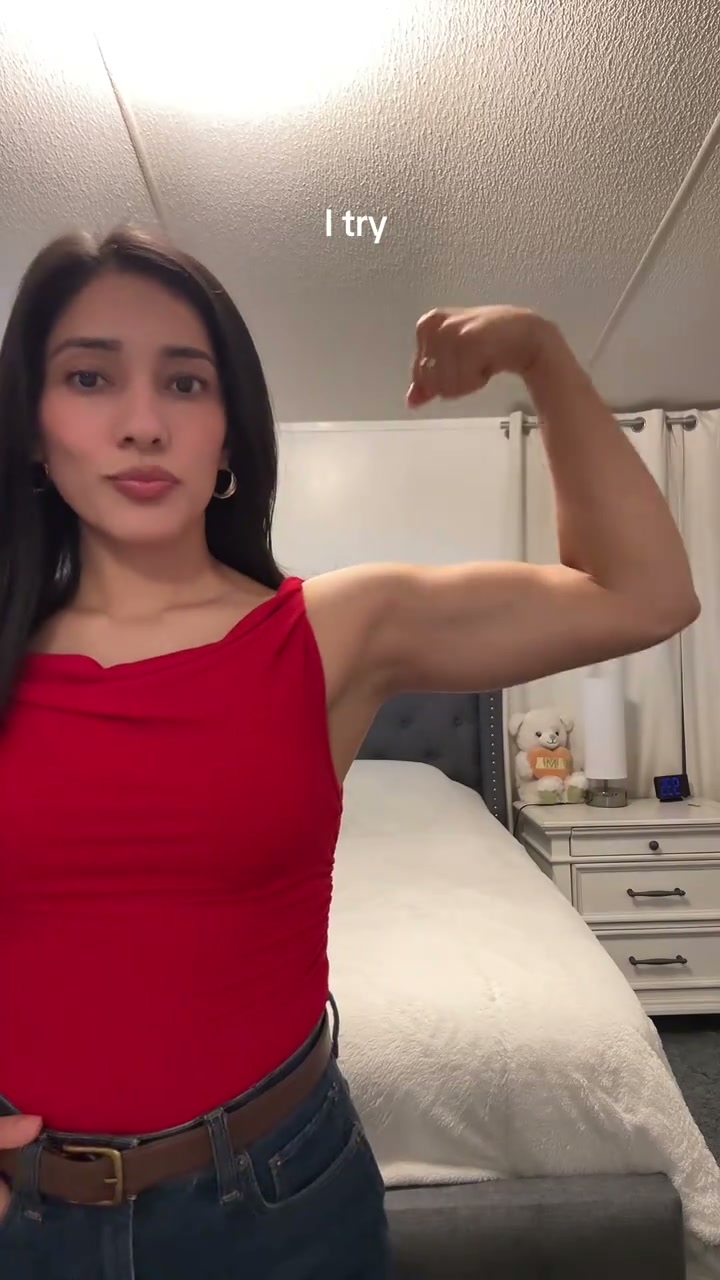
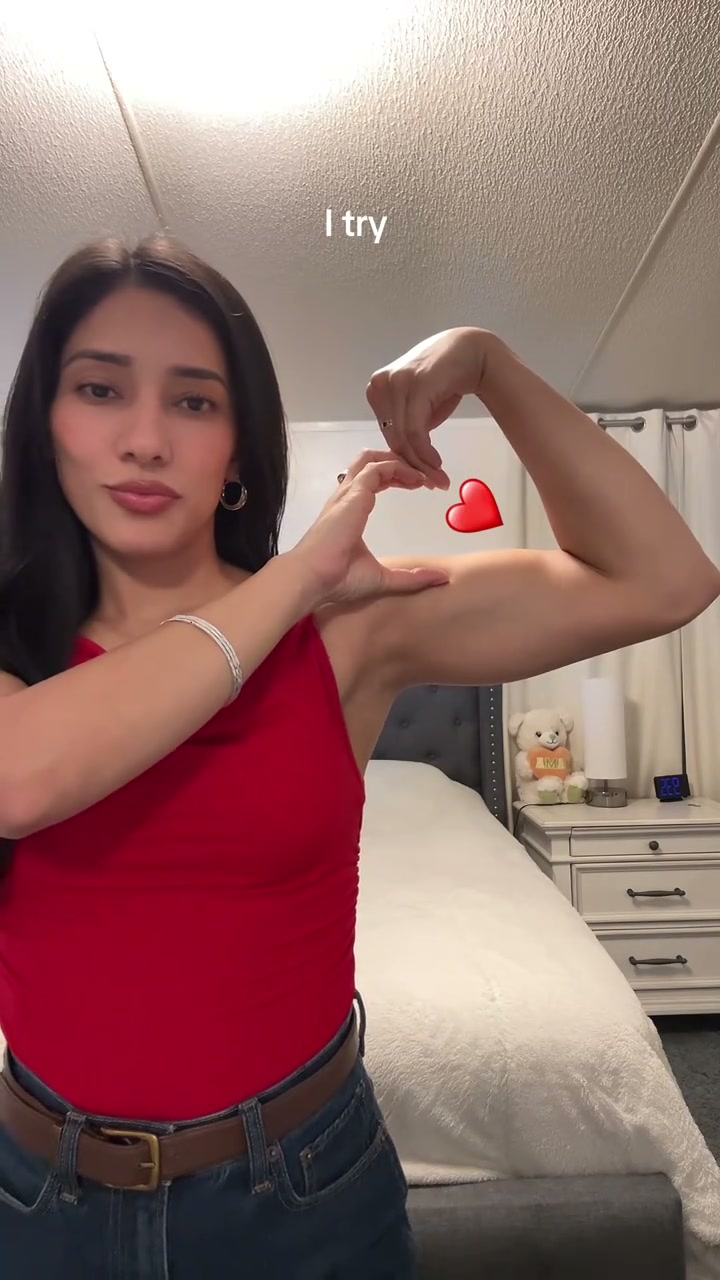
A person in a red top bends an arm with both shoulders visible

A second person, the same heart

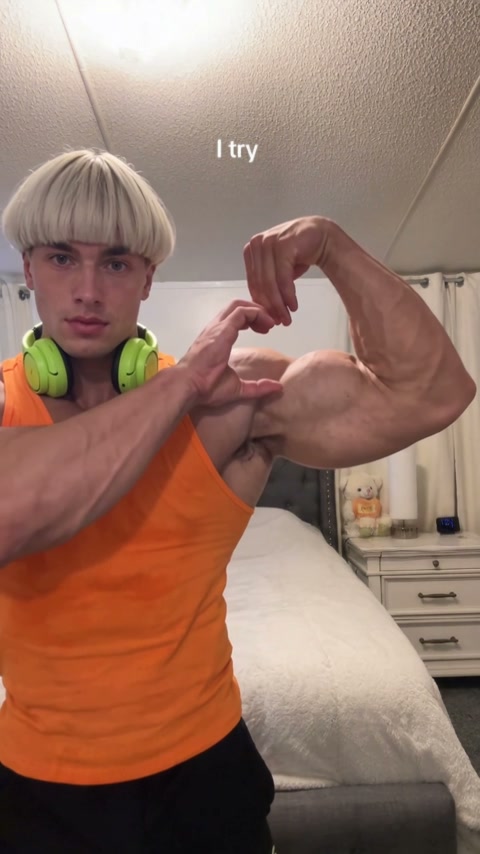
The other public Bicep Heart Trend AI keeps the bedroom, the teddy bear, the nightstand and the words “I try”. The person is different: an orange tank top, green headphones and a light bowl-cut hairstyle, with the same bend-and-heart action. The guide can follow either public file. This page’s generator follows the red-top reference, and the tutorial download uses the orange-top example so the steps match that file.

A second person, the same heart

Keep it one shot

The Bicep Heart Trend AI stays one continuous shot. The source is 6.9 seconds and the integer output is 7 seconds, so a spare tail can be trimmed. Economy, Standard and Original all use that full short reference. A single-person motion model can fit this one-person shot. It does not cover a two-person dance.

The same person completes the arm heart in the continuous bedroom shot

What you control in the Bicep Heart Trend AI

The photo sets the person in the Bicep Heart Trend AI. The flex, the room and the existing caption stay with the reference.

One required photo

The Bicep Heart Trend AI uses one photo. Put the face, the arms and the clothes in that picture.

Existing words stay

The Bicep Heart Trend AI reference includes “I try” on screen and a small heart graphic later. Keep those words, or cover them in an editor afterward.

Audio is the reference track

The Bicep Heart Trend AI restores the prepared audio. The photo does not clone a voice. A newly generated sound, described in the guide, is a different track.

Bicep Heart Trend AI credits

Use the quote on Generate for the Bicep Heart Trend AI mode and resolution you picked. An account with enough credits is required. Other pricing examples can use longer clips.

Starter

For your first ideas.

$8.3/month

$100.0 charged yearly

2,400 credits/year

Up to 400 images

GPT Image 2Nano Banana Pro

Up to 133 videos

Seedance 2.5Kling 3.0 Motion Control
  • Up to 4K images and HD videos, depending on the model
  • Image editing, video creation & motion transfer
  • Watermark-free image & video downloads
  • Generation history in your account
Popular40% OFFSave $238.8

Pro

For a steady creative flow.

$30.0/month$49.9/month

$360.0 charged yearly

21,600 credits/year

Up to 3,600 images

GPT Image 2Nano Banana Pro

Up to 1,200 videos

Seedance 2.5Kling 3.0 Motion Control
  • Up to 4K images and HD videos, depending on the model
  • Image editing, video creation & motion transfer
  • Watermark-free image & video downloads
  • Generation history in your account
  • Use credits across image and video models
Best Value50% OFFSave $599.8

Business

For more creations, more often.

$49.9/month$99.9/month

$599.0 charged yearly

48,000 credits/year

Up to 8,000 images

GPT Image 2Nano Banana Pro

Up to 2,666 videos

Seedance 2.5Kling 3.0 Motion Control
  • Up to 4K images and HD videos, depending on the model
  • Image editing, video creation & motion transfer
  • Watermark-free image & video downloads
  • Generation history in your account
  • Use credits across image and video models

Basic

$0

Try before you subscribe

  • 18 one-time signup credits
  • Generation history included
  • Watermarked previews & downloads
  • Up to 3 images or 1 video
  • Watermark-free downloads require payment

Prices in USD; taxes and total shown at checkout. Subscriptions renew automatically; cancel in Billing settings. Subscription credits expire each period; one-time credits never expire.

Refunds: request within 72 hours. Used purchased credits and applicable non-refundable processing costs (up to 6%) are deducted. Terms · Refund Policy

Bicep Heart Trend AI questions

The arm heart, the on-screen words, and the single photo.

Which arm bends in the Bicep Heart Trend AI?

The arm on the viewer’s right bends up. The other hand forms the half heart against that upper arm. A small heart graphic appears later in the Bicep Heart Trend AI clip.

Does the Bicep Heart Trend AI have on-screen text?

Yes. The Bicep Heart Trend AI reference shows the words “I try”. Keep those words, or cover them in an editor afterward.

How many photos does the Bicep Heart Trend AI need?

One photo for the Bicep Heart Trend AI. It must show the person whose full appearance should carry the flex, with enough of the arms to support the heart.

Can a single-person motion model do this?

A single-subject continuous model can be a fit for the Bicep Heart Trend AI because there is one person. It is not a fit for a two-character dance. Compare the video-reference controls in the model guide before you choose.

Will Economy look worse by rule?

Economy, Standard and Original all use the same short Bicep Heart Trend AI reference. They can differ in model, resolution and credits.

Why is the output 7 seconds?

The Bicep Heart Trend AI source is 6.9 seconds, and the integer output rounds to 7. Trim the extra tail if you need the source ending.

Where do I download the Bicep Heart Trend AI video?

My creations holds the Bicep Heart Trend AI result. Confirm the arms and the existing caption, play the sound, and download the file.

Can I crop the arms out of a Bicep Heart Trend AI photo?

A tight crop makes the Bicep Heart Trend AI heart fail. Keep both shoulders and the upper arms inside the frame so the bend and the half heart stay visible.

Make a Bicep Heart Trend AI video

Bring one photo for a Bicep Heart Trend AI video that leaves room for both arms.

Bicep Heart Trend AI