
Two performers in one pink studio
The opening places one performer beside the drum kit and the other behind it. Use separate photos to choose both people and keep the roles clear as the scene moves through close-ups and wider views.
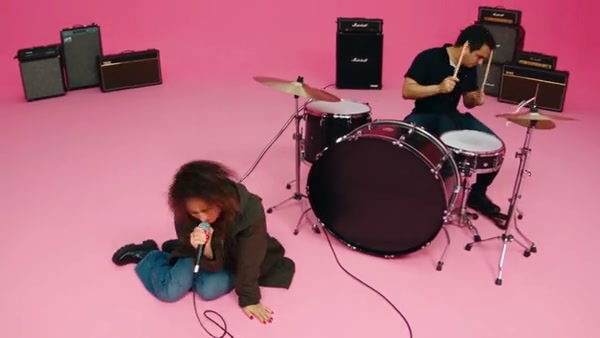
Turn two photos into a pink-studio duet. The sample shows the full performance; Economy and Standard use the opening 15 seconds.
APT AI Video is a two-person music-video-style scene set in a pink studio. The performance moves from the drum kit to dancing and close-ups together. Choose one photo for each performer and bring your own looks to the sequence.
Choose your photos, review the settings and create the prepared scene.
STEP 1
Two separate, clear photos help distinguish the singer and the drummer. A wider photo can give the model more information about each person’s outfit.
STEP 2
Review the available mode, duration and credit estimate in the workspace.
STEP 3
Create the video, then open My creations to play and download it.
Turn two photos into a playful pink-studio duet, with singing, drums and a shared dance.
The opening places one performer beside the drum kit and the other behind it. Use separate photos to choose both people and keep the roles clear as the scene moves through close-ups and wider views.
The sequence includes drumming, playful gestures and a dance together. The reference supplies the movement and changing camera views, so you can focus on choosing the people and their looks.
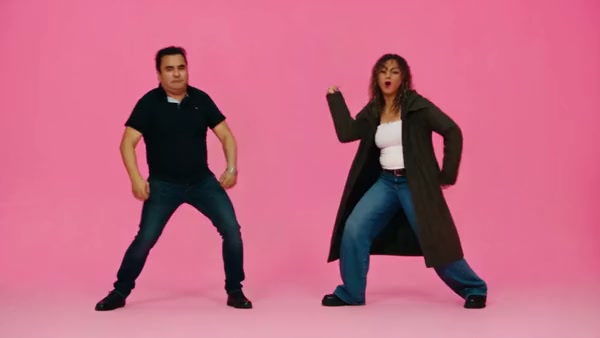
Choose the two performers; the prepared scene provides the pink studio, drums and dance.
Assign Photo 1 to the opening singer beside the drums and Photo 2 to the opening drummer. Their positions change during the performance.
Face, hair and outfit all come from each photograph. Photos with the shoulders and clothing visible provide more detail than a tightly cropped face.
The prepared clip supplies the camera cuts, pink backdrop, instruments and timing. The exact appearance of these details can vary in the result.
Photos, timing and the prepared performance.
Two separate photos are required: Photo 1 is the opening singer and Photo 2 is the opening drummer.
Use a separate photo for each performer. That makes it clearer which appearance belongs to each role, including when they share the frame.
Your photos guide the two performers and their clothing. The studio, drums and performance follow the prepared reference.
The full reference is about 25 seconds. Shorter modes use a selection from that performance; see the workspace for the current setting.
The prepared scene uses the reference soundtrack. Uploading a photo does not create a personalized singing voice.
Clear images help, but faces, outfits and fine details may vary during close-ups, turns and other movement.
Choose a mode and review the credit estimate shown in the workspace before creating.
Turn two photos into a playful pink-studio duet, with singing, drums and a shared dance.