
Gas Station Dance AI Trend: Make It with Three Photos
The gas station dance AI trend on this page follows one loaded clip: an opening dancer, a selfie that returns at the end, and a performer beside a car. Make it from three photos in the Gas Station Dance AI tool, or use the checks below.
Open the gas station tool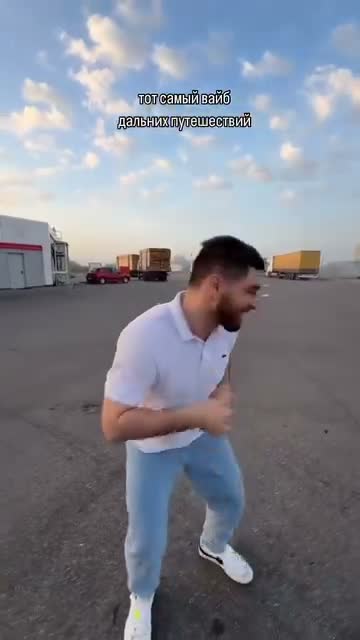
What is the gas station dance AI trend?
The appeal is a familiar road-trip moment turned into a performance: one friend starts dancing, the camera swings into a selfie, and another person gets their moment beside the car. AI versions recast that little group while following the same sequence. The fun comes from recognizing who you have put in each role.
The Motion Transfer reference is about 17.7 seconds long. It returns to the selfie operator at the end, so that person appears twice. The steps below follow that version.
Cast a group with three different personalities
Your road-trip crew
Give the opening dance to the friend who starts the party, the selfie to the one who films everything, and the car-side entrance to the friend who always arrives in style.
An unexpected family lineup
Use three family members who would enjoy the joke. Familiar faces doing an unusually confident dance make the ordinary parking lot feel like their own music video. Ask before using their photos.
A trio of your own characters
Cast three original characters with distinct outfits and silhouettes. Keep a consistent visual style across the photos so the group feels connected when the camera changes roles.
Three photos, in a fixed order
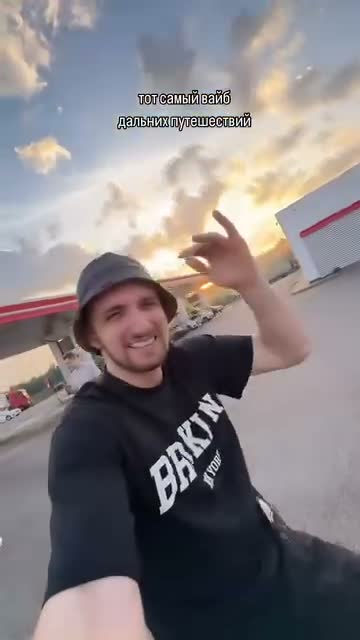
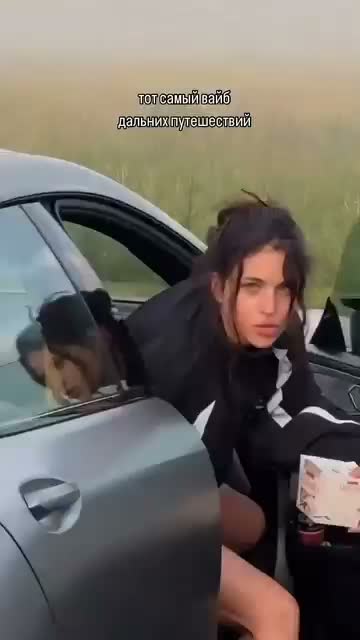
Photo 1 replaces the opening dancer. Photo 2 replaces the camera operator whenever the selfie appears, including the final return. Photo 3 replaces the person beside the car. You do not upload the lot, the cars, or the camera move. Each photo supplies the face, hair, build, clothing, and accessories of that person. The reference supplies the performance.
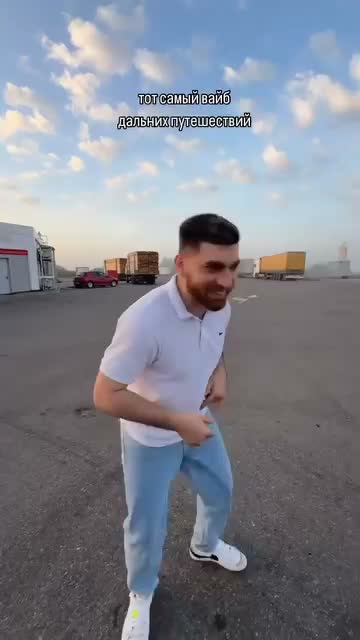
What Photo 1 is for
Only the opening dancer. In the source this person wears a light shirt, pale jeans, and white shoes. Your photo supplies the person you want instead. The lot stays in the reference.
What Photo 2 is for
Both selfie appearances. In the source this person wears a dark T-shirt and a bucket hat. One photo covers the first selfie and the ending. Do not assign the ending to Photo 1 or Photo 3.
What Photo 3 is for
Only the person at the car, including the lean against the open door. Keep this person different from the other two. You do not need a matching gas-station background.
Choose the three photos
One person in each photo
Use people you have permission to transform. Do not impersonate someone. One person per photo is easier to keep separate than a group shot.
Show the body the dance needs
For the opening dancer and the person at the car, a full-body photo shows trousers and shoes that a face-only crop leaves out. For the selfie, use a readable face, a visible hairstyle, and the upper-body outfit you want. Avoid sunglasses or a heavy filter.
Make the three outfits easy to tell apart
Clothes come from the photos. Contrasting outfits make it easier to see whether each role stayed with the right person when the camera turns.
Use a JPG, PNG, or WebP. After each file uploads, check the preview and any warning on that slot before you generate.
How to make a gas station dance video
Open Gas Station Dance AI. The model is Seedance 2.5 Edit. You choose the three photos and the resolution. The reference supplies the performance.
1Preview the three-person sequence
Play the prepared reference and notice the opening dance, selfie, car-side moment, and return to the selfie. Turn the sound on to hear the reference audio. The motion video and prompt are already prepared.
2Add the three photos in order
Use the slot labeled Opening dancer · Photo 1, then Selfie operator · Photo 2, then Car-side performer · Photo 3. All three photos are required. If a file is in the wrong slot, remove later photos first, or use Replace, so each photo stays with its role. Generate stays off until all three photos are in and the reference video is ready. Uploading alone does not start the job.
3Set the resolution
Duration and framing follow the reference. There is no length picker. In Settings, choose 480p, 720p, or 1080p. The preset starts at 480p. A higher resolution changes the credit estimate beside Generate. It does not change the dance, the lot, or which person returns. Choosing a larger export does not guarantee sharper source detail.
4Generate, then watch the job
Sign in if prompted, read the estimate beside Generate, and click it. Follow the result in My creations. Review the opening, both selfies, and the car-side scene before you download. If a job is already processing, check that entry before you submit again. Another click can start another generation.
Check the opening, both selfies, and the car
Play the result from the start before you download it. Results can vary. An exact face, outfit, or the contact with the car is not guaranteed.
The opening dancer drifts
Check firstPause on the opening dance. Look at the face, hair, clothing, and the feet on the lot.
NextTry one clearer full-body photo of a single person, with the face unobstructed. Leave Photo 2 and Photo 3 in place.
The two selfies do not match
Check firstPause on the first selfie and again on the final return. Photo 2 should be the same person both times. Look at the face, hair, and collar.
NextReplace Photo 2 with one readable photo of that person, without sunglasses or a heavy filter. Leave the other two photos in place.
The car-side contact breaks
Check firstPause where the performer leans on the open door and where they turn out of view. Look at the hands, feet, and garment edges.
NextReplace Photo 3 with one full-body photo of a single person. Leave Photo 1 and Photo 2 in place.
Want to customize more?
The ready-made template comes with the motion reference and prompt prepared. Upload the role photos shown above to make this version with fewer steps. The original reference soundtrack is included.
For a different background, supporting cast, or performance, open the Motion Transfer workspace on the homepage. Upload your own motion video and reference images, choose a compatible model, and adjust the prompt to describe what should change and what should stay. Available inputs depend on the selected model.
What to expect from AI video generation
AI video results can vary, even with the same photos and prompt. A face or outfit may change between the selfie shots, and hands or bodies can distort near the car. Consistency remains a limitation of current AI video models, so a good result may take more than one attempt.
Start with clear reference images and review the full video. If something looks wrong, change one image or instruction at a time. Another attempt can produce a different result, but it does not guarantee an improvement.
Before you make this clip
Does every gas station dance tutorial match this clip?
Public pages use the gas station dance name for more than one clip. This guide follows only the loaded reference: an opening dancer, a selfie, a person at a car, then a return to the selfie operator. A tutorial that ends on the car exit, or that lets you skip a role, is not this template.
Which photo comes back at the end?
Photo 2. It replaces the camera operator in the first selfie and again at the final return. Photo 1 is only the opening dancer. Photo 3 is only the person beside the car. All three slots are required, and there is no fourth photo.
Why is Generate unavailable?
Generate stays off until all three photos are in their slots and the reference video is ready. Uploading a photo does not start the job. If you turn Custom prompt on, the box cannot be empty.
Make the gas station dance with your three photos
Use the loaded reference when all three photos are ready.
Open the gas station tool