
Create a video

Required photos1
Settings
Mode
Video length13s
Resolution

GTA 6 Police Chase AI Video Generator

Make a GTA 6 Police Chase AI video with one photo, a chair on a moving car and pursuing vehicles.

0:00 / —:—

What is GTA 6 Police Chase AI?

GTA 6 Police Chase AI is a one-photo video template in which a person sits in an armchair mounted above a moving car. The prepared clip shows a helmeted driver inside, police vehicles following on the road and helicopters overhead. The camera moves from a side view of the seated person to a wider view of the pursuit, with an explosion near the end. Your photo guides the rider in the chair; the vehicle, driver, road and other action come from the reference. The result is an AI interpretation and details can change.

GTA 6 Police Chase AI

How to make a GTA 6 Police Chase AI video

Choose a rider photo, select a mode and review the finished chase.

  1. STEP 1

    Add the rider

    Upload one clear person photo for GTA 6 Police Chase AI. The image guides the person seated in the chair, not the helmeted driver.

  2. STEP 2

    Choose a mode

    In GTA 6 Police Chase AI, Economy, Standard and Original use the same prepared scene. Compare the displayed credits for the selected model and resolution.

  3. STEP 3

    Generate and check

    Sign in, submit the task and open My creations. Watch the rider across the camera move and check the car, chase and sound before downloading.

A chair above the chase

Use a person photo for the rider while the prepared clip supplies the action.

Follow the GTA 6 Police Chase AI scene

The GTA 6 Police Chase AI sequence starts beside the car, with the rider holding a controller while the driver steers below. The camera then faces the rider and pulls back to reveal a long line of vehicles and helicopters behind. An explosion appears in the distance before the video ends. All three modes use the same approximately 13-second reference, with different generation models and costs. This is a fixed scene: there is no control for directing the pursuit or choosing a different car, road or ending.
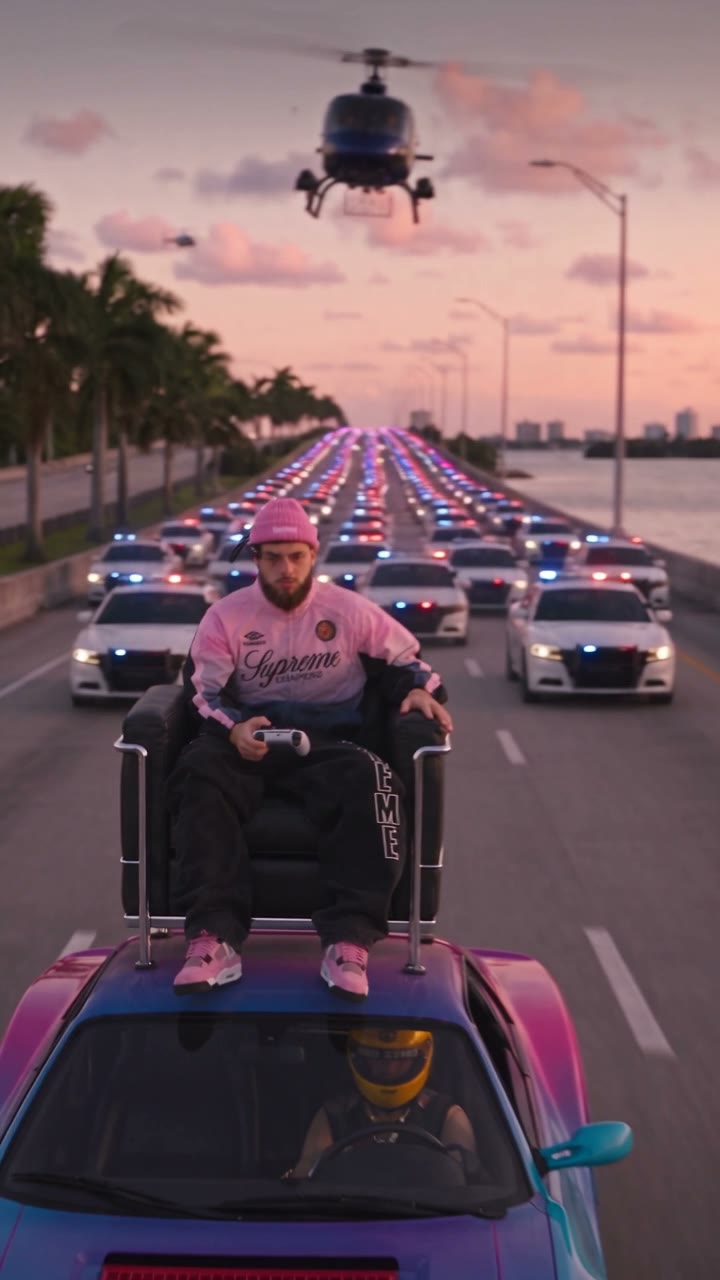
Follow the GTA 6 Police Chase AI scene

Ideas for a GTA 6 Police Chase AI video

Use the fictional pursuit for a playful game-inspired edit.

Be the rooftop rider

Cast yourself in the chair and let the prepared camera move reveal the vehicles following behind. A recognizable face helps make the contrast readable.

Make a friend’s reaction

With permission, use a friend’s photo for the rider in GTA 6 Police Chase AI. The reference already provides the controller, driver and chase, so no separate action footage is needed.

Pair it with another game scene

Use GTA 6 Police Chase AI as one short scene in a personal montage, then explore the related game-night or car-wash templates for a different setting.

Prepare a GTA 6 Police Chase AI result

Choose an identifiable photo and check the moving shot carefully.

Pick a clear portrait

For GTA 6 Police Chase AI, a well-lit photo with an unobstructed face, hair and clothing gives the model useful visual information. The rider turns as the camera changes angle.

Understand the fixed roles

The person in the chair is the only photo role. The driver, police vehicles, helicopters and surrounding road remain part of the reference.

Review action and details

Watch the rider’s face and hands as the view moves from the side to the front. Generated clothing, controller, vehicles and distant explosion can vary.

GTA 6 Police Chase AI questions

The rider, reference scene, duration and audio.

How many photos does GTA 6 Police Chase AI need?

One person photo is required for the rider in the chair. The driver and pursuing vehicles are supplied by the reference.

What photo should I use for GTA 6 Police Chase AI?

Choose a clear, well-lit image of one person with a visible face and hair. Clothing can guide the rider, although the result may change across angles.

How long is GTA 6 Police Chase AI?

The reference is about 13 seconds. The workspace rounds its duration, and Economy, Standard and Original all use that same full reference.

Does GTA 6 Police Chase AI use a different clip for each mode?

No. The three modes use the same prepared scene and differ in generation model and displayed credit cost.

Am I the driver in GTA 6 Police Chase AI?

Your photo guides the person seated in the chair on top of the car. The helmeted driver inside the car remains part of the reference.

Can GTA 6 Police Chase AI use my car photo?

This page has one person-photo slot and does not offer a separate car upload. The car follows the fixed reference and generated details may vary.

Can I change the police chase or road?

The vehicles, road, helicopters and timing come from the prepared clip. There is no separate control to direct the pursuit on this page.

Does GTA 6 Police Chase AI include sound?

The reference has an audio track. GTA 6 Police Chase AI is configured to restore the selected reference audio after generation; listen to the completed result before sharing.

Will the rider keep the same appearance throughout?

The photo guides the rider through the changing viewpoint. A video model may still alter facial features, clothes, hands or the controller between frames.

Can I use another person’s photo?

Use media you are authorized to upload and obtain any required consent from the person shown. The finished video is a fictional AI-made scene.

Is GTA 6 Police Chase AI an official game?

No. It is an independent fan-inspired video template, not a playable game, and is not affiliated with or endorsed by the game publisher.

Does GTA 6 Police Chase AI cost credits?

Generation requires an account and sufficient credits. The workspace shows the current estimate for your mode and resolution before submission.

Where is my GTA 6 Police Chase AI video?

Open My creations to see task status. Once the video is ready, review it there and use the download control; processing and failed tasks also appear there.

Make a GTA 6 Police Chase AI video

Add one rider photo to GTA 6 Police Chase AI and choose a generation mode.

GTA 6 Police Chase AI