
Create a video

Required photos1
Optional photos0/1
Settings
Mode
Video length8s
Resolution

GTA 6 Car Wash AI Video Generator

Make a GTA 6 Car Wash AI video with a person photo and an optional car photo.

0:00 / —:—

What is GTA 6 Car Wash AI?

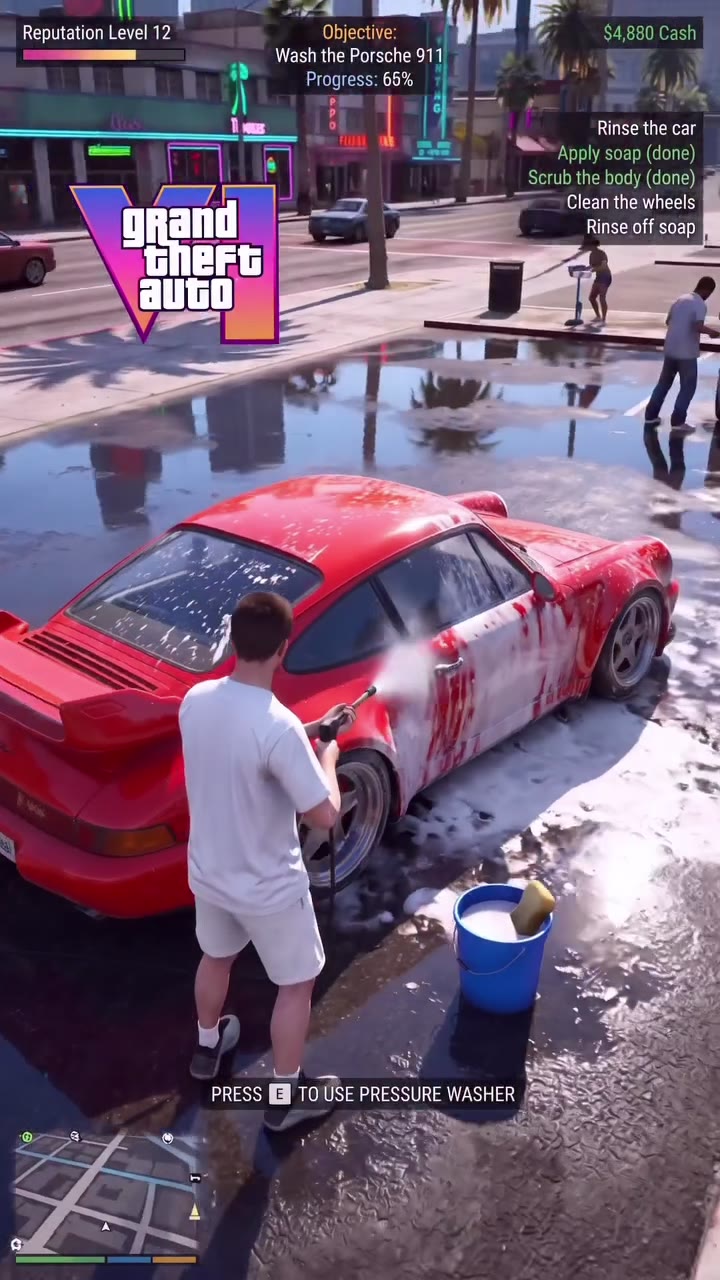
GTA 6 Car Wash AI is a short photo-to-video template styled as a third-person game scene. A person rinses a sports car on a wet street, crouches near a wheel and finishes the wash as the interface changes. One person photo is required. You can also upload a car photo to guide the vehicle; without it, the reference car remains the intended vehicle. The street, bucket, foam, washing action and interface come from the prepared video. Vehicle details and on-screen text can vary in the generated result.

GTA 6 Car Wash AI

How to make a GTA 6 Car Wash AI video

Prepare the required person photo and decide whether to add a car.

  1. STEP 1

    Add the person

    Upload one clear person photo for GTA 6 Car Wash AI. The image guides the character washing the vehicle.

  2. STEP 2

    Optionally add a car

    In GTA 6 Car Wash AI, add a second photo to guide the car’s appearance, or leave that slot empty to use the reference car. Review the displayed cost for your mode.

  3. STEP 3

    Generate and inspect

    Sign in, submit the task and open My creations. Check the character, car shape, wheel-cleaning action and sound before downloading.

From foam to a clean car

Choose the person and optionally guide the vehicle with another photo.

Follow the GTA 6 Car Wash AI sequence

The GTA 6 Car Wash AI reference opens behind the person beside a foamy red car. The person moves the pressure washer along the body, approaches the rear wheel and crouches to clean it. The final view shows the car with a mission-complete style overlay. The same roughly eight-second reference is used in Economy, Standard and Original; the modes differ in model and displayed credit cost. Since the person faces away for much of the clip, a face may be less visible than in a portrait scene.
Follow the GTA 6 Car Wash AI sequence

Ways to use GTA 6 Car Wash AI

Make a fictional game-style car-care clip from the photos you choose.

Wash the reference car

Use only a person photo when the prepared red sports car suits your idea. This keeps the photo setup quick and follows the reference vehicle.

Guide the vehicle

Add a car photo to GTA 6 Car Wash AI when the shape or color of a particular vehicle matters. The model interprets it within the fixed washing scene.

Create a game-night edit

Pair the short car wash with another game-inspired video and add your own context outside the generator. The interface elements come from the reference.

Prepare a GTA 6 Car Wash AI result

The scene uses two distinct photo roles with different requirements.

Choose a person photo

Use a clear image of one person with visible hair and clothing. The character is seen mostly from behind, so the face may be small or out of view.

Choose an optional car photo

For GTA 6 Car Wash AI, a well-lit view showing the vehicle body and color can help the model interpret the car. The reference camera and wash action still determine the scene.

Review the car and overlay

Check the vehicle shape, wheels, hands and washing tool. Model-generated text, logos, progress indicators and exact car details may differ from the preview.

GTA 6 Car Wash AI questions

Person and car photos, the fixed scene and finished videos.

How many photos does GTA 6 Car Wash AI need?

One person photo is required. A second car photo is optional and guides the vehicle when supplied.

Can GTA 6 Car Wash AI work without a car photo?

Yes. In GTA 6 Car Wash AI, leave the car slot empty and the reference car remains the intended vehicle. Generated details may still vary.

What car photo works for GTA 6 Car Wash AI?

Choose a well-lit image that clearly shows the body shape and color. The model interprets it from the angles and movement in the prepared video.

What person photo works for GTA 6 Car Wash AI?

Use a clear photo of one person with visible hair and clothing. The reference shows the character mostly from behind, so facial detail may not be prominent.

How long is GTA 6 Car Wash AI?

The reference is about 7.6 seconds and the workspace displays a rounded duration. Economy, Standard and Original use the same prepared clip.

Do GTA 6 Car Wash AI modes use different scenes?

No. The three modes use the same car-wash reference; they differ in generation model and displayed credit cost.

Can GTA 6 Car Wash AI change the street or camera?

The wet street, camera position, bucket and washing sequence follow the fixed reference. This page has no separate location or camera selector.

Will GTA 6 Car Wash AI reproduce the interface text?

The reference contains game-style interface overlays, but generated lettering, numbers, badges and logos may change or be unreadable.

Does GTA 6 Car Wash AI include sound?

The reference contains an audio track. The template is configured to restore the selected reference audio after generation; listen to the output before sharing.

Can I upload a friend’s photo or a car I do not own?

Use media you are authorized to upload and any required consent from identifiable people. Review your rights to the images and finished clip before sharing.

Is GTA 6 Car Wash AI an official game?

No. This is an independent fan-inspired video template. It is not a playable game and is not affiliated with or endorsed by the game publisher.

Does GTA 6 Car Wash AI use credits?

Generating requires an account and sufficient credits. The workspace displays the estimate for the chosen mode and resolution before submission.

Where is my GTA 6 Car Wash AI video?

Open My creations to check task status. Once the video is ready, review it and use the download control; processing or failed tasks appear there too.

Make a GTA 6 Car Wash AI video

Add a person photo to GTA 6 Car Wash AI, then decide whether to guide the car with another image.

GTA 6 Car Wash AI