Create a video

ModelSeedance 2.5 Edit

Configured for this template

Car jump reference · 11.9s

Person · Photo 1
Vehicle · Photo 2

Car Jump AI Video Generator

Make a car jump AI video with two photos. Photo 1 is the person in the folding chair. Photo 2 is the vehicle that jumps behind them. The source clip and its soundtrack stay in place.

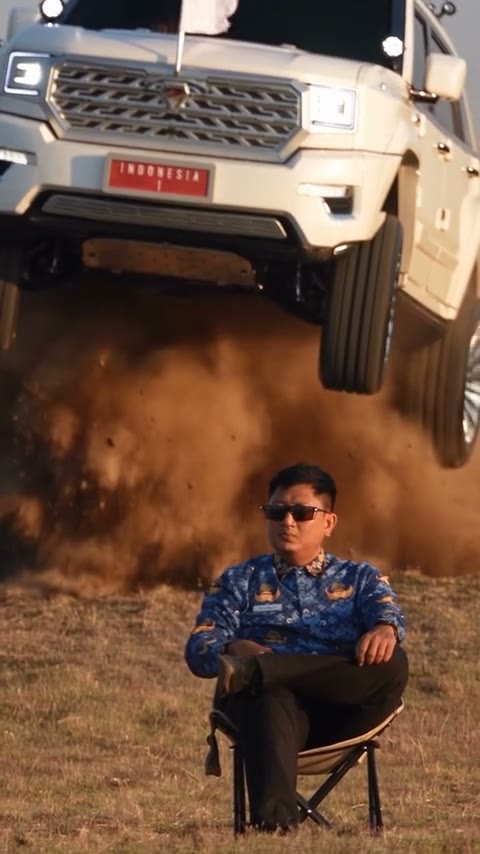
Original vertical source clip of a person seated in a folding chair while a vehicle jumps behind them

What is car jump AI?

Car jump AI turns a person photo and a vehicle photo into a short stunt edit: someone stays seated in a folding chair while a vehicle jumps behind them. You choose the two subjects without filming a stunt. This car jump AI example is a community effect, not a Motion Transfer result or a guarantee of your output. The original source is loaded in the workspace. Treat the scene as fiction; do not imitate the jump or close pass.

Community effect of a seated person and a jumping vehicle, not a result generated on this site

Make a car jump AI video in three steps

Use the car jump AI video generator with two photos. Confirm the slot order and estimate before starting.

  1. STEP 1

    Upload the person, then the vehicle

    Add the person as Photo 1 and the vehicle as Photo 2. Both car jump AI inputs are required. The reference video is already loaded.

  2. STEP 2

    Preview, replace, and read the quote

    Preview the car jump AI source and use Replace if either photo is wrong. Remove photos from the last slot first to preserve their order. Changing inputs does not start a job.

  3. STEP 3

    Sign in, generate, and review

    Sign in to make the car jump AI video. Open My creations and watch the chair, the hand raise, the jump, and the landing. Listen before you download. If a finished clip is missing sound, use the audio retry on that result instead of paying for another generation.

Choose your car jump AI look

The car jump AI template is already loaded. Match Photo 1 to the seated person and Photo 2 to the vehicle, then read the estimate.

The car jump AI effect

The car jump AI reference supplies the chair pose, camera, outdoor setting, and timing. Near 3.8 seconds the person raises a hand as the vehicle launches, lands, and passes behind them. Your photos define who sits and which vehicle jumps. The edit follows this roughly 12-second, vertical 9:16 source and keeps its soundtrack. Compare the original footage here with the community effect above to see which subjects change.

Original source clip · about 12 seconds

Photo 1 is the person

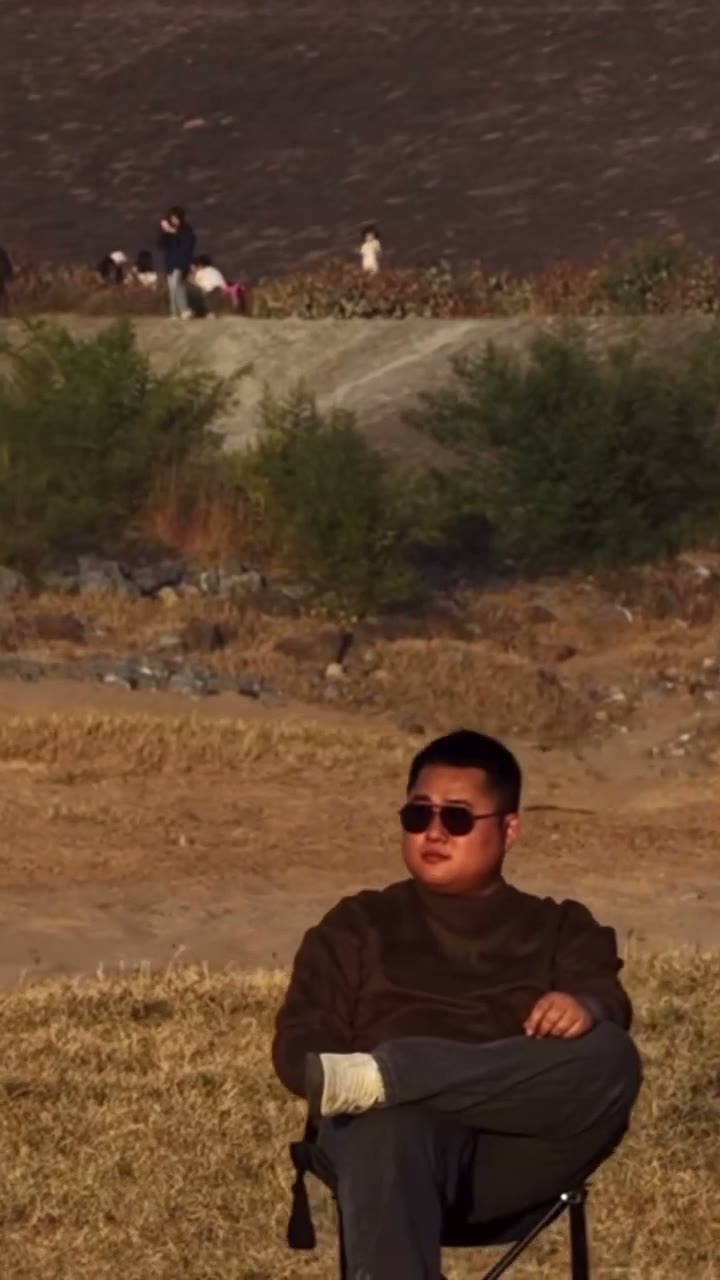
For car jump AI, Photo 1 defines the seated character, including their face, hair, clothing, and visible build. Use a clear photo with enough body detail for the chair pose; a face-only crop leaves the outfit unspecified. The car jump AI prompt requests black sunglasses like the source character while retaining the other features from your photo. Results can vary when the hand crosses the face. This community input shows the useful framing: face, torso, and arms are visible. Upload a person or character you have permission to transform.

Community example photo of a seated person for the car jump AI person slot
Person · Photo 1 · community input example, not a site result

Photo 2 is the vehicle

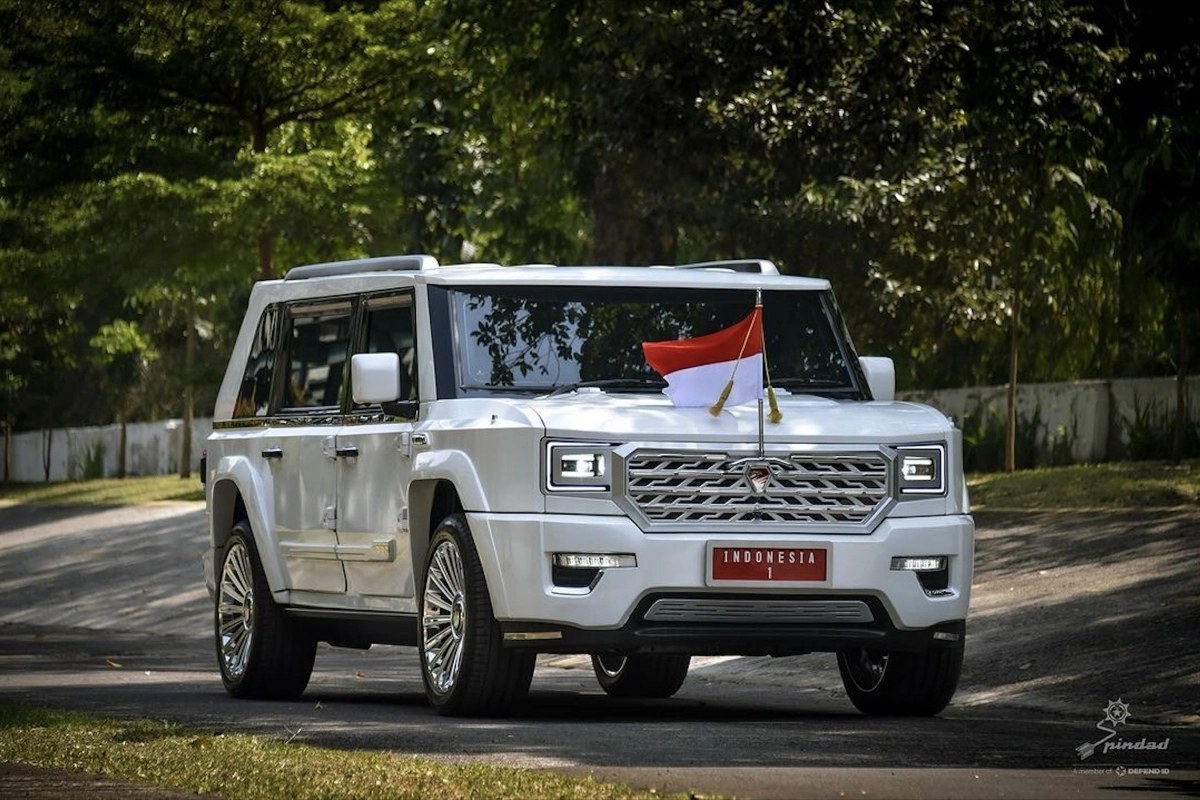
Photo 2 defines the vehicle in your car jump AI video. The source shows the pickup mainly from the front and front three-quarter angle, so choose a photo with the full body, wheels, lamps, and grille visible. A side-only shot leaves the front-end details open to interpretation. The community SUV input demonstrates this angle; its original corner mark is retained. Car jump AI can reinterpret badges, plates, and small trim, so inspect them in the result. Use a vehicle photo you have permission to transform.

Community example photo of a white SUV from the front-side angle, with the corner mark left in place
Vehicle · Photo 2 · community input example, corner mark kept

Prepare your car jump AI photos

Car jump AI is a fixed edit, so the choices that matter are the person, the vehicle angle, and whether this stunt clip is appropriate to make at all.

Black sunglasses are requested, not guaranteed

The car jump AI prompt makes one appearance exception: black sunglasses in the source style. Keep the face and hair unobstructed in Photo 1. Glasses, expression, and identity can still drift, especially during the hand raise.

Match the angle the jump actually shows

For the car jump AI launch, a front three-quarter photo gives information about both the grille and the body. Keep the wheels inside the frame. Tiny badges and plate lettering may change even with a clear reference.

Treat it as a creative clip, not a stunt lesson

Create car jump AI edits digitally; do not imitate the jump or close pass. Template access does not confirm permission to republish the source footage, community examples, or soundtrack. Check those rights before posting.

What stays fixed in car jump AI

You choose the person and the vehicle. The performance, the frame, and the slot order stay fixed.

Person, then vehicle

Photo 1 is the seated person. Photo 2 is the vehicle. Car jump AI does not treat the second photo as another person. Keep that order when you replace a file.

About 12 seconds, vertical

A car jump AI video follows the roughly 12-second source in a 9:16 frame. There is no length picker. Trim the download in your own editor if you need a shorter cut.

Resolution changes the estimate

Car jump AI starts at 480p, with 720p and 1080p available in Settings. Resolution changes the estimate and file detail; it does not guarantee identity, vehicle markings, or realistic physics.

The reference soundtrack stays

The finished car jump AI video keeps the soundtrack from the reference clip. Page previews start muted, so use the player control when you want to listen. Publish that audio only where you have permission.

Credits are confirmed before Generate

Read your car jump AI estimate beside Generate before submitting. Preparing photos spends no generation credits. Signup credits may not cover the job; use the displayed estimate when choosing a plan.

Car jump AI pricing

Check the car jump AI estimate beside Generate. Plan counts below cover other models and settings. This clip can cost more. The live estimate is the price for this job.

Starter

For your first ideas.

$8.3/month

$100.0 charged yearly

2,400 credits/year

Up to 400 images

GPT Image 2Nano Banana Pro

Up to 240 videos

Seedance 2.5Kling 3.0 Motion Control
  • Up to 4K images and HD videos, depending on the model
  • Image editing, video creation & motion transfer
  • Watermark-free image & video downloads
  • Generation history in your account
Popular40% OFFSave $238.8

Pro

For a steady creative flow.

$30.0/month$49.9/month

$360.0 charged yearly

21,600 credits/year

Up to 3,600 images

GPT Image 2Nano Banana Pro

Up to 2,160 videos

Seedance 2.5Kling 3.0 Motion Control
  • Up to 4K images and HD videos, depending on the model
  • Image editing, video creation & motion transfer
  • Watermark-free image & video downloads
  • Generation history in your account
  • Use credits across image and video models
Best Value50% OFFSave $599.8

Business

For more creations, more often.

$49.9/month$99.9/month

$599.0 charged yearly

48,000 credits/year

Up to 8,000 images

GPT Image 2Nano Banana Pro

Up to 4,800 videos

Seedance 2.5Kling 3.0 Motion Control
  • Up to 4K images and HD videos, depending on the model
  • Image editing, video creation & motion transfer
  • Watermark-free image & video downloads
  • Generation history in your account
  • Use credits across image and video models

Basic

$0

Try before you subscribe

  • 18 one-time signup credits
  • Generation history included
  • Watermarked previews & downloads
  • Up to 3 images or 1 video
  • Watermark-free downloads require payment

Prices in USD; taxes and total shown at checkout. Subscriptions renew automatically; cancel in Billing settings. Subscription credits expire each period; one-time credits never expire. Refund requests: within 72 hours. Eligible refunds deduct used purchased credits and, where permitted, actual non-returned processing fees. Processing fees are capped at 6% of the original purchase amount, excluding separately charged taxes. Terms · Refund Policy.

Car jump AI questions

Photo order, sunglasses, vehicle angle, length, sound, credits, drift, and safety.

How many photos does car jump AI need?

Upload two photos in order. Photo 1 is the person in the chair. Photo 2 is the vehicle that jumps. The reference video is already loaded. Both photos are required. Choose Generate when your inputs are ready, then sign in if prompted. You need enough credits to cover the estimate before the job can start.

Does car jump AI add black sunglasses?

The instruction asks for black sunglasses in the style of the source character and asks to keep the other facial and visual features from Photo 1. Review the face when the hand rises. An exact match is not guaranteed.

What vehicle photo works for car jump AI?

Use a front or front three-quarter photo with the full vehicle, wheels, and front end visible. A side-only photo is weaker because this jump is seen from the front. Badges and plates can change. The community SUV sample keeps its corner mark. Upload your own vehicle photo.

How long is a car jump AI video, and does it have sound?

The edit follows the source: about 12 seconds, vertical 9:16, with no length picker. The finished video keeps the reference soundtrack. Players on this page start muted. If a completed result has no sound, use the audio retry in My creations instead of generating again.

Is car jump AI free?

Watching the source, looking at the community examples, and preparing photos does not spend credits. Generating is not free. It requires an account and enough credits for the estimate beside Generate. Check that amount before you buy. Signup credits may not cover this clip.

Can car jump AI keep faces and vehicle details exact?

No. Car jump AI does not promise a locked identity, real vehicle physics, an exact badge or plate, or a particular generation speed. Hands, sunglasses, wheels, and contact with the ground can drift. Watch the launch, the landing, and the pass before you download.

Which photos can I use in car jump AI?

Use yourself, a consenting adult, or a character or vehicle you may transform. Do not impersonate someone. The community photos and community effect are existing examples, not results from this site. Template access does not confirm a license for the source footage, those examples, or the soundtrack.

Is it safe to recreate this stunt?

No. The clip is a creative video. Do not imitate the jump, drive toward a seated person, or treat the result as a driving tutorial. If you only want a normal driving shot, use a different template or the AI video generator.

How is this different from Gas Station, Raindance, or Hotel Lobby?

Gas Station Dance recasts three performers. Raindance and Hotel Lobby each recast two people. Car jump AI uses one person photo and one vehicle photo for a jump behind a chair. For a scene you describe yourself, use the AI video generator.

Where can I download my car jump AI video?

Find your car jump AI result in My creations or video history. Play the seated opening, hand raise, jump, landing, and pass. Listen to the soundtrack, then use the download control on that result.

Try the car jump AI video generator

Choose your car jump AI character and vehicle. Upload the person first, check the estimate, and generate from the loaded source clip.

Original source clip used as the car jump AI motion reference, separate from the community effect