
A LITTLE INSPIRATION

See it in action

Explore a few ideas, then make the words your own.

  • Where EVERY MOVE COUNTS.

  • Go FROM STILL TO MOTION.

  • THE STORY MOVES.

What is a text match cut?

See the same phrase move through changing layouts.

01

Follow a phrase through the pages

A text match cut holds a word or short phrase in place while the surrounding newspaper-style pages change. That repeated highlight gives viewers a familiar point to follow through the sequence. Use a text match cut to introduce a subject, name a character or move from one scene to another.
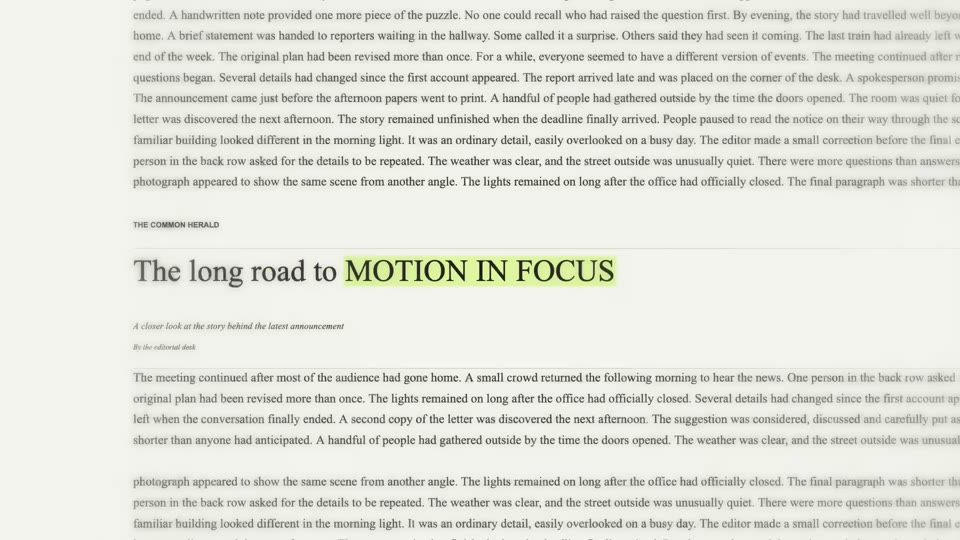
A landscape text match cut example

02

Create a clip for your edit

This text match cut generator draws and records illustrative layouts in your browser. Enter a phrase, preview the clip and adjust its frame, pace or sound. The decorative pages do not come from real articles, and the editor cannot import your own screenshots. Download the clip to add it to your video timeline. Create a text match cut for free without signing in or spending AI credits. Motion Transfer’s separate character animation and AI video workspaces have their own input and credit requirements. You can use a downloaded text clip alongside those separate creations in your own editing app.

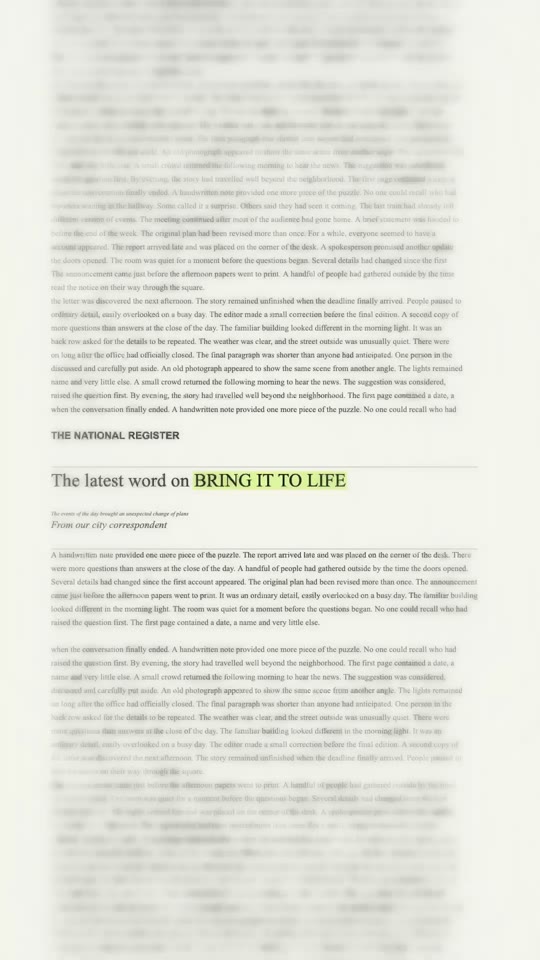
A vertical text match cut example

How to make a text match cut

Create a short clip, then bring it into the rest of your edit.

  1. Step 1

    Enter your words

    Type a name or short phrase of up to 23 characters and choose a highlight color. The text match cut preview lets you see the words move through changing pages.

  2. Step 2

    Generate and adjust

    Select Generate for free and keep the page open while the square video is recorded. Choose a frame, sound or pace afterward, then regenerate the text match cut to apply your changes.

  3. Step 3

    Download and add to your edit

    Download the text match cut in a format your browser supports. Import it into your editor to combine it with your other footage.

Ideas for your next edit

Choose a phrase and a setting that support the story you want to tell.

Introduce the theme of a motion video

Start with a text match cut that names a person or place, then introduce a separate character performance. Arrange both downloaded clips in your video editor.

Bridge two chapters

Place a text match cut between moments connected by a person, event or subject. A repeated word can make a shift in place or time easier to follow. Compare cut speeds with your soundtrack.

Highlight a name or announcement

A text match cut can keep a project name, launch phrase or key idea at the centre while the page designs change around it. Preview the clip at its eventual size. Shorter wording often reads more clearly than a full sentence when each layout appears only briefly.

Make a vertical opening

Generate a vertical text match cut for a portrait-oriented timeline. Check that captions and overlays will not cover the words. You can also use a wider landscape frame.

Text match cut questions

Details about the editor, output and next steps.

Is this text match cut generator free?

Yes. This text match cut editor is free to use, requires no sign-in and does not consume AI credits. It runs in your browser. Motion Transfer’s separate AI tools may require an account and credits; their terms are shown in their own workspaces.

What can I put in a text match cut?

Use a word, person’s name, place or short phrase up to 23 characters. The phrase becomes the repeated focal point. The surrounding material is illustrative rather than a collection of verified news articles, so add any factual context separately in your finished video.

Can I use a text match cut with motion transfer?

You can use both outputs in a larger edit. Create and download the text clip here, then make a separate motion transfer video using its own workspace. Import the resulting files into your video editor and arrange them in your preferred order; this page does not combine them automatically.

Which shapes can a text match cut use?

After the first text match cut appears, you can choose 9:16 vertical, 1:1 square or 16:9 landscape. The first result is square. Changing the control prepares the next render, so select Regenerate to see and download a clip with the newly selected shape.

Does the text match cut download as MP4?

The format menu lists MP4 or WebM recording formats supported by your browser. Text match cut options vary across devices; confirm your editing software can import the file.

Can I make a text match cut slower?

Open Advanced settings after generating the first text match cut and lower the cuts-per-second value. Zoom changes the framing and blur softens the background. Regenerate and watch the whole result; timing is rounded to video frames and the sequence duration changes with the pace.

Can I remove or replace the text match cut sound?

Choose No sound and regenerate the text match cut for a silent clip. You can also select a built-in effect or add your own audio in your video editor.

Can I upload my own newspaper or article screenshots?

The text match cut editor makes its own newspaper-inspired layouts around your phrase. It does not accept image uploads or use real article pages as the changing background. If your project requires a particular source, you will need to compose that separately in an editor that accepts your material.

Why does my text match cut preview still use the previous settings?

The displayed text match cut is the video already recorded. Changing a control does not alter that file; the page indicates when settings have changed. Select Regenerate to create a replacement. Your earlier result remains available while the new version is being made.

Where is the video saved?

The preview exists in the current browser session until you leave or replace it. Use the Download button to save a copy to your device. It is not automatically uploaded to your Motion Transfer account or added to your AI creations.

Why can’t my browser record a text match cut?

The text match cut editor depends on browser video-recording support. Try a current browser and an available format, and leave the page open during recording. Sound support can also vary; if recording audio fails, choose No sound and retry. Device performance may affect how long creation takes.

Can I change the text match cut highlight color?

Yes. Choose yellow or another highlight before creating your text match cut. To change a finished clip, pick a new color and regenerate; the earlier download remains available until the new video is ready.

Give your next idea a focal point

Choose your words and create a text match cut in your browser.