
Create a video

Required photos1
Settings
Mode
Video length27s
Resolution

Goodbye GTA 5 Highway AI Video Generator

Create a Goodbye GTA 5 Highway AI video from one photo. Take the wheel for a sunset farewell with a rider and other drivers.

0:00 / —:—

What is Goodbye GTA 5 Highway AI?

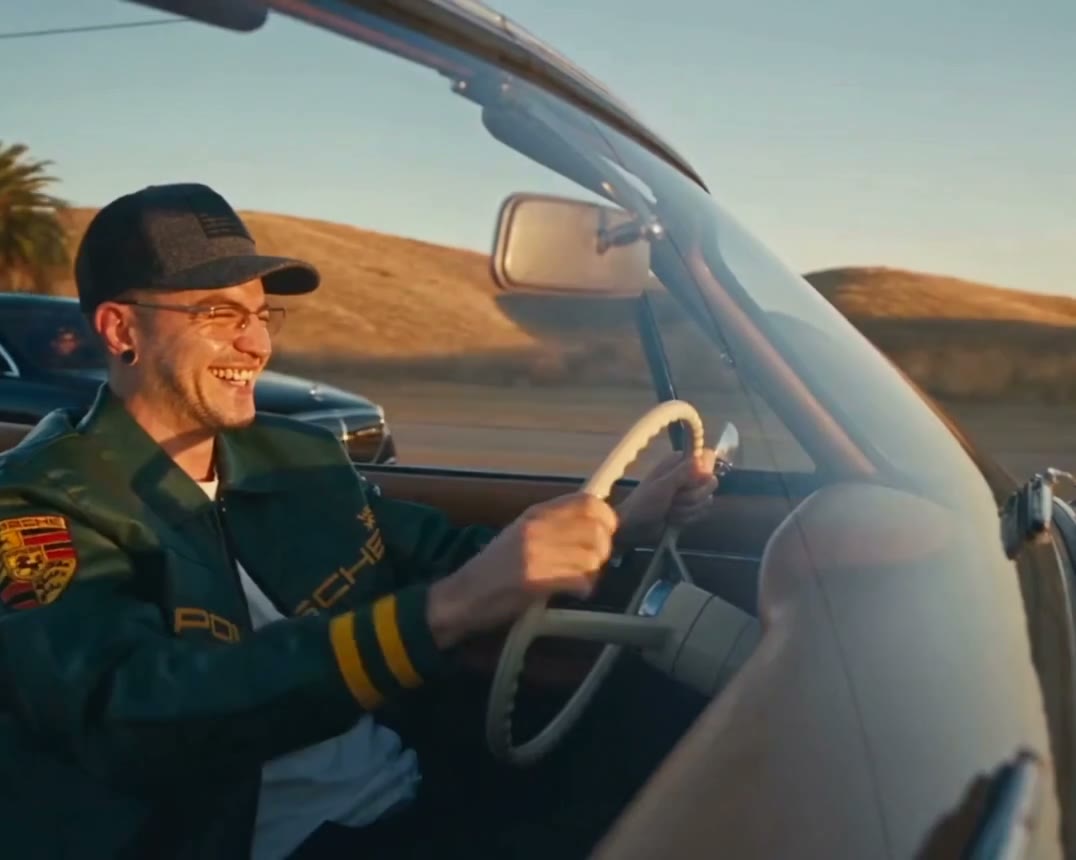
Goodbye GTA 5 Highway AI is a one-photo video template built around a game-inspired highway farewell. Your photo guides the driver of a white convertible as a motorcyclist and other drivers wave alongside. The prepared sequence supplies the road, vehicles, sunset, camera cuts and audio. Original follows the complete trimmed highway sequence; the two shorter modes use its opening. It is a fictional fan-inspired edit, and generated details can vary.

Goodbye GTA 5 Highway AI

How to make a Goodbye GTA 5 Highway AI video

One photo is enough to cast the convertible driver.

  1. STEP 1

    Add a driver photo

    Choose a clear photo of one person for Goodbye GTA 5 Highway AI. A visible face, hair and upper body give the model useful details across the close and wide shots.

  2. STEP 2

    Choose a mode

    Original follows the roughly 26.5-second reference through the drive away. Economy and Standard use the opening roughly 15 seconds. Check the credit estimate before generating.

  3. STEP 3

    Generate and review

    Sign in and submit the task. Open My creations to check the driver, waves, vehicle details and restored audio before downloading your Goodbye GTA 5 Highway AI video.

A Goodbye GTA 5 Highway AI farewell on the road

Choose the opening exchange or follow the drive to the final wide shot.

Follow the highway farewell

The Goodbye GTA 5 Highway AI scene moves between the convertible driver and the people traveling nearby. They exchange waves on the desert road before the vehicles take different paths. In Original, the convertible continues down the highway in the final wide shot. Economy and Standard follow the first approximately 15 seconds, so they focus on the earlier exchanges and do not include the final drive away. The story, locations and camera angles are fixed by the selected reference.
Follow the highway farewell

Ideas for Goodbye GTA 5 Highway AI

Use the prepared scene for a fictional game-night farewell or a short memory edit.

Make a send-off for friends

Cast yourself as the driver and share the highway exchange with friends who enjoy game-inspired stories. The other travelers remain part of the fixed scene.

Keep a short road moment

Choose an opening segment when you want the first waves in a compact Goodbye GTA 5 Highway AI video. The shorter version ends before the final drive away.

Finish with the open road

Use Original when the farewell needs its wider ending. Add your own context when sharing the finished clip; the template does not include a custom caption editor.

Get ready for Goodbye GTA 5 Highway AI

Choose a suitable photo, then check the details after generation.

One driver, several angles

The driver appears from multiple camera positions. A well-lit portrait with a clear face and visible hair gives the model more to work with as the driver turns and reacts.

Two reference lengths

Goodbye GTA 5 Highway AI has a full Original sequence and a shorter opening for Economy and Standard. Both follow the same road scene, with different duration and model choices.

A prepared scene and soundtrack

The convertible, other travelers and sunset road come from the reference. Its audio is configured to be restored after generation; listen to the completed video and check the result.

Goodbye GTA 5 Highway AI questions

Learn about the photo, modes, sound and finished video.

How many photos does Goodbye GTA 5 Highway AI need?

One photo is required for the convertible driver. The other people in the scene follow the fixed reference and do not have separate photo slots.

What photo works for Goodbye GTA 5 Highway AI?

Choose a sharp, well-lit image showing one person’s face. Hair and visible clothing can help the model interpret the driver across different angles.

How long is Goodbye GTA 5 Highway AI?

Original uses the roughly 26.5-second reference, displayed as 27 seconds in the workspace. Economy and Standard use an approximately 15-second opening. The completed video length can vary slightly.

Which Goodbye GTA 5 Highway AI mode includes the final drive?

Original follows the reference through the wide shot at the end. The shorter Goodbye GTA 5 Highway AI modes focus on the earlier highway exchanges.

Can Goodbye GTA 5 Highway AI change the car or other drivers?

This page has one driver photo slot. The white convertible, other vehicles and travelers are guided by the prepared reference and cannot be separately selected here.

Does Goodbye GTA 5 Highway AI include audio?

The reference contains an audio track. The template is configured to restore the selected reference audio after generation; review the finished video before sharing.

Will Goodbye GTA 5 Highway AI keep the road sign and faces?

Generated faces, hands, vehicles and lettering can change between shots. Check the completed clip, particularly close-ups, waving gestures and any visible text.

Can I use a friend’s photo for Goodbye GTA 5 Highway AI?

Use a photo you have permission to upload and any required consent from the person shown. The result is a fictional AI-generated scene.

Is Goodbye GTA 5 Highway AI an official game?

This is an independent fan-inspired video template. It is not a playable game and is not affiliated with or endorsed by the game publisher.

Does Goodbye GTA 5 Highway AI cost credits?

Generating requires an account and sufficient credits. Review the displayed estimate for the selected mode and resolution before submitting the task.

Where can I find my video?

Open My creations to see task status. Once your Goodbye GTA 5 Highway AI video is ready, review it there and use the download control.

Make a Goodbye GTA 5 Highway AI video

Add one driver photo and choose the length of your highway farewell.

A convertible driver waves goodbye to other travelers on a desert highway