
Create a video

Required photos1
Settings
Mode
Video length19s
Resolution

GTA 6 Apocalypse AI Video Generator

Put one person into GTA 6 Apocalypse AI as a fiery impact and a wave appear outside the window.

0:00 / —:—

What is GTA 6 Apocalypse AI?

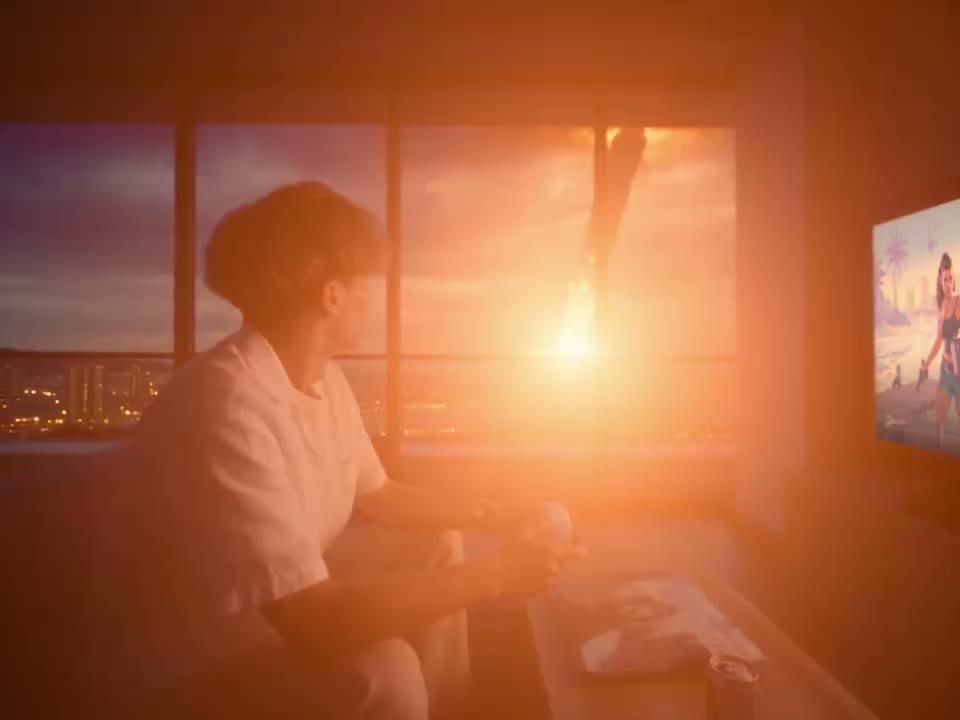
GTA 6 Apocalypse AI is a one-photo video template about a player who sits down with a controller as a dramatic scene develops beyond the apartment window. In the full reference, a countdown on the television gives way to a bright flash, a fiery object falling over the city and a large wave approaching the building. Your image guides the seated player. The room, screen, city view, camera sequence and sound come from the prepared video. Generated identity, screen graphics and motion can differ from the preview.

GTA 6 Apocalypse AI

How to make a GTA 6 Apocalypse AI video

Prepare a portrait, choose a version and review the scene.

  1. STEP 1

    Add the player

    Upload one clear photo for GTA 6 Apocalypse AI. A visible face, hair and upper body help guide the person seated with the controller.

  2. STEP 2

    Choose the opening

    For GTA 6 Apocalypse AI, select Original for the full countdown and window sequence. The shorter modes start later and keep the falling object and wave. Check the credit estimate.

  3. STEP 3

    Generate and watch

    Sign in, submit the task and open My creations. Review the face as the player turns, then check the window scene and sound before downloading.

From the game screen to the window

Choose how much of the prepared reaction to include.

Follow the GTA 6 Apocalypse AI sequence

The GTA 6 Apocalypse AI reference begins with a close side view of the player and the television. A bright flash reveals the apartment and its window; the player turns toward a fiery trail in the distance. A wave then rises across the outside view. Original follows the approximately 19-second reference from the opening countdown through the wave. Economy and Standard begin about four seconds later and run for roughly 15 seconds, keeping the impact and wave while omitting most of the opening countdown. The same person remains the intended subject in each version.
Follow the GTA 6 Apocalypse AI sequence

Ideas for a GTA 6 Apocalypse AI edit

Use the prepared scene for a fictional game-night reaction or dramatic reveal.

Make a game-night reaction

Place yourself in the player role and use the full sequence when the countdown matters to the setup. Add your own context outside the generated clip.

Start nearer the impact

Choose an Economy or Standard version when you want a shorter GTA 6 Apocalypse AI clip focused on the flash, falling object and wave.

Create with a friend’s photo

With the person’s permission, cast them as the player in a fictional reaction. The screen and city remain part of the fixed scene.

Prepare your GTA 6 Apocalypse AI result

A clear source image and a review of the full sequence help you judge the result.

Choose a visible face

For GTA 6 Apocalypse AI, use a well-lit photo with one person and an unobstructed face. The reference includes a side view and a turn, so appearance may still change between angles.

Know what stays fixed

The controller, room, television, windows and outside action come from the reference. This page has no separate controls for the background or game screen.

Check the dramatic moment

Watch the transition from the screen to the window. The generated player, hands, on-screen lettering and movement of the wave may vary from the reference.

GTA 6 Apocalypse AI questions

Photos, timing, the fixed scene and finished videos.

How many photos does GTA 6 Apocalypse AI need?

One person photo is required for the seated player. The apartment, television and outside scene follow the prepared reference.

Which photo works for GTA 6 Apocalypse AI?

Choose a sharp photo with one visible face and useful hair and clothing detail. A distant group image or a face hidden by a hand gives the model less to work with.

How long is GTA 6 Apocalypse AI?

Original uses the roughly 19-second reference. Economy and Standard use a roughly 15-second segment that begins around 3.9 seconds into the full video.

Does GTA 6 Apocalypse AI show the wave?

Both the full and prepared short references include the approaching wave. The exact motion and visual details can change in a generated result.

Does GTA 6 Apocalypse AI include the countdown?

Original includes the initial countdown on the television. Economy and Standard start later, so most of that opening is outside their reference segment.

Can GTA 6 Apocalypse AI change the game on the screen?

The screen is part of the fixed reference. There is no separate screen upload or game selector, and text or artwork can be changed by the model.

Can GTA 6 Apocalypse AI replace the city view?

The window and outside scene follow the prepared video. You cannot select a different city, falling object or wave on this page.

Does GTA 6 Apocalypse AI include sound?

The reference contains an audio track. GTA 6 Apocalypse AI is configured to restore the selected reference audio after generation; listen to the result before sharing.

Why can the player look different after turning?

The model interprets a single image across changing angles and light. A clear portrait can help, but exact likeness and clothing continuity are not guaranteed.

Can I use a friend’s photo for GTA 6 Apocalypse AI?

Use media you are authorized to upload and any required consent from the person shown. The output is a fictional AI-generated scene.

Is GTA 6 Apocalypse AI an official game?

No. This is an independent fan-inspired video template. It is not a playable game and is not affiliated with or endorsed by the game publisher.

Does GTA 6 Apocalypse AI use credits?

An account and sufficient credits are required to generate. The workspace displays an estimate for the chosen mode and resolution before submission.

Where can I download my GTA 6 Apocalypse AI video?

Open My creations to follow the task. When the video is ready, review the output and use its download control; processing and failed tasks appear there too.

Make a GTA 6 Apocalypse AI video

Add one player photo to GTA 6 Apocalypse AI and choose the version of the scene you want to create.

A player watches a fiery object fall outside an apartment window