
Create a video

Required photos1
Settings
Mode
Video length18s
Resolution

Grand Theft India AI Video Generator

Put one person into the Grand Theft India AI game reveal and reaction with a single photo.

0:00 / —:—

What is Grand Theft India AI?

Grand Theft India AI is a photo-to-video reaction template built around a player who expects a different game, watches a television reveal and reacts in a purple-lit room. The reference includes the on-screen caption “Bro thought I bought him GTA 6” and ends with the television falling. Add one photo to guide the player; the prepared clip supplies the screen, room, camera, actions and audio. The result is an AI interpretation, so the person, screen lettering and movement can vary.

Grand Theft India AI

How to make a Grand Theft India AI video

Prepare a portrait and select the reference length.

  1. STEP 1

    Add a Grand Theft India AI photo

    Choose one clear image of the person who should play the role. A visible face and upper body help describe the subject.

  2. STEP 2

    Choose a Grand Theft India AI mode

    Original uses the whole clip; Economy and Standard use a later short segment. Check the displayed credits before submitting.

  3. STEP 3

    Generate and review the reaction

    Sign in, generate and open My creations. Check the screen, facial details, final action and sound before downloading.

From game reveal to reaction

One person photo guides the player through the fixed scene.

Follow the Grand Theft India AI reveal

The Grand Theft India AI sequence begins with the player beside a television, then changes from a game menu to the Grand Theft India title and illustrated screen. The player watches, gestures and turns before the final reaction knocks the screen down. The supplied video sets the camera angle and timing, while your photo guides the player. Economy and Standard start a little later than Original so the shorter reference still includes the screen change and ending. Generated hands, objects and screen text may differ from the reference.
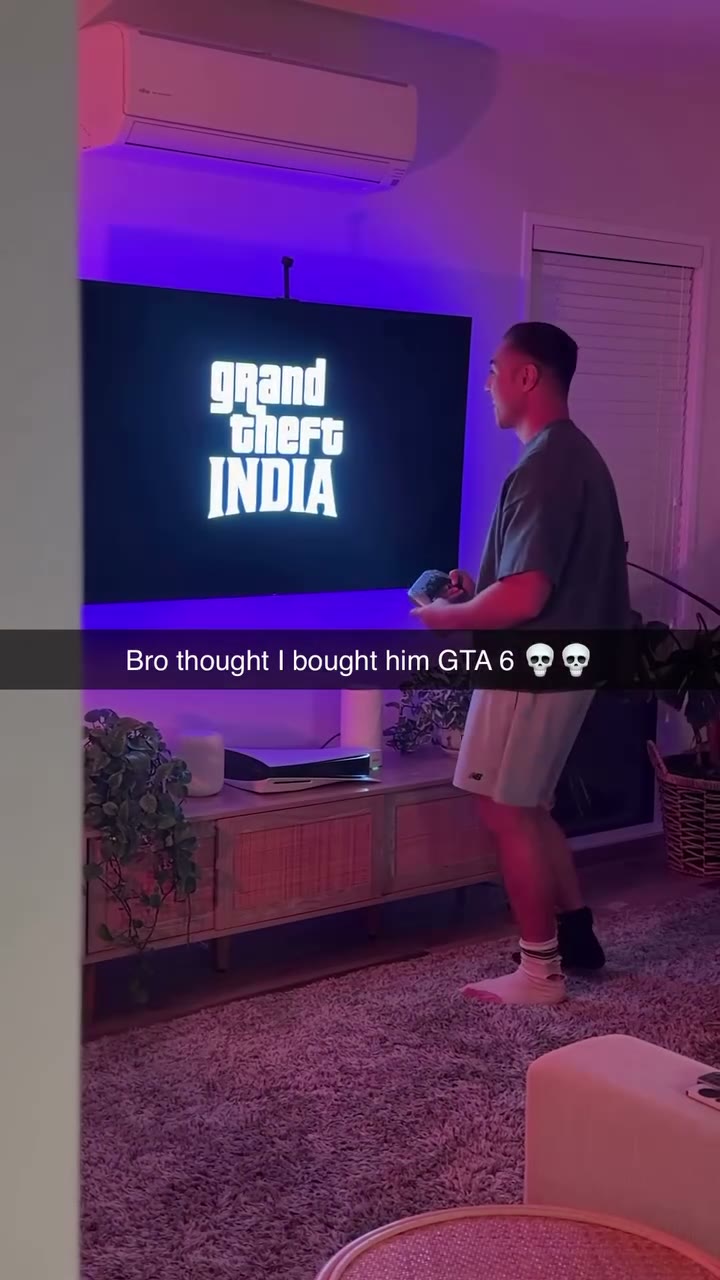
Follow the Grand Theft India AI reveal

Ideas for your Grand Theft India AI video

Use the prepared reaction as a short, clearly fictional game-night joke.

A Grand Theft India AI game-night reaction

Cast yourself as the player who sees an unexpected title appear on screen. A clear front-facing portrait gives the model a useful starting point for the person in the scene.

A Grand Theft India AI friend edit

Make an imagined reaction with a friend’s photo when you have their permission. The clip supplies the room and sequence, so you do not need to film the action yourself.

A short reveal for a group chat

Choose a shorter mode when the screen change and final moment are the important parts. Original keeps more of the opening reaction before the reveal.

Prepare your Grand Theft India AI result

Small choices make it easier to review the finished clip.

Use one recognizable person

Choose a well-lit, unobstructed face rather than a distant group photo. The player moves and turns, so hair, clothing and facial details may still change between frames.

Know what the reference controls

The prepared video controls the television, room, camera and sequence. This page does not offer a separate screen-image, caption or background editor.

Check the ending and text

Watch the transition and final television movement. Video models can alter lettering or physical contact, so the exact on-screen caption and impact are not guaranteed.

Grand Theft India AI questions

Photos, timing, screen details and finished videos.

How many photos does Grand Theft India AI need?

One person photo is required. It guides the player beside the television; the figures and artwork on the screen come from the video reference.

What kind of photo works for Grand Theft India AI?

A sharp, well-lit photo of one person with a visible face and upper body is a useful starting point. A crowded, distant or heavily obscured image gives the model less identifying detail.

How long is a Grand Theft India AI video?

Original follows the roughly 18-second reference. Economy and Standard use a roughly 15-second segment beginning about 2.7 seconds into that clip. The display rounds durations.

Does Grand Theft India AI include the final reaction?

All three prepared references include the late screen reveal and the television falling. The generated action can vary, so review the ending in the finished result.

Can I change the screen in Grand Theft India AI?

The television content follows the fixed reference. This page has no separate upload or control for replacing the image shown on the screen.

Will Grand Theft India AI reproduce the caption exactly?

The reference has an existing caption, but video generation may distort or change lettering. Exact words, title graphics and screen details are not guaranteed.

Does Grand Theft India AI include audio?

The reference has an audio track, and this template is configured to restore the selected reference audio after generation. Check the finished sound before sharing.

Can I add a second person to Grand Theft India AI?

This fixed template accepts one person photo. People or characters shown on the television remain part of the prepared scene rather than separate photo roles.

Can Grand Theft India AI change the room?

The room, lighting, camera and television come from the fixed video. There is no background selector on this page, and generated details may still vary.

Why does my Grand Theft India AI result look different?

The model interprets your photo across turns, gestures and screen contact. Try a clearer portrait and review each shot; hands, clothing, facial features and object motion may change.

Can I use a friend’s photo in Grand Theft India AI?

Use an image you have the rights and necessary permission to use, including any required consent from the person shown. The result is a fictional AI-made reaction.

Is Grand Theft India AI an official game?

This is an independent video effect. It does not provide a playable game and is not affiliated with or endorsed by the game’s publisher.

Does Grand Theft India AI use credits?

An account and sufficient credits are needed to generate. The workspace displays an estimate for the selected mode and resolution before you submit.

Where can I download my Grand Theft India AI video?

When the task finishes, open My creations, review the finished video and use its download control. A failed or still-processing task is shown in the same workspace.

Make a Grand Theft India AI video

Choose one person photo and select a version of the game reveal.

Grand Theft India AI