
Create a video

Required photos1
Settings
Mode
Video length30s
Resolution

GTA 5 Airport Goodbye AI Video Generator

Make a GTA 5 Airport Goodbye AI video with one person. Original follows the farewell through takeoff; shorter modes focus on the greeting.

0:00 / —:—

What is GTA 5 Airport Goodbye AI?

GTA 5 Airport Goodbye AI is a one-photo video template built around an airport send-off. Friends and a dog approach a traveler, share a game case and embrace before the traveler boards a plane. The full reference ends with a flight at sunset. Your photo guides the traveler; the fixed footage supplies the other people, dog, airport, airplane, camera cuts and audio. It is an independent fan-inspired edit, and facial details, objects and movement can change during generation.

GTA 5 Airport Goodbye AI

How to make a GTA 5 Airport Goodbye AI video

Prepare one traveler photo and choose the version that fits your story.

  1. STEP 1

    Choose a traveler photo

    Upload one clear image of the person who should appear in the GTA 5 Airport Goodbye AI scene. A visible face and upper body give the model useful detail.

  2. STEP 2

    Pick the airport sequence

    For GTA 5 Airport Goodbye AI, use Original for the full departure and takeoff. Economy or Standard uses the shorter opening greeting. Review the displayed credits before submitting.

  3. STEP 3

    Generate and check the video

    Sign in, submit the task and open My creations. Watch the traveler across the cuts and check the case, expressions and audio before sharing.

From the terminal to takeoff

Choose how much of the prepared airport sequence to follow.

Follow the GTA 5 Airport Goodbye AI story

The GTA 5 Airport Goodbye AI reference opens with the group arriving at the terminal. The traveler greets the dog, receives a game case and says goodbye to the others. The later shots show the traveler walking toward the gate, settling into a seat and looking at game cases before the plane takes off. Original uses the whole roughly 30-second video. Economy and Standard use the opening roughly 15 seconds, so those shorter versions focus on the meeting and farewell rather than the flight. The exact expressions and game-box artwork may vary in a generated result.
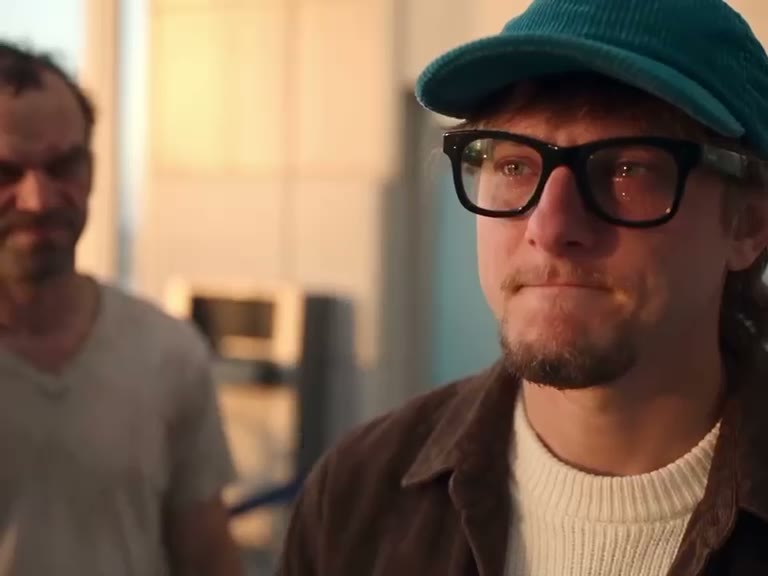
Follow the GTA 5 Airport Goodbye AI story

Ways to use GTA 5 Airport Goodbye AI

Create a fictional farewell for a game-night memory or a personal montage.

Make an airport send-off

Place yourself in the traveler role and use the full sequence for an edit that moves from meeting friends to leaving on a plane.

Focus on the reunion

Choose a short GTA 5 Airport Goodbye AI mode when you want the dog, greeting and goodbye in a more compact scene.

Share a fan-inspired farewell

Add a personal caption outside the generated video if you want to explain the moment to friends. The tool does not provide a separate caption editor here.

Prepare a better GTA 5 Airport Goodbye AI result

A useful source image and a quick review help you judge the finished edit.

Start with a recognizable photo

Choose one well-lit subject with an unobstructed face. A view that also shows hair and clothing gives the model more information as the traveler turns and walks.

Choose the story length

The GTA 5 Airport Goodbye AI opening contains the greeting and embrace. The full reference continues through boarding and takeoff; the shorter versions do not include that later ending.

Review faces and props

The traveler appears in several close and wide shots. Check identity, clothing, hands and the game cases across the edits, especially during the embrace and handoff.

GTA 5 Airport Goodbye AI questions

Photos, story lengths, sound and finished videos.

How many photos does GTA 5 Airport Goodbye AI need?

One photo is required for the traveler. The other people and the dog are part of the reference, with no separate photo slots on this page.

What photo works best for GTA 5 Airport Goodbye AI?

Use a sharp, well-lit image of a single person with a visible face. Showing the upper body and clothing can help when the traveler appears in wider shots.

How long is GTA 5 Airport Goodbye AI?

Original uses the full reference of about 30 seconds. Economy and Standard use its opening segment of about 15 seconds. The workspace rounds the displayed durations.

Does GTA 5 Airport Goodbye AI show the plane?

The full Original reference continues through boarding and a takeoff shot. The shorter Economy and Standard reference ends after the opening airport farewell.

Can I replace the other people in GTA 5 Airport Goodbye AI?

This template provides one traveler slot. The friends and dog follow the fixed reference, though their appearance can still vary in generated frames.

Can GTA 5 Airport Goodbye AI change the airport?

The terminal, plane, camera and shot order come from the prepared video. There is no separate setting for choosing another airport or vehicle.

Does GTA 5 Airport Goodbye AI include sound?

The supplied reference contains an audio track. GTA 5 Airport Goodbye AI is configured to restore the selected reference audio after generation; listen to the final result before sharing.

Will GTA 5 Airport Goodbye AI keep the game cases readable?

The cases are part of the reference, but video generation may alter their covers, lettering, position or the hands holding them. Exact artwork is not guaranteed.

Why does the traveler look different between shots?

The model interprets one photo through changing angles, distance and lighting. Try a clearer portrait and check close-ups as well as wider shots in the completed video.

Can I use a friend’s photo for GTA 5 Airport Goodbye AI?

Use media you have permission to upload and any required consent from the person shown. The result is a fictional AI-generated video.

Is GTA 5 Airport Goodbye AI an official game product?

No. This is an independent fan-inspired video template. It is not a playable game and is not affiliated with or endorsed by the game publisher.

Does GTA 5 Airport Goodbye AI cost credits?

Generating requires an account and sufficient credits. Review the estimate shown in the workspace for the chosen mode and resolution before submitting.

Where is my GTA 5 Airport Goodbye AI video?

Open My creations to see task status. When your GTA 5 Airport Goodbye AI video is ready, review it there and use its download control; processing or failed tasks are also shown in the workspace.

Make a GTA 5 Airport Goodbye AI video

Add one traveler photo and choose the airport farewell you want to make.

A traveler says goodbye to friends at an airport before a flight