Create a video

Required photos1
Settings
Mode
Video length17s
Resolution

GTA 6 Convertible Chase AI Video Generator

Upload one photo to take the wheel in a GTA 6 Convertible Chase AI scene through a neon-lit city.

0:00 / —:—

GTA 6 Convertible Chase AI video ideas

Explore examples of this effect. Open a video for a closer look.

What is GTA 6 Convertible Chase AI?

GTA 6 Convertible Chase AI places the subject of one photo in the driver’s seat of a convertible during a fictional city chase. Two passengers ride along as police cars follow, and the camera moves from a close view of the driver to a wider shot of the car and helicopters above the street. Your photo guides the driver; the passengers, vehicle, route and action come from the prepared reference.

A convertible driver looks back as police cars follow

How to make a GTA 6 Convertible Chase AI video

Choose one driver photo and review the prepared sequence.

  1. STEP 1

    Add one photo

    Upload a clear image of the person or pet you want as the driver. GTA 6 Convertible Chase AI uses one photo for that role.

  2. STEP 2

    Select a mode

    Watch the reference and choose Economy, Standard or Original. The two short modes use the same prepared opening section.

  3. STEP 3

    Generate and review

    Check the displayed credit estimate, sign in and generate. Open My creations to watch and download the finished video.

Explore GTA 6 Convertible Chase AI ideas

Different drivers in a game-inspired city chase.

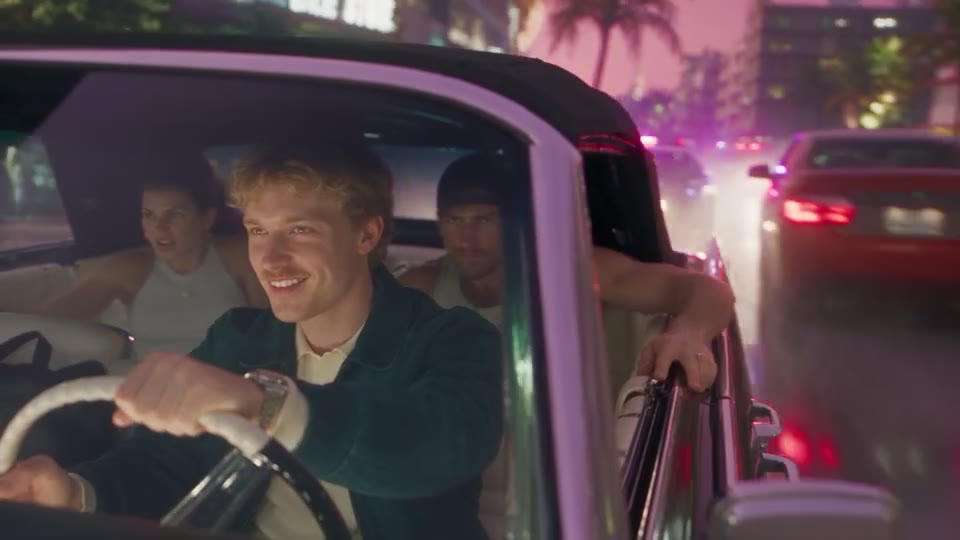
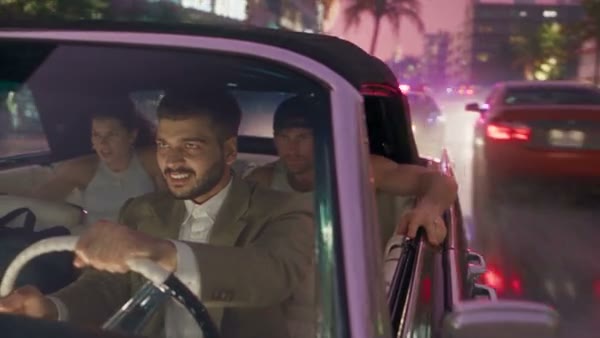
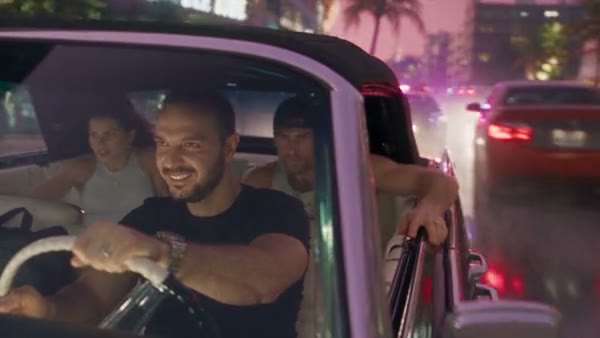
Take the driver’s seat

Choose who should lead the GTA 6 Convertible Chase AI scene. Your photo guides the driver’s appearance in the close shots at the wheel, including the moment when the driver looks back. One clear subject is easier to assign than a crowded group photo. The model must interpret different angles and motion, so facial features, clothing or other details may vary between frames.
Take the driver’s seat

Keep the chase moving through the city

The GTA 6 Convertible Chase AI reference includes the convertible, two passengers, following police cars, illuminated buildings and wet street reflections. As the camera moves ahead of the vehicle, helicopters enter the wider city view. These scene elements follow the reference and do not have separate upload or editing controls on this page.

Keep the chase moving through the city

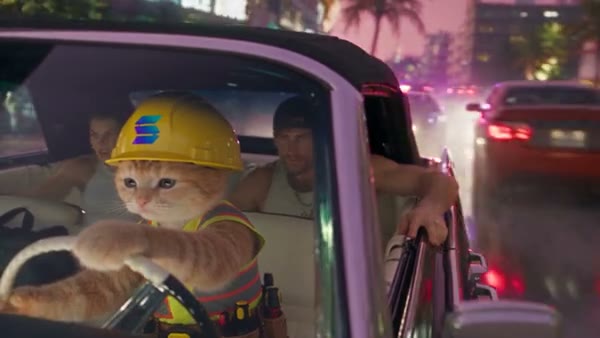
Try an unexpected driver

You can also try a clear pet photo for a playful GTA 6 Convertible Chase AI interpretation. The model places the chosen subject in the driver role while the scene continues around them. Animal anatomy, clothing and scale may be interpreted differently from the photo; check the result before using it in a post or longer edit.

Try an unexpected driver

Ideas for GTA 6 Convertible Chase AI

Use the chase as a short fictional scene with your chosen driver.

Introduce a character

Put a character at the wheel in GTA 6 Convertible Chase AI and use the close driver view as a quick introduction.

Make a playful pet edit

Try a pet photo for an unexpected driver. The generated interpretation can differ from the supplied image.

Add a city action beat

Use the convertible, neon street and helicopters as a short transition in a game-inspired video edit.

Prepare your GTA 6 Convertible Chase AI video

Know which details your photo controls before you generate.

One driver photo

Pick one well-lit subject with a visible face. A person’s hair and upper-body clothing, or a pet’s face and markings, give the model more visual context.

The rest of the scene is prepared

GTA 6 Convertible Chase AI supplies two passengers, the convertible, police cars, helicopters and city. They do not have separate photo slots.

Full or short reference

Original uses the complete reference of about 16.7 seconds. Economy and Standard use its first 14.9 seconds with different generation settings.

Listen to the result

The source contains audio and the workflow attempts to restore it after generation. Play the completed file to check its sound.

GTA 6 Convertible Chase AI questions

Find out what changes in the scene and what to upload.

What is GTA 6 Convertible Chase AI?

It is a fixed, game-inspired city chase video. One photo guides the convertible driver while the prepared reference supplies the passengers, pursuit and camera movement.

What photo should I upload for GTA 6 Convertible Chase AI?

Choose one clear photo of the person or pet you want as the driver. A visible face and an unobstructed view give the model useful information.

Can a pet drive in GTA 6 Convertible Chase AI?

You can try a pet photo as the single driver image. GTA 6 Convertible Chase AI will interpret the animal in the scene, and the appearance and proportions may vary.

Can I replace either passenger in GTA 6 Convertible Chase AI?

This page has one required driver slot. The two passengers are guided by the reference and cannot be assigned separate photos here.

Do I need to upload a car or a motion video?

No. GTA 6 Convertible Chase AI already supplies the convertible and chase reference. The only required upload is the driver photo.

How long is the GTA 6 Convertible Chase AI reference?

The full reference is about 16.7 seconds. Original uses the full sequence; Economy and Standard use its first 14.9 seconds. Check the duration displayed for your mode.

What changes between GTA 6 Convertible Chase AI modes?

Economy and Standard use different generation settings with the same shorter reference. Original follows the full reference. Resolution and the credit estimate appear in the workspace.

Can I change the street, pursuit or camera?

Those elements follow the prepared reference. The page does not provide separate controls for the location, camera movement, police cars or helicopters.

Does GTA 6 Convertible Chase AI include sound?

The reference contains an audio track. The workflow attempts to restore it after generation; listen to the finished file and confirm that you can use the audio before sharing.

Will the driver look identical throughout?

The photo guides the driver, but the model may vary identity details, clothing, hands or animal features as the view changes. Review the complete result.

Is this official game footage?

GTA 6 Convertible Chase AI is an independent, fictional AI video template. It is not playable gameplay and is not affiliated with or endorsed by the game publisher.

How much does GTA 6 Convertible Chase AI cost?

Generating requires an account and sufficient credits. The workspace displays the current estimate for your chosen mode and resolution before submission.

Where can I find my GTA 6 Convertible Chase AI result?

Open My creations to follow the task. When your GTA 6 Convertible Chase AI video is ready, play it there and download it if you want a copy.

Make your GTA 6 Convertible Chase AI video

Choose one driver photo and start the prepared city chase.

GTA 6 Convertible Chase AI