Create a video

Required photos1
Settings
Mode
Video length7s
Resolution

Golf Cart Fail AI Video Generator

Create a Golf Cart Fail AI video from one photo of the rider who starts in the front-left driver seat. The other riders, cart and jolt stay prepared.

0:00 / —:—

What is Golf Cart Fail AI?

Golf Cart Fail AI follows a prepared group ride with a sudden jolt. One required photo replaces only the rider who starts in the front-left driver seat. The reference supplies the other three riders, cart, camera and timing. The page does not expose four-person casting yet because the rear seats and overlaps need generation validation. Golf Cart Fail AI keeps the same timing.

Golf Cart Fail AI

How to make a Golf Cart Fail AI

Add one photo for the front-left driver, compare the modes, then check the whole group ride.

  1. STEP 1

    Add one rider

    Use one photo for the rider who starts in the front-left driver seat. There is one required photo and no optional slot.

  2. STEP 2

    Compare the three modes

    The prepared reference is about 7 seconds, already inside the short-mode limit, so Economy, Standard and Original each play the full Golf Cart Fail AI. A lower-cost mode does not cut the ending.

  3. STEP 3

    Check the result, then download

    Open the result in My creations. Look at one rider, confirm the cart, the other riders and the jolt are still there, play the sound, and download the file.

One community example: the front-left driver joins a group golf-cart jolt

The video and stills are one community example of Golf Cart Fail AI. Your subject can look different. The prepared scene keeps the cart, the other riders and the jolt.

Cast the front-left driver

The upload guides the rider who starts in the front-left driver seat: face, hair, body and clothing. A clear upper-body view gives the model more to follow than a tiny crop. There is one required photo and no optional rider slot.
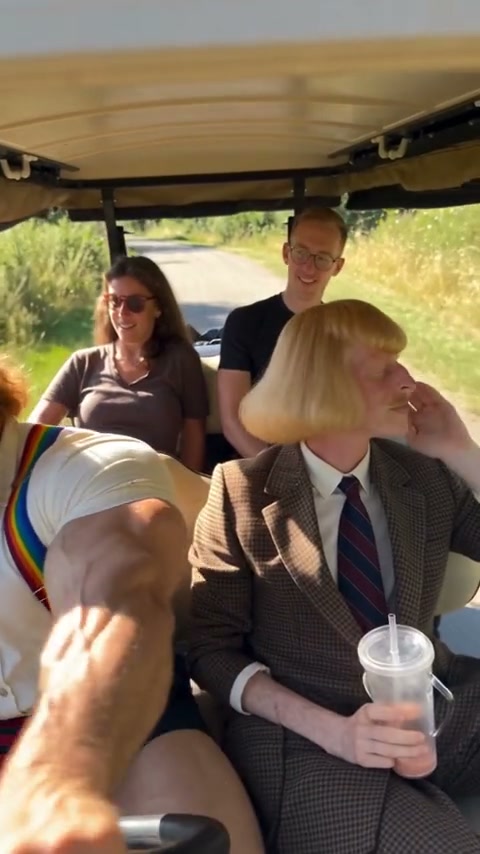
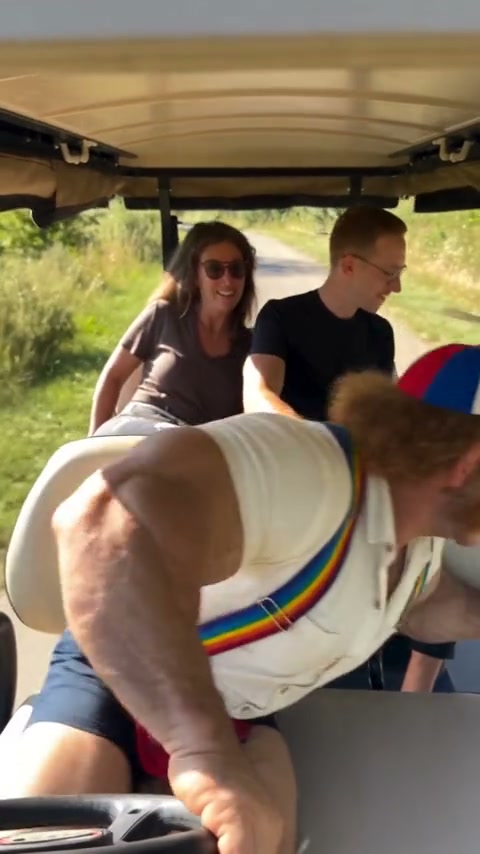
A community example of riders jolting in a golf cart

Leave the prepared scene in place

What stays is the cart, the other riders and the jolt. You do not clear those parts on request, and you do not move the scene somewhere else. The video and stills are frames from one community example. Your subject can look different. The rest of the frame is not a cast you replace one by one.

Leave the prepared scene in place

Play the full clip in every mode

The prepared reference is about 7 seconds, already inside the short-mode limit, so Economy, Standard and Original each play the full Golf Cart Fail AI. A lower-cost mode does not cut the ending. The reference has a soundtrack, and every prepared segment restores that track. You do not upload a song. The photo does not become a new voice.

Another frame from the same community example

What you control in Golf Cart Fail AI

Your photo guides the front-left driver. The reference keeps the other riders, cart and jolt.

The photos you add

There is one required photo and no optional slot. It is bound to the rider who starts in the front-left driver seat.

A scene you do not rewrite

The cart holds more than one person in the reference. This page does not offer a photo for every rider.

Reference audio, not a new voice

The reference has a soundtrack, and every prepared segment restores that track. You do not upload a song. The photo does not become a new voice.

Golf Cart Fail AI questions

The photos, the parts that stay, the modes and the sound.

What photo does Golf Cart Fail AI need?

One clear photo of the rider you want in the front-left driver seat. There is one required photo and no optional rider slot.

Can Golf Cart Fail AI clear the rest of the scene?

No. The cart, the other riders and the jolt stay. The cart holds more than one person in the reference. This page does not offer a photo for every rider. If you want a different prepared scene, use AI Convertible Drive Video.

How do the Golf Cart Fail AI modes differ?

The prepared reference is about 7 seconds, already inside the short-mode limit, so Economy, Standard and Original each play the full Golf Cart Fail AI. A lower-cost mode does not cut the ending.

Does Golf Cart Fail AI include sound?

The reference has a soundtrack, and every prepared segment restores that track. You do not upload a song. The photo does not become a new voice.

Can I type a prompt for Golf Cart Fail AI?

No. Golf Cart Fail AI keeps this scene and this timing. There is no prompt field for a different location or a cleared background. That page is a low-angle convertible selfie for one person. This page keeps the other golf-cart riders in place.

Will one rider match my photo in Golf Cart Fail AI?

A clear photo helps the model follow the front-left driver, but the jolt and overlapping riders can shift the body, hands, face or clothing. Check the role before downloading; the page does not promise a perfect match.

How is Golf Cart Fail AI different from AI Convertible Drive Video?

That page is a low-angle convertible selfie for one person. This page keeps the other golf-cart riders in place.

How much does Golf Cart Fail AI cost?

The generator shows a credit estimate for the mode and resolution you select. An account with enough credits is required. Plan details live on the Pricing page.

Where do I download my Golf Cart Fail AI?

My creations holds the finished clip. Play it, check one rider, and use the download control on that result.

Is the example on this page a finished Motion Transfer result?

No. The video and stills are frames from one community example. They are not a second case and they were not generated as a paid result on this site. Display and soundtrack rights for that example are unconfirmed. Upload photos you have permission to use.

Create your Golf Cart Fail AI

Add the photos, review the Golf Cart Fail AI estimate, and start from the generator.

Golf Cart Fail AI