
How to Make a BABYMONSTER DESERVE AI Video
This is a rainy-night music-video performance. One person stands in the rain in front of a car, looks down, looks up, and passes a hand through their hair while the camera moves closer.
Open BABYMONSTER DESERVE AI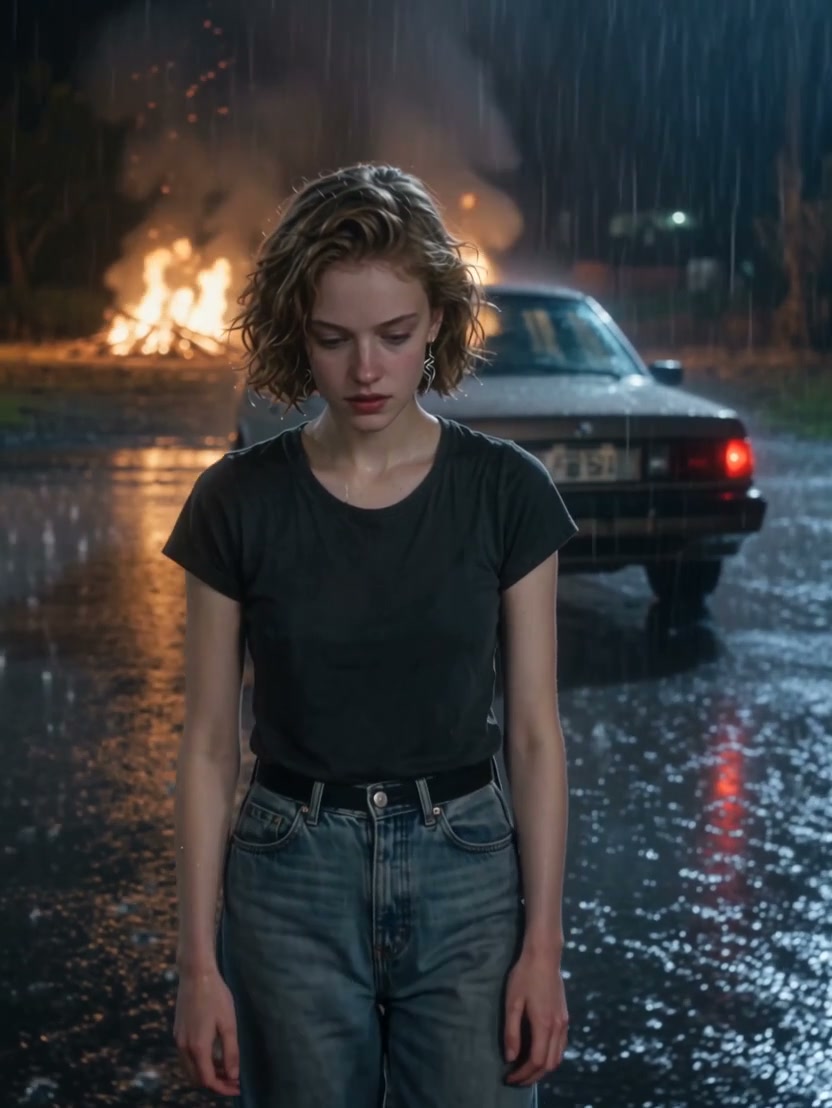
1. Prepare the reference video
Download the ten-second clip. It is 832 by 1108 and includes audio. The person has short wavy hair, a dark t-shirt and jeans. Firelight sits behind the car, and the wet ground reflects it. The action stays complete inside the ten seconds: eyes down, eyes up, hand through the hair, camera push-in. A second public clip shows a person in a beige coat in the same kind of scene. That coat clip is a different cast. This tutorial and its download follow the t-shirt performance only.
If the hand passes through the face, retry with a clearer photo before you add effects.
2. Prepare 1 character photo
Image 1 is the only person. The photo should show the hair that the hand will touch, the face, and the outfit you want in the rain. The reference supplies the weather, the car and the firelight, so the photo can be a normal standing picture.
| Upload | Role | What the photo should show |
|---|---|---|
| Image 1 | The only performer | One person, full hair and outfit, readable eyes. No second character. |
3. Choose a video generation model
You need video editing with one image reference, for about ten seconds, with a way to keep or replace audio. Kling 4.0 and Seedance 2.5 both document video reference, editing and audio. Because there is a single subject in one continuous shot, a single-person motion mode such as Kling 2.6 or Kling 3 Motion Control can also be a reasonable candidate. That choice does not extend to a two-person dance.
Check which controls the product you use actually exposes. Our video model guide by scene and budget compares those inputs.
4. Prepare the prompt
Upload the rainy clip as the video and the one photo as the person. Swap the @ tags for your editor’s asset names.
Edit @Video1 with @Image1 as the only person in the rain in front of the car. Use the photo’s complete hair, face, body, clothing and shoes. Keep the rainy-night performance continuous: the person looks down, raises their eyes, draws a hand through their hair, and the camera moves closer. Preserve the night rain, the car, the firelight behind it and the reflections on the wet ground. Do not add a second person, captions, or a cloned singing voice.
5. Generate the video and choose its sound
Keep a vertical frame and the ten-second length. If the editor forces whole seconds, use 10 and do not ask for an eleventh second that the action does not contain. The downloaded file was already trimmed to 10.0 seconds so the gesture finishes inside the clip.
To keep the reference audio, mute new sound and place the downloaded track under the picture, or use an original-audio restore control. Line up the eye lift and the hand through the hair, not only the first frame.
If you want new ambience instead, enable audio generation and describe rain and a low fire, as below. That new track is not a copy of the song and not a cloned vocal.
Audio: steady night rain, a low fire crackle, and distant outdoor room tone. No sung lyrics and no cloned voice.
Use the prepared BABYMONSTER DESERVE AI template
The BABYMONSTER DESERVE AI template uses this same ten-second performance, one photo slot, and reference-audio restore. Economy, Standard and Original all follow the full clip. You do not upload the video or paste this prompt there. Sign in and read the credit quote before generating.
Make my videoBefore you start
Which download matches this prompt?
The ten-second rainy clip of the person in the dark t-shirt. The beige-coat clip is a separate public example with a different cast.
Can I keep the car and the rain?
Yes. The car, the rain and the firelight stay with this reference. Use a different video if you want a different place.
Will the vocal be cloned from my photo?
No. Keep the reference audio or generate new ambience. A photo does not become a singing voice, and lip-sync to lyrics is not promised.
Or use the prepared template
One photo is enough. The rainy performance and the soundtrack are already attached.
Open BABYMONSTER DESERVE AI