Create a video

Your pet · Photo 1

Bad Times AI Pet Lip Sync Generator

Your pet has something to say. Upload one photo to join the Bad Times AI trend with dramatic lip sync, expressive paws, and the original reference soundtrack.

What is Bad Times AI?

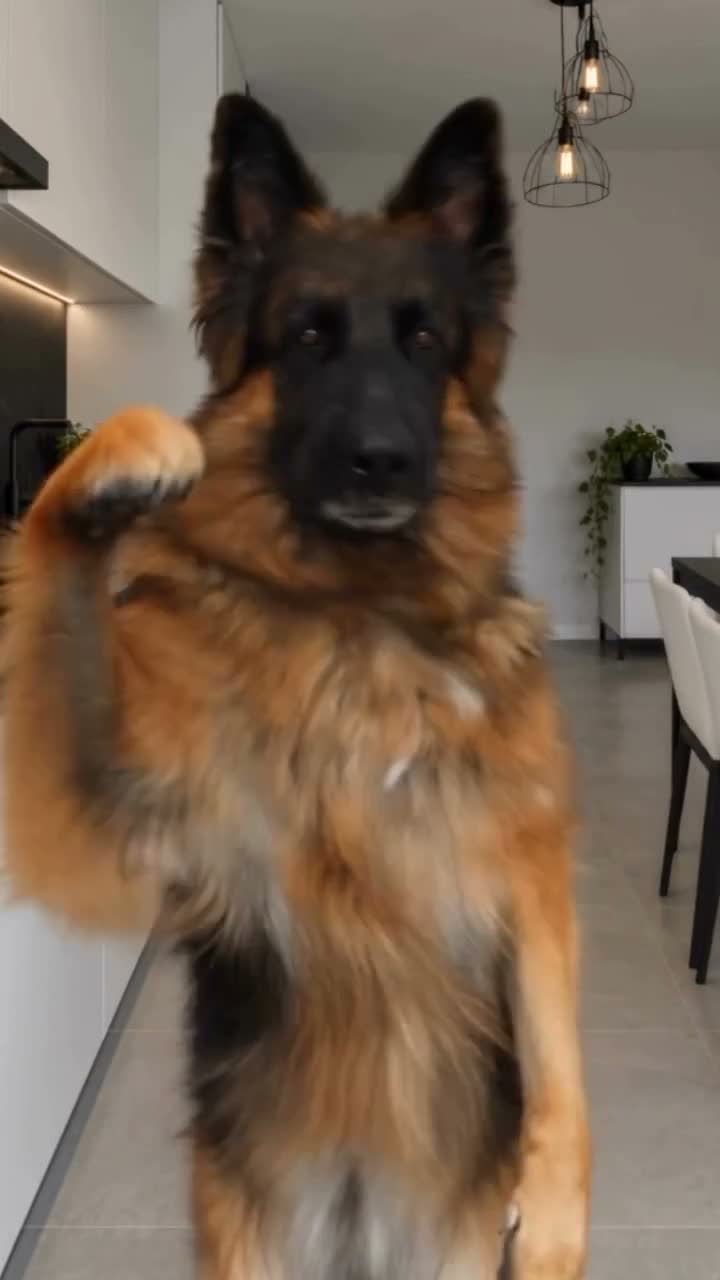
Bad Times AI turns one pet photo into an animated argument with the camera. The performer leans toward the lens, opens its mouth, raises its paws, and steps back before another reaction. Your photo supplies the complete pet; the loaded reference supplies the sequence. This Bad Times pet lip sync template keeps the kitchen setting and uses the original soundtrack after generation. Watch the reference above to hear the performance, then compare the cat and dog adaptations below.

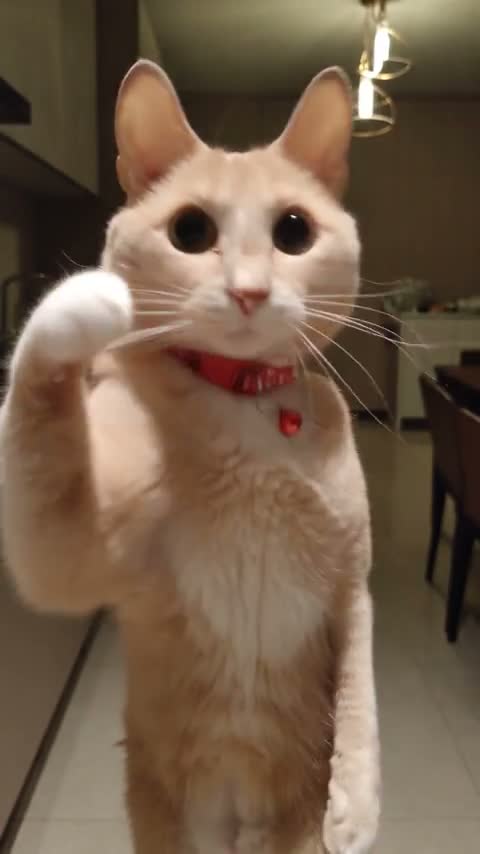
A cream cat with a red collar raising its paws in a Bad Times AI lip-sync adaptation

Make a Bad Times AI video in three steps

The performance is ready. Bring one photo of your pet.

  1. STEP 1

    Upload a pet photo

    Add one clear photo in Photo 1. Show the face and body where possible. Use Replace to select another image before generating.

  2. STEP 2

    Generate the performance

    Choose an available resolution, sign in when asked, and select Generate. The button shows the credit cost. Uploading a photo alone does not start a paid request.

  3. STEP 3

    Preview and download

    Open your Bad Times AI result in My creations. Watch the reactions with sound, then download the finished video using the action available for your account.

One Bad Times AI performance, different pets

Explore three pet adaptations before choosing your star. Your generation uses the original performance loaded in the reference player.

Make your dog the one doing the talking

The Bad Times dog AI look comes from your photo: muzzle shape, ears, coat markings, body proportions, and visible accessories. A small dog does not need to look like the shepherd in the reference. The brown-and-white example shows how a different face and chest pattern change the character while retaining the near-camera reactions. Choose a photo with one clearly visible pet so the template has a single appearance to follow throughout the clip.
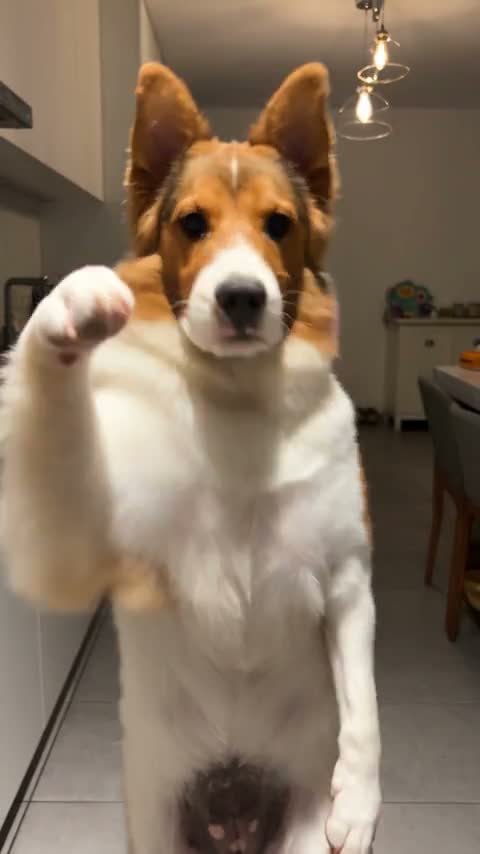
Make your dog the one doing the talking

Keep the attitude, paws, and personal details

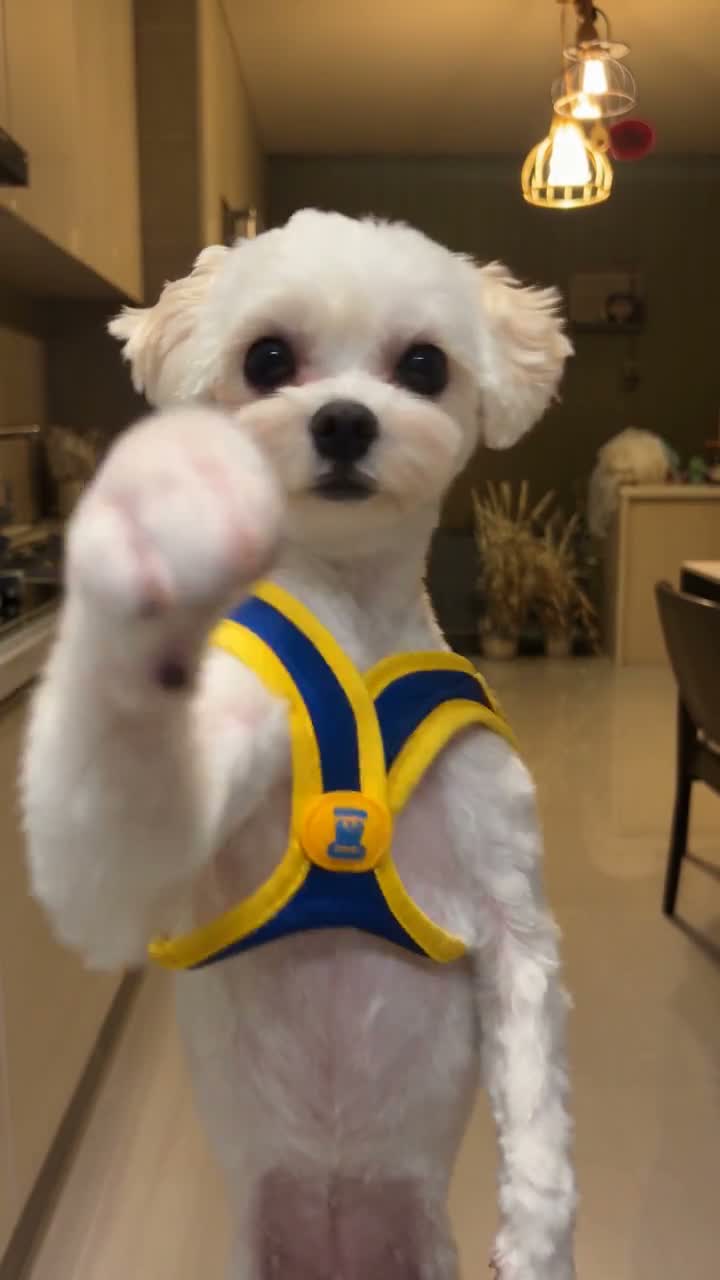
Bad Times AI follows more than mouth motion. Raised paws, sudden forward leans, and pauses make the pet seem to answer whoever is filming. A collar, harness, or outfit visible in your photo also guides the complete appearance, as the white-dog example illustrates. The instructions ask for pet-shaped paws and natural adaptation to the animal’s build. Fast gestures can still distort small details; check the moving result, especially where a paw crosses the muzzle.

Keep the attitude, paws, and personal details

A big reaction for your pet’s next post

Use Bad Times AI when a still photo cannot quite express your pet’s attitude. The fixed performance gives each version the same comic setup.

The pet with a complaint

Make a reaction clip for a late dinner, an interrupted nap, or an empty treat bag. Add your own caption afterward; this page does not generate caption text inside the video.

A character for the group chat

Turn a familiar pet into the star of a playful reply. Keep the joke clearly fictional and label the clip as AI-generated where appropriate.

Different looks, the same routine

Compare a collar photo with a favorite outfit photo while keeping the reference performance fixed. Each new generation uses credits; replaying a saved result does not.

What your Bad Times AI video includes

A single-pet performance with a fixed scene, expressive timing, and restored reference sound.

A 30-second vertical performance

Bad Times AI follows the supplied 9:16 kitchen clip. Its camera work and sequence determine framing and length. Choose a resolution without having to specify each gesture.

The original reference soundtrack

The model generates the edited video silently. The existing audio-restoration step adds the reference soundtrack afterward. Showcase videos play muted; use the reference player or your completed result to listen.

Bad Times AI credits and plans

Video generation uses credits based on the reference length and selected resolution. Use the cost on Generate for this clip; general plan examples may use other durations or models.

Starter

For your first ideas.

$8.3/month

$100.0 charged yearly

2,400 credits/year

Up to 400 images

GPT Image 2Nano Banana Pro

Up to 133 videos

Seedance 2.5Kling 3.0 Motion Control
  • Up to 4K images and HD videos, depending on the model
  • Image editing, video creation & motion transfer
  • Watermark-free image & video downloads
  • Generation history in your account
Popular40% OFFSave $238.8

Pro

For a steady creative flow.

$30.0/month$49.9/month

$360.0 charged yearly

21,600 credits/year

Up to 3,600 images

GPT Image 2Nano Banana Pro

Up to 1,200 videos

Seedance 2.5Kling 3.0 Motion Control
  • Up to 4K images and HD videos, depending on the model
  • Image editing, video creation & motion transfer
  • Watermark-free image & video downloads
  • Generation history in your account
  • Use credits across image and video models
Best Value50% OFFSave $599.8

Business

For more creations, more often.

$49.9/month$99.9/month

$599.0 charged yearly

48,000 credits/year

Up to 8,000 images

GPT Image 2Nano Banana Pro

Up to 2,666 videos

Seedance 2.5Kling 3.0 Motion Control
  • Up to 4K images and HD videos, depending on the model
  • Image editing, video creation & motion transfer
  • Watermark-free image & video downloads
  • Generation history in your account
  • Use credits across image and video models

Basic

$0

Try before you subscribe

  • 18 one-time signup credits
  • Generation history included
  • Watermarked previews & downloads
  • Up to 3 images or 1 video
  • Watermark-free downloads require payment

Prices in USD; taxes and total shown at checkout. Subscriptions renew automatically; cancel in Billing settings. Subscription credits expire each period; one-time credits never expire.

Refunds: request within 72 hours. Used purchased credits and applicable non-refundable processing costs (up to 6%) are deducted. Terms · Refund Policy

Bad Times AI questions

Photos, pet lip sync, original sound, and saving your video.

How many photos does Bad Times AI need?

Upload one photo of one pet. No second character, motion recording, or audio upload is needed. If several animals appear in your photo, choose an image that clearly isolates your intended performer.

Can I make a Bad Times dog AI video with any breed?

You can try your dog’s photo regardless of breed. The reference shows an upright shepherd, so a similar body shape gives the model a closer starting point. Short legs, long fur, a flat muzzle, or a very small build can affect how the performance transfers.

Does Bad Times pet lip sync work with cats?

Cats can be used as the appearance reference, and the cat adaptation on this page shows the intended style. The source still supplies upright gestures and camera-facing reactions. Your result may vary with the cat’s posture and face shape. Clear eyes, an unobstructed muzzle, and visible front paws give the model more useful appearance information.

What photo should I upload for Bad Times AI?

Choose a sharp, well-lit photo with one pet and a clear face. A standing or sitting three-quarter or full-body view helps establish proportions. Avoid heavy blur, a cropped muzzle, paws hidden behind objects, or another animal covering the subject. The photo provides the appearance; you do not need to photograph your pet arguing or standing like the reference.

Will my pet have human hands?

The Bad Times AI instructions specifically request furry pet paws and movement adapted to the animal’s anatomy. That guides generation without guaranteeing every frame. Look at raised paws, pointing gestures, and contact near the face. If fingers, extra limbs, or unstable paws appear, review another photo or generation before sharing; new attempts use credits.

Is the lip sync exact?

Bad Times AI uses the reference’s expressive mouth movements and timing as the guide. It is an AI recreation, so the mouth shape, teeth, muzzle, or synchronization can drift during fast reactions. Listen to the completed result and watch the close-ups together. A sharp photo helps describe the pet, but it cannot guarantee perfect syllable-by-syllable synchronization.

Does Bad Times AI include the original sound?

Yes. This template generates video without new model audio, then adds the soundtrack from the supplied reference. You do not need to attach music yourself. The marketing examples stay muted. To hear the source, use the reference player; to check your own soundtrack, open the completed clip in My creations. Audio-processing errors should be resolved through the available result action before sharing.

Can I change the song, words, or kitchen background?

This Bad Times AI page is a fixed performance. It follows the loaded reference’s scene, actions, and soundtrack; it does not provide a lyric editor, voice upload, or background selector. For a different permitted motion video, use the main Motion Transfer workspace and choose a compatible model. A different background in your pet photo does not select a new scene here.

How long is a Bad Times AI video?

The prepared reference is 30 seconds and vertical. The output follows that sequence rather than an independently selected duration or aspect ratio. Resolution changes pixel dimensions while preserving the portrait framing. If you want a shorter excerpt for a post, download the completed video and trim your chosen section afterward in your preferred editor.

Do I need to write a Bad Times AI prompt?

No. The page supplies the pet-replacement instructions and uses Seedance 2.5 Edit. Upload Photo 1 and choose an available resolution. The prompt asks for the pet’s complete appearance, expressive mouth movements, reactions, and furry paws. Existing saved drafts retain their inputs for review instead of silently overwriting your previous work.

Is Bad Times AI free to try?

Watching the examples is free. Generating a video requires sign-in and enough credits for the amount on Generate. A second attempt with the same photo uses credits again; replaying a saved result does not.

What should I check before sharing the result?

Watch the whole clip with sound. Check that the pet stays recognizable when it leans close to the camera, that fur markings and accessories remain coherent, and that paws do not merge with the muzzle. Use photos you have permission to edit, and confirm soundtrack and reference rights for your intended use. Download availability follows your account; public or commercial use also depends on the relevant rights and platform rules.

Give your pet a Bad Times AI moment

Choose one photo and let your pet take over the conversation.

A German shepherd raising its paws and reacting to the camera in a kitchen