Create a video

Defender · Photo 1
Ball-handler · Photo 2
Settings
Mode
Video length9s
Resolution

Middle Finger Dunk AI Video Generator

Choose both sides of the night-court showdown. Middle Finger Dunk AI uses two photos for the defender and ball-handler, keeping their full looks through the jump, shot and cheeky finish.

0:00 / —:—

What is Middle Finger Dunk AI?

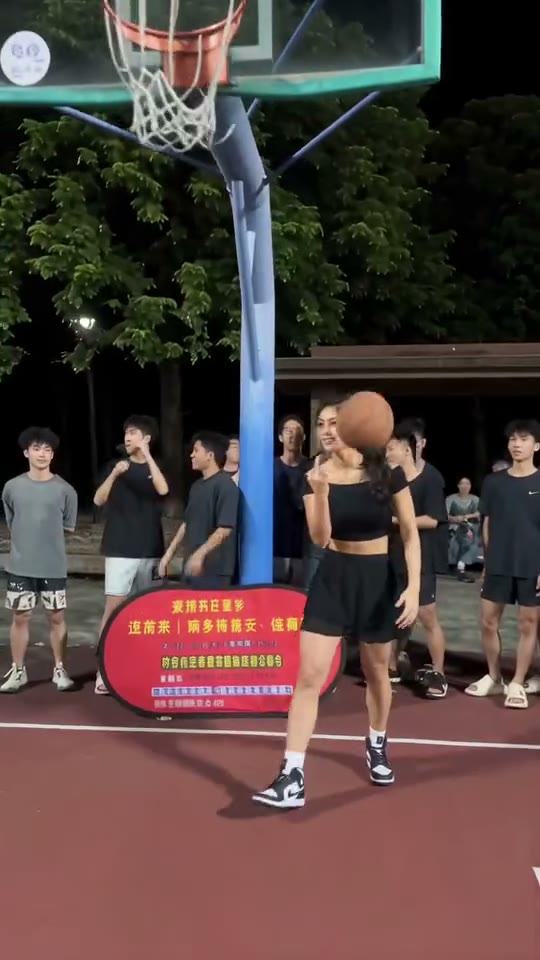
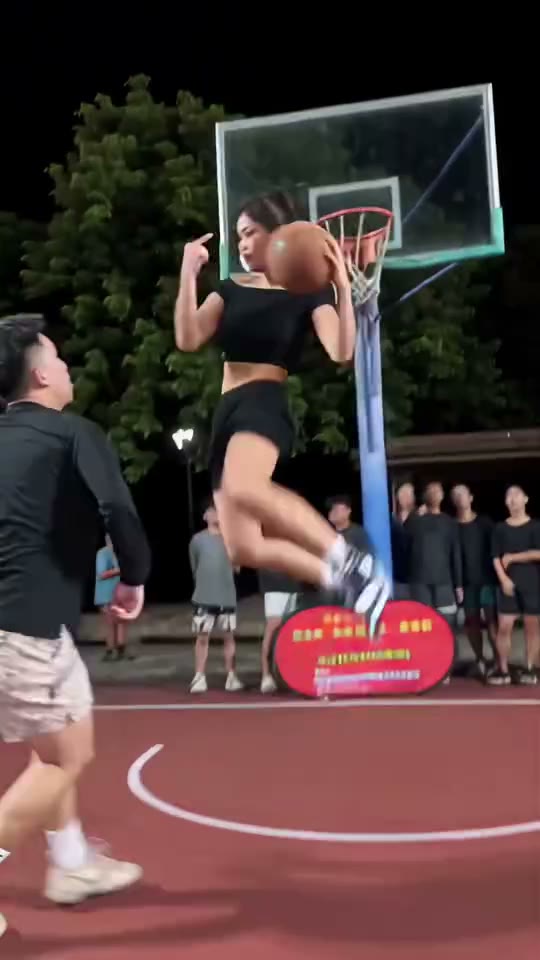
Middle Finger Dunk AI is a two-character basketball meme built around an exaggerated airborne taunt. The ball-handler crosses past a defender, lifts into a split-leg pose, raises a middle finger and sends the ball overhead toward the basket before landing. Despite the trend's name, the reference on this page uses an overhead shot rather than a conventional hand-to-rim dunk. Motion Transfer lets you cast both featured people: Photo 1 is the defender and Photo 2 is the ball-handler. Middle Finger Dunk AI uses each person's complete appearance and outfit, keeping the night court, spectators, ball and hoop from the prepared nine-second sequence. Both photos are required.

A ball-handler making an airborne taunting shot past a defender on a night court

How to create your Middle Finger Dunk AI video

The reference and instructions are ready. Choose your photos and review the quote before generating.

  1. STEP 1

    Choose your Middle Finger Dunk AI cast

    Upload Photo 1 for the defender and Photo 2 for the ball-handler. Use separate photos with distinct outfits, and keep bodies and shoes visible where possible.

  2. STEP 2

    Choose a mode and generate

    Choose a generation mode and an available resolution in Settings, then review the current credit quote. Sign in and submit when ready. Selecting photos alone does not start a paid job.

  3. STEP 3

    Preview your Middle Finger Dunk AI result

    Check both identities, the airborne hand gesture, the ball path and landing. Download the result once the matchup looks right.

See the Middle Finger Dunk AI sequence

The images below are moments from the prepared reference, showing the action and the role your photo will change.

Build the rivalry with two distinct characters

The joke works best when viewers can tell the two roles apart. Middle Finger Dunk AI gives each featured person a separate photo slot, so you can pair yourself with a consenting friend or two original characters. Photo 1 supplies the defender's look; Photo 2 supplies the attacking player's look. Different clothing colors can make the pairing readable even as the camera moves behind the defender. Middle Finger Dunk AI requests stable identities through the crossover and return to view. Keep each upload to one person so there is no ambiguity about who belongs in each role.
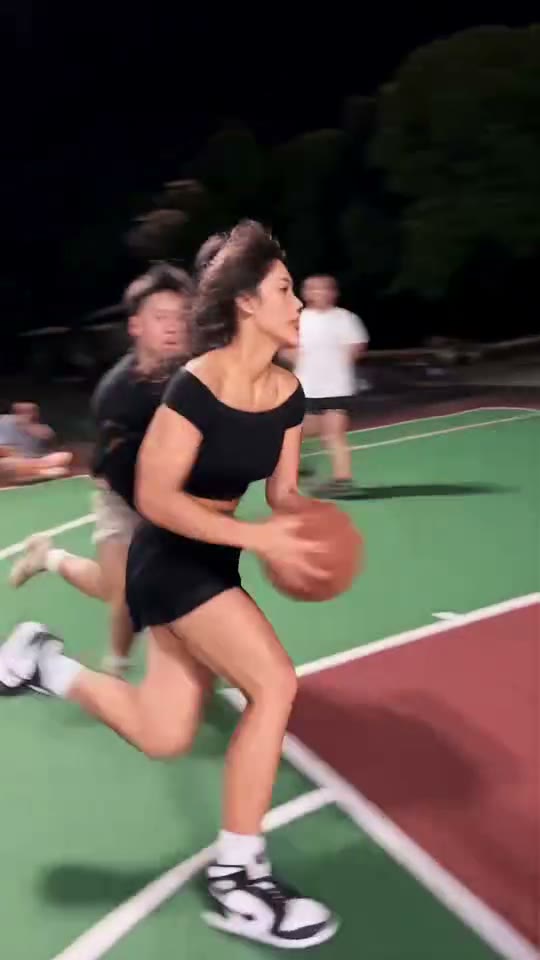
Build the rivalry with two distinct characters — frame from the prepared Middle Finger Dunk AI sequence

Keep the airborne gesture and shot together

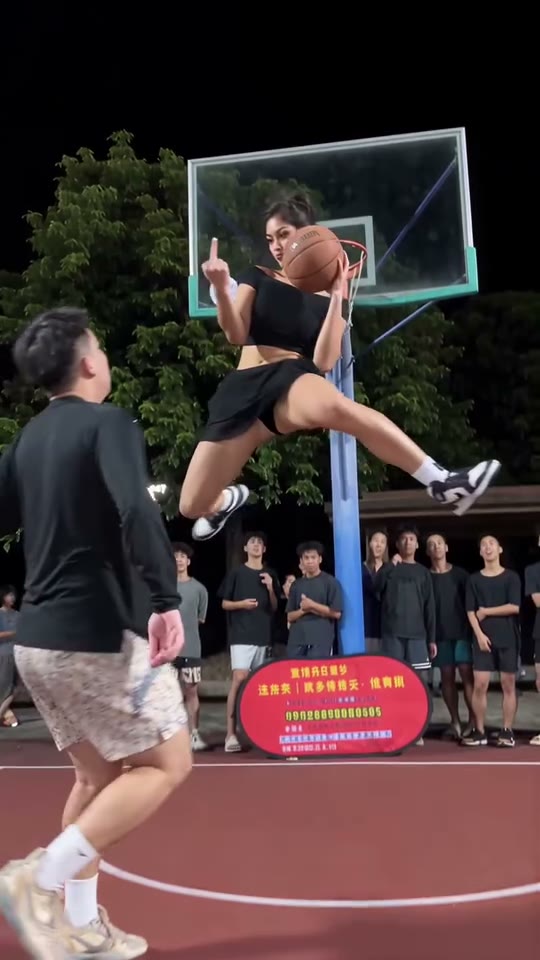
Middle Finger Dunk AI follows a specific sequence, with the approach setting up the improbable jump and the final gesture completing the joke. You do not need to stage a basketball move or perform a stunt. The prepared clip supplies the timing, the court and the spectator setting. Middle Finger Dunk AI includes the rude hand gesture shown in the preview; choose a different template if that does not suit your audience. The instructions preserve the action order, while actual AI results may vary in the finger pose, ball release or landing.

Keep the airborne gesture and shot together — frame from the prepared Middle Finger Dunk AI sequence

Make a playful matchup without a court shoot

Use Middle Finger Dunk AI for a consensual friend-versus-friend joke, a fictional rivalry or a group-chat challenge. Everyday outfits can make the contrast with the impossible move more surprising than matching sports kits. The reference already supplies the setting and audio, so the two people do not need to be photographed together. Middle Finger Dunk AI does not create a real match record or guarantee an accurate score sequence. Review the result and add your own context after downloading, especially if the gesture could be misunderstood outside your intended group.

Make a playful matchup without a court shoot — frame from the prepared Middle Finger Dunk AI sequence

What you choose in Middle Finger Dunk AI

Your photos define the characters. The prepared reference supplies the action and setting.

Two required photos

Middle Finger Dunk AI needs a defender in Photo 1 and a ball-handler in Photo 2. Each image defines that person's full look and clothing. Neither role is optional.

Fixed court and choreography

The night court, crowd, hoop and exaggerated shot follow the reference. Middle Finger Dunk AI has no court, team-logo or gesture selector.

Same source across modes

The complete reference is nine seconds, so Economy, Standard and Original all receive the same prepared sequence. Middle Finger Dunk AI adds its reference audio to the result.

Middle Finger Dunk AI credits and plans

Generation requires an account and sufficient credits. Use the quote on Generate for your chosen mode and resolution; general plan examples below can use different models and lengths.

Starter

For your first ideas.

$8.3/month

$100.0 charged yearly

2,400 credits/year

Up to 400 images

GPT Image 2Nano Banana Pro

Up to 133 videos

Seedance 2.5Kling 3.0 Motion Control
  • Up to 4K images and HD videos, depending on the model
  • Image editing, video creation & motion transfer
  • Watermark-free image & video downloads
  • Generation history in your account
Popular40% OFFSave $238.8

Pro

For a steady creative flow.

$30.0/month$49.9/month

$360.0 charged yearly

21,600 credits/year

Up to 3,600 images

GPT Image 2Nano Banana Pro

Up to 1,200 videos

Seedance 2.5Kling 3.0 Motion Control
  • Up to 4K images and HD videos, depending on the model
  • Image editing, video creation & motion transfer
  • Watermark-free image & video downloads
  • Generation history in your account
  • Use credits across image and video models
Best Value50% OFFSave $599.8

Business

For more creations, more often.

$49.9/month$99.9/month

$599.0 charged yearly

48,000 credits/year

Up to 8,000 images

GPT Image 2Nano Banana Pro

Up to 2,666 videos

Seedance 2.5Kling 3.0 Motion Control
  • Up to 4K images and HD videos, depending on the model
  • Image editing, video creation & motion transfer
  • Watermark-free image & video downloads
  • Generation history in your account
  • Use credits across image and video models

Basic

$0

Try before you subscribe

  • 18 one-time signup credits
  • Generation history included
  • Watermarked previews & downloads
  • Up to 3 images or 1 video
  • Watermark-free downloads require payment

Prices in USD; taxes and total shown at checkout. Subscriptions renew automatically; cancel in Billing settings. Subscription credits expire each period; one-time credits never expire.

Refunds: request within 72 hours. Used purchased credits and applicable non-refundable processing costs (up to 6%) are deducted. Terms · Refund Policy

Middle Finger Dunk AI questions

Inputs, the prepared sequence, generation settings and your finished result.

How do I use Middle Finger Dunk AI?

Upload the defender first and ball-handler second. Choose a mode and resolution, review the credits and submit. Middle Finger Dunk AI supplies the reference. Preview and download the completed video in My creations.

Which Middle Finger Dunk AI photo is the attacker?

Photo 2 is the ball-handler who jumps, shoots and makes the gesture. Photo 1 is the defender. Middle Finger Dunk AI keeps these assignments through camera changes; reversing uploads reverses the casting.

Can I use only one photo for Middle Finger Dunk AI?

Both roles require photos. For one-photo basketball, choose AI Basketball Dunk, which changes a single arena player and has different choreography without the taunt.

What images work best for Middle Finger Dunk AI?

Use sharp individual photos that show each person's hair, build, clothes and shoes. A full-body view is useful because the attacker makes a wide airborne pose and the defender turns relative to the camera. Avoid two-person collages or objects hiding limbs. Contrasting outfits help you check that Middle Finger Dunk AI keeps the roles distinct.

Does Middle Finger Dunk AI actually show a dunk?

This reference shows an exaggerated airborne overhead shot, a split-leg pose and a middle-finger taunt. The page keeps the meme name. For a conventional rim finish, choose AI Basketball Dunk.

Can Middle Finger Dunk AI remove the rude gesture?

The gesture is part of the prepared sequence and has no removal switch. Choose another template when your audience needs a different tone. Changing photos preserves the choreography.

Will Middle Finger Dunk AI preserve both outfits?

The instructions request each reference person's full appearance and clothing throughout, without swapping roles or adding players. Strong motion and overlapping bodies can still change small details. Check both people at the start, during the jump and after the landing. Middle Finger Dunk AI cannot guarantee perfect identity or wardrobe continuity on every attempt.

Can I change the Middle Finger Dunk AI duration or court?

The nine-second sequence keeps the same court and action in every mode. Choose a mode and resolution for the displayed quote. For an unrelated reference or scene, use the main Motion Transfer workspace.

Does Middle Finger Dunk AI include sound?

The result includes the prepared reference audio. Listen using the preview sound control. There is no music selector or voice recreation; edit the downloaded soundtrack separately if needed.

What does Middle Finger Dunk AI cost?

The current quote is shown on Generate after you choose a mode and resolution. Submission requires an account and sufficient credits. Each new Middle Finger Dunk AI generation is a separate job. Replay and download the completed result from My creations without starting a new generation; inspect the ball and hands before sharing.

Create your Middle Finger Dunk AI video

Choose your photos and bring your idea into the prepared sequence.

A ball-handler making an airborne taunting shot past a defender on a night court