
Create a video

Celebrating player · Photo 1

Enzo Celebration AI Video Generator

Put yourself in the celebration. Enzo Celebration AI turns one person photo into the hands-to-ears football performance, followed by the raised-arm finish, with your full appearance and outfit and the reference sound.

0:00 / —:—

What is Enzo Celebration AI?

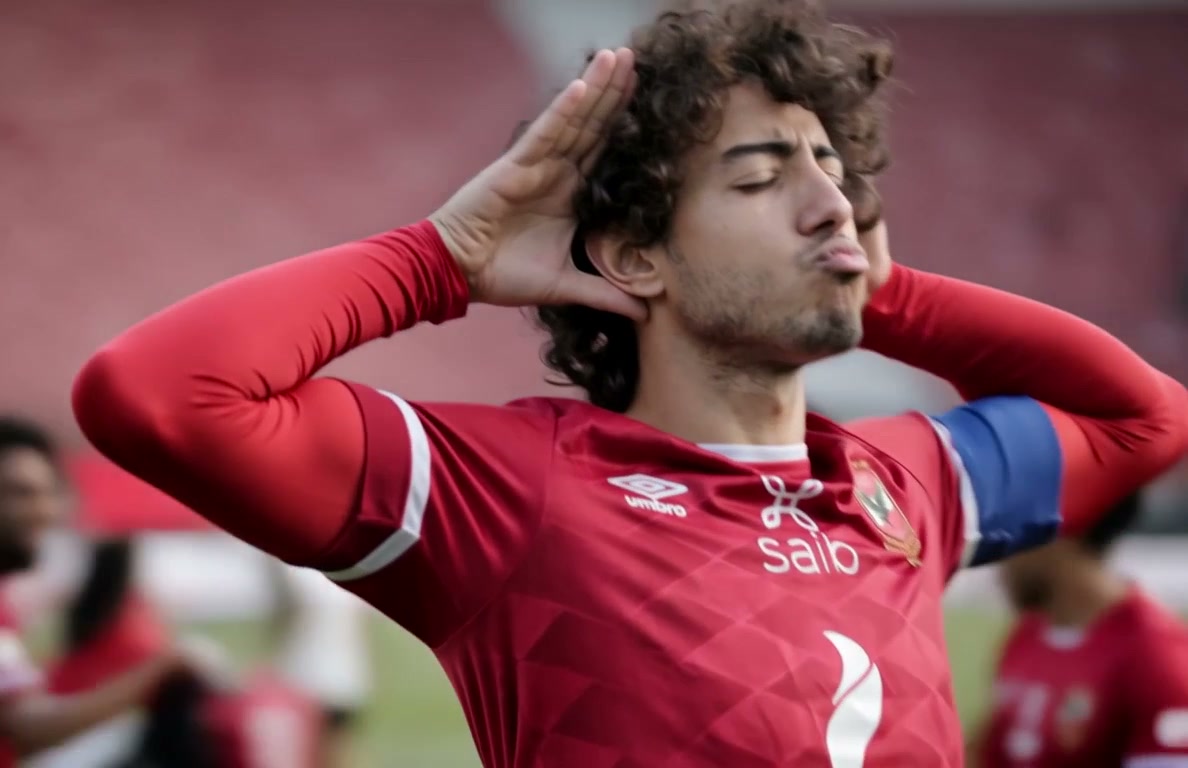
Enzo Celebration AI is a short football celebration in which the central player brings both hands beside their ears, turns with the tracking camera and lifts their arms. On Motion Transfer, you upload one person photo to replace that player's complete appearance, including their hair, body and outfit. Teammates remain around the lead while the pitch and stadium provide the setting. Enzo Celebration AI produces a roughly seven-second landscape video following the prepared performance and its original audio. The photo chooses who celebrates; the reference supplies the sequence.

A football player celebrating with hands beside his ears before lifting both arms, with teammates behind him

How to make an Enzo Celebration AI video

Choose the player, review the prepared motion and generate.

  1. STEP 1

    Choose your Enzo Celebration AI player

    Upload one clear photo showing the person's face, hair and clothing. Use an image you have permission to use.

  2. STEP 2

    Generate your Enzo Celebration AI clip

    Preview the reference, select a resolution in Settings, check the displayed credits and sign in to submit.

  3. STEP 3

    Review your Enzo Celebration AI result

    Open the completed video in My creations. Check the player, hands and sound, then download the result.

The celebration sequence

Preview the hands-to-ears gesture, camera movement and raised-arm finish.

Make the Enzo Celebration AI moment your own

Give a football celebration a personal lead without arranging a match or filming yourself on a pitch. Enzo Celebration AI uses the whole person in your photo, so the result can carry your usual look or a team outfit you deliberately choose. The central role stays clear even when teammates enter behind the performer. Use Enzo Celebration AI for a personal win, a friendly challenge or a congratulatory message where seeing the chosen person celebrate is the point.
Make the Enzo Celebration AI moment your own

Keep the gesture and the finishing beat

The appeal comes from the sequence: hands beside the ears, the turn toward the camera, then the arms going up. Enzo Celebration AI follows that prepared movement and tracking shot, saving you from recording a matching performance yourself. The change in framing gives the short clip a beginning and a finish. Preview the reference to decide whether this confident, playful delivery suits your message. Enzo Celebration AI keeps this particular celebration rather than offering a list of different football moves.

Keep the gesture and the finishing beat

Create an Enzo Celebration AI victory reply

Turn a game-night result, a team milestone or a small personal achievement into a compact celebratory reply. Enzo Celebration AI keeps the football setting and reference sound, so the moment has context even before you add a caption in your usual editor. The landscape framing leaves room for the player and the teammates behind them. An Enzo Celebration AI clip works as a short standalone reaction or as the closing beat of a longer edit; review the finished video before sharing it.

Create an Enzo Celebration AI victory reply

Is Enzo Celebration AI right for your idea?

Choose the prepared football performance when its gesture and setting fit your message.

One photo, one celebrating player

Enzo Celebration AI assigns your photo to the central player. Teammates provide the surrounding reaction and are kept from the reference; you do not upload a photo for every person on the pitch.

Your appearance, the prepared movement

The image defines the player's complete appearance and clothing. Enzo Celebration AI follows the reference motion and camera path, with no separate jersey, stadium or gesture selector.

A short clip with sound

The landscape reference runs about seven seconds and includes audio. Enzo Celebration AI offers available output resolutions while the duration and framing follow the supplied performance.

Enzo Celebration AI credits and plans

An account and enough credits are required. Check the Generate quote for this reference and resolution; plan examples may use other models or shorter clips.

Starter

For your first ideas.

$8.3/month

$100.0 charged yearly

2,400 credits/year

Up to 400 images

GPT Image 2Nano Banana Pro

Up to 133 videos

Seedance 2.5Kling 3.0 Motion Control
  • Up to 4K images and HD videos, depending on the model
  • Image editing, video creation & motion transfer
  • Watermark-free image & video downloads
  • Generation history in your account
Popular40% OFFSave $238.8

Pro

For a steady creative flow.

$30.0/month$49.9/month

$360.0 charged yearly

21,600 credits/year

Up to 3,600 images

GPT Image 2Nano Banana Pro

Up to 1,200 videos

Seedance 2.5Kling 3.0 Motion Control
  • Up to 4K images and HD videos, depending on the model
  • Image editing, video creation & motion transfer
  • Watermark-free image & video downloads
  • Generation history in your account
  • Use credits across image and video models
Best Value50% OFFSave $599.8

Business

For more creations, more often.

$49.9/month$99.9/month

$599.0 charged yearly

48,000 credits/year

Up to 8,000 images

GPT Image 2Nano Banana Pro

Up to 2,666 videos

Seedance 2.5Kling 3.0 Motion Control
  • Up to 4K images and HD videos, depending on the model
  • Image editing, video creation & motion transfer
  • Watermark-free image & video downloads
  • Generation history in your account
  • Use credits across image and video models

Basic

$0

Try before you subscribe

  • 18 one-time signup credits
  • Generation history included
  • Watermarked previews & downloads
  • Up to 3 images or 1 video
  • Watermark-free downloads require payment

Prices in USD; taxes and total shown at checkout. Subscriptions renew automatically; cancel in Billing settings. Subscription credits expire each period; one-time credits never expire.

Refunds: request within 72 hours. Used purchased credits and applicable non-refundable processing costs (up to 6%) are deducted. Terms · Refund Policy

Enzo Celebration AI questions

Photos, player roles, sound and your finished clip.

What photo should I upload to Enzo Celebration AI?

Choose one sharp person photo with an unobstructed face, visible hair and enough clothing to establish the outfit. A wider portrait supplies more body information as the shot opens out. Enzo Celebration AI accepts one role photo, so avoid group pictures, collages and hands covering the face.

Does Enzo Celebration AI change the whole outfit?

Yes. Your photo supplies the chosen player's complete appearance and clothing, rather than requiring the reference's red shirt. Logos, jewelry and fine fabric details may vary during generation. Select a photo that already shows the look you want; there is no separate clothing upload on this page.

Can Enzo Celebration AI replace the teammates too?

The single photo maps only to the central celebrating player. Other players stay in the reference scene, including the people moving behind the lead. If you need a different group performance, choose a template with separate role inputs or use your own permitted reference on the Motion Transfer homepage.

Can I choose another stadium in Enzo Celebration AI?

The stadium, pitch, lighting and tracking camera come from the prepared reference. The page has no background or venue selector. Choose this version for its shown football setting, and preview the whole sequence before generating so the surrounding scene fits your intended message.

Does Enzo Celebration AI generate a new crowd chant?

The result uses the reference audio. Your photo does not generate a voice, and the page has no lyrics, chant or voice-cloning input. Turn on the reference preview sound to hear the supplied track. If you later add your own soundtrack, check that you have the rights to use it.

How long is an Enzo Celebration AI video?

The supplied performance is about seven seconds in landscape framing. Resolution is selectable in Settings; duration and aspect ratio follow the reference. Increasing resolution changes the requested output size, but it does not add new shots, extend the celebration or guarantee sharper facial details.

Is Enzo Celebration AI free to generate?

Generation requires signing in and having sufficient credits. The workspace shows the quote for your selected resolution before submission. Use that quote to decide whether to proceed; the pricing section's example output counts may refer to a different model or reference duration.

What should I check in an Enzo Celebration AI result?

Watch the hands beside the ears, the head turns and the lifted-arm finish. Check that the same person and outfit continue through the moving shot and that teammates remain separate from the lead. Hair edges, fingers and small logos can vary; a clear source photo helps establish the intended appearance without guaranteeing a perfect result.

Can I share my Enzo Celebration AI clip?

Download the completed result from My creations and use it for a permitted personal or team message. Obtain permission for the person's photo and check the reference footage and audio rights. Make the AI nature clear where viewers might otherwise treat the clip as a real match recording or endorsement.

Create your Enzo Celebration AI video

Choose the person for your next victory reply.

A football player celebrating with hands beside his ears before lifting both arms, with teammates behind him