
Car Exit Salute AI Video Generator
Step out of the red sports car and greet the camera. Car Exit Salute AI uses one photo for your complete look and outfit, following the short exit and salute with sound included.
0:00 / —:—
Car Exit Salute AI video ideas
Explore community remixes of this performance. Open a video for a closer look.
What is Car Exit Salute AI?
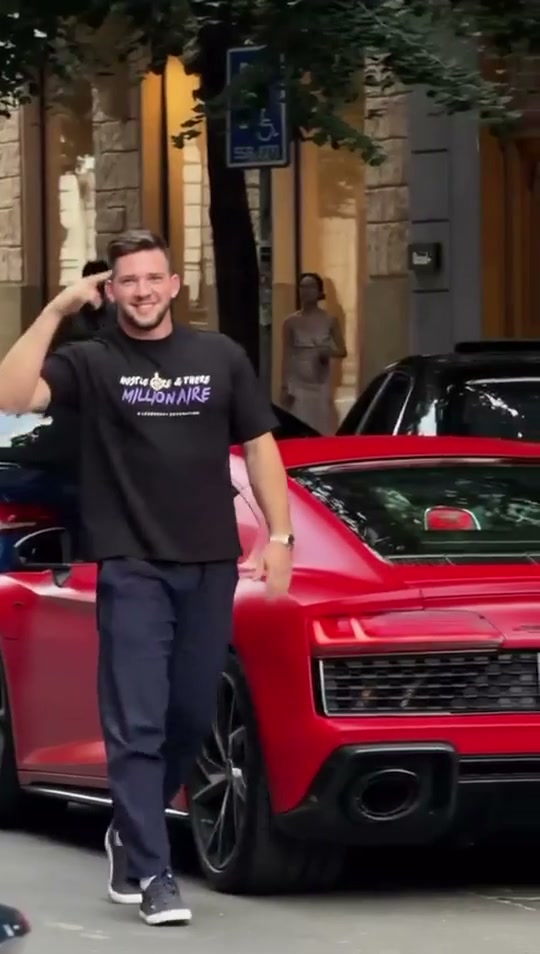
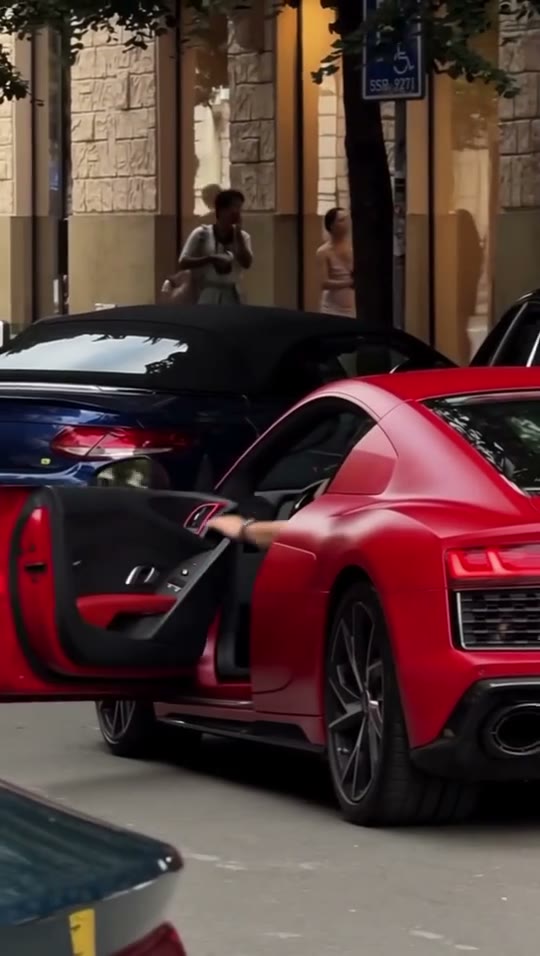
Car Exit Salute AI puts the person from your photo into a brief street-side arrival: they rise from the driver’s seat of a red sports car, step beside the open door, give one salute and walk forward. On Motion Transfer, your image defines the driver’s face, hair, body, clothing and shoes. The car, parked vehicles, pedestrians and building remain part of the reference. This Car Exit Salute AI template follows the shown roughly five-second portrait shot and includes its audio. It focuses on the driver’s entrance and greeting; there is no racing sequence or vehicle transformation.
How to make a Car Exit Salute AI video
One photo, a prepared shot and a quote to check before generating.
STEP 1
Cast your Car Exit Salute AI driver
Upload one clear person photo with face, outfit and shoes visible. A full-body view helps define the appearance beyond the close-up.
STEP 2
Generate your Car Exit Salute AI clip
Select an available resolution in Settings, check the displayed credits and sign in to submit. Uploading the photo alone does not start a paid job.
STEP 3
Review the exit and greeting
Open your Car Exit Salute AI result in My creations. Check the step out, hand gesture and outfit with sound, then download.
Your character in the red-car arrival
Preview the quick exit, walk and salute with a different full look. This community remix was not generated on Motion Transfer; your result will vary.
Give Car Exit Salute AI your own arrival style
A familiar face and outfit make the entrance yours. Car Exit Salute AI uses your full appearance, letting casual clothes, a jacket or a recognizable pair of shoes carry through the step out of the seat. Choose a clear photo of yourself or someone whose image you have permission to use. You do not need a picture inside a car. Car Exit Salute AI supplies the arrival scene while your photo casts the driver.
Keep the quick exit and single greeting
The appeal is a compact sequence: the door opens, the driver plants their feet, stands and raises one hand in a salute. Car Exit Salute AI follows these movements and their timing, so the greeting comes after the person is clear of the seat. The existing reference provides the car interaction without a filmed performance from you. Car Exit Salute AI works best when this exact quick entrance fits your idea; preview the hand gesture before generating.
Use Car Exit Salute AI as a short personal intro
Make a playful arrival message, a reaction to joining friends or a compact opening for a social post. Car Exit Salute AI keeps the red car and street in view, with the performer approaching the camera after the greeting. The short portrait format gives the scene an immediate payoff, with sound included. Watch your Car Exit Salute AI result before downloading and choose a caption that clearly presents it as an AI-created performance.
Is Car Exit Salute AI the arrival you want?
Choose this template for the shown red-car exit and one salute.
One driver photo
Car Exit Salute AI replaces the driver’s full look and clothing. It does not offer separate passenger, pedestrian, vehicle or background images.
The original car and street
Car Exit Salute AI retains the red sports car, open door and street setting. Your photo changes the person; a car model, paint color or location selector is not included.
A brief portrait shot
Car Exit Salute AI follows about five seconds of action and includes sound. Output resolution is selectable; the reference is low resolution and a larger output does not guarantee new detail.
Car Exit Salute AI credits and plans
A generation requires an account and sufficient credits. Check the Generate quote for the selected resolution; the plan examples below may describe other models or lengths.
Starter
For your first ideas.
$8.3/month
$100.0 charged yearly
2,400 credits/year
Up to 400 images
GPT Image 2Nano Banana Pro
Up to 133 videos
Seedance 2.5Kling 3.0 Motion Control
- Up to 4K images and HD videos, depending on the model
- Image editing, video creation & motion transfer
- Watermark-free image & video downloads
- Generation history in your account
Popular40% OFFSave $238.8
Pro
For a steady creative flow.
$30.0/month$49.9/month
$360.0 charged yearly
21,600 credits/year
Up to 3,600 images
GPT Image 2Nano Banana Pro
Up to 1,200 videos
Seedance 2.5Kling 3.0 Motion Control
- Up to 4K images and HD videos, depending on the model
- Image editing, video creation & motion transfer
- Watermark-free image & video downloads
- Generation history in your account
- Use credits across image and video models
Best Value50% OFFSave $599.8
Business
For more creations, more often.
$49.9/month$99.9/month
$599.0 charged yearly
48,000 credits/year
Up to 8,000 images
GPT Image 2Nano Banana Pro
Up to 2,666 videos
Seedance 2.5Kling 3.0 Motion Control
- Up to 4K images and HD videos, depending on the model
- Image editing, video creation & motion transfer
- Watermark-free image & video downloads
- Generation history in your account
- Use credits across image and video models
Basic
$0Try before you subscribe
- 18 one-time signup credits
- Generation history included
- Watermarked previews & downloads
- Up to 3 images or 1 video
- Watermark-free downloads require payment
Prices in USD; taxes and total shown at checkout. Subscriptions renew automatically; cancel in Billing settings. Subscription credits expire each period; one-time credits never expire.
Refunds: request within 72 hours. Used purchased credits and applicable non-refundable processing costs (up to 6%) are deducted. Terms · Refund Policy
Car Exit Salute AI questions
Preparing the driver and checking the arrival.
What photo works for Car Exit Salute AI?
Use one clear photo of one person, ideally with their full body, clothing and shoes visible. Keep the face well lit and limbs separate. A tight selfie leaves lower-body details unspecified.
Will Car Exit Salute AI use my own clothes?
Yes. The photo supplies the complete person and outfit, including footwear. The source driver’s dark shirt is not required. Fine logos, patterns or partly hidden clothes may change during generation.
How many salutes does Car Exit Salute AI create?
The reference contains one brief salute after the driver gets out, followed by a forward walk. The fixed instructions request that same gesture and timing without an extra salute. AI output still needs review.
Can I choose another car in Car Exit Salute AI?
This page keeps the red sports car and its door interaction. There is no vehicle upload or model selector. For another car or scene, use a different trend or your own permitted motion video on the Motion Transfer homepage.
Does Car Exit Salute AI include sound?
Yes, the result includes the reference audio. Turn on sound if the preview is muted. The page does not offer a separate music picker or audio upload.
Can Car Exit Salute AI make a longer or landscape clip?
The template follows the roughly five-second portrait reference. Resolution is selectable, but duration and framing are fixed. Cropping afterward may remove the car, feet or saluting hand, so review the composition first.
What should I check in my Car Exit Salute AI result?
Check the person’s scale against the car, the feet meeting the pavement, and the legs clearing the seat and door. Watch the saluting hand and appearance through the head turns. Tight car interactions and fingers can vary in AI output.
Is Car Exit Salute AI free to preview?
You can watch the reference before generating. Making your own video requires an account and enough credits for the displayed quote. Each new generation is a separate job; watching a saved result does not generate another video.
Can I share my Car Exit Salute AI video?
Download the completed result and check your photo, footage and soundtrack permissions for the intended use. The car and people shown do not imply endorsement. Clearly identify generated footage when the clip could be mistaken for a real event.
Create your Car Exit Salute AI video
Choose your photo and make a quick entrance.