
Jean Phil Dance AI Video Generator
Jean Phil Dance AI brings your full look and outfit into a white-room solo from one photo. Follow the quick hops, backward kicks and turns, with sound included.
0:00 / —:—
Jean Phil Dance AI video ideas
Explore community remixes of this performance. Open a video for a closer look.
What is Jean Phil Dance AI?
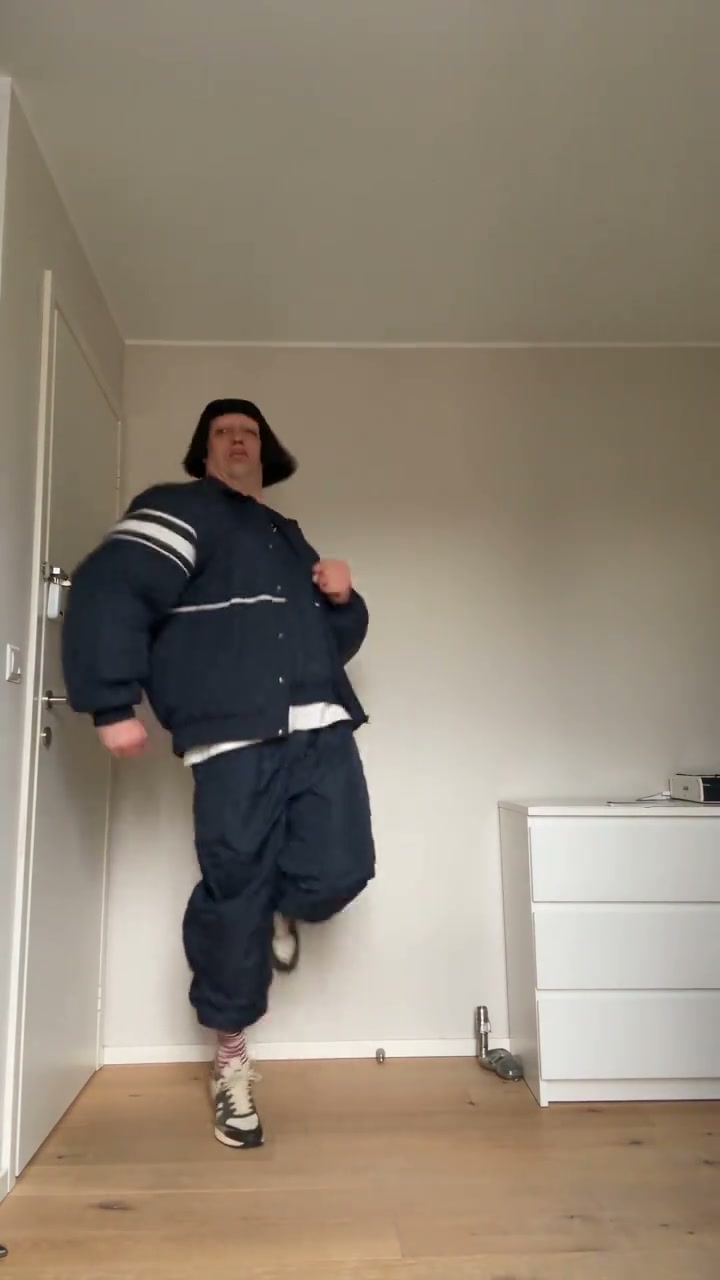
Jean Phil Dance AI turns a still photo into the white-room solo dance: quick hops, backward kicks, changes of direction and playful arm gestures in a fixed vertical shot. On Motion Transfer, you upload one person’s photo and the prepared clip supplies the performance. Your photo defines the dancer’s complete appearance, hair, clothing and shoes. The result follows the roughly eleven-second reference and includes its sound. The Jean Phil name appears on several different dance formats; this page specifically uses the solo shown here, with the wooden floor and white dresser. Watch it before choosing your photo to check that it is the routine you want.
How to create a Jean Phil Dance AI video
The reference is ready. Start with one photo and review the quote before generating.
STEP 1
Choose your Jean Phil Dance AI dancer
Upload one sharp image of one person. Include their hair, body, clothing and shoes when possible. A clear pose with separated arms and legs gives more detail than a tightly cropped selfie.
STEP 2
Generate your Jean Phil Dance AI video
Open Settings to choose an available resolution, check the displayed credits and sign in to submit. The white-room reference and motion instructions are already prepared; selecting a photo alone does not start a paid job.
STEP 3
Review and download your dance
Open your Jean Phil Dance AI result in My creations. Watch the hops and turns with sound, check the appearance throughout, then download the completed video for the use you have in mind.
Your photo in the white-room routine
See how a different look follows the same white-room routine. This community remix illustrates the movement; it was not generated on Motion Transfer, and your result will vary.
Make Jean Phil Dance AI look like your own performance
Jean Phil Dance AI uses your photo for the entire dancer, so a recognizable jacket, hairstyle or pair of shoes can become part of the joke. A clear full-body image provides details as the dancer shifts weight and lifts each foot. Pick yourself or someone whose image you have permission to use. Jean Phil Dance AI puts that everyday look into an unexpectedly energetic performance, without needing a photo taken in the same room.
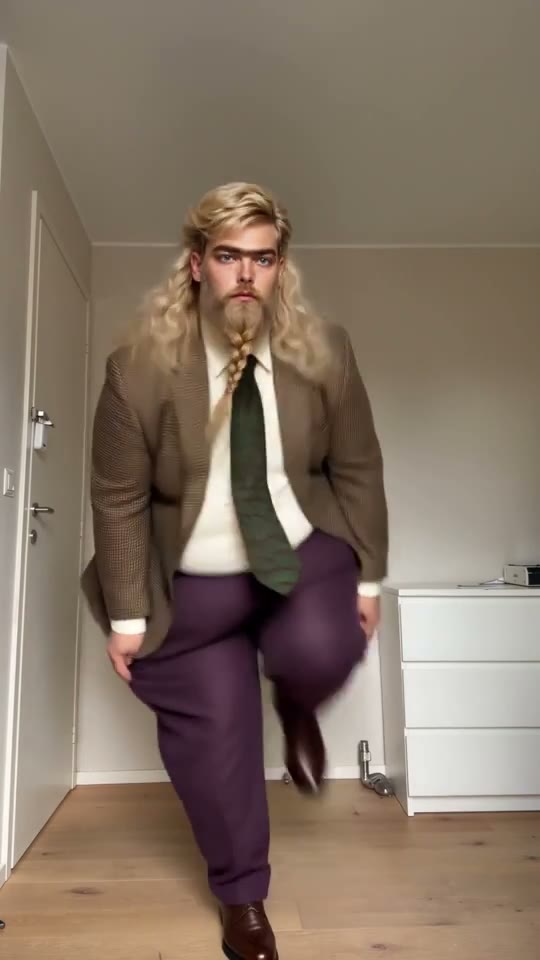
Join the quick-hop routine without filming a dance
Jean Phil Dance AI pairs a simple room with constant movement: the dancer bounces backward, raises a fist, opens both arms and turns sideways into backward kicks. The prepared performance supplies those beats without rehearsals or recording takes. Jean Phil Dance AI keeps one continuous vertical view, letting viewers follow the whole body. Watch the reference before generating; choose another template if you want a duet or a different routine.
Get a Jean Phil Dance AI clip ready to preview with sound
Use Jean Phil Dance AI for a personal reaction, a playful message to friends or an AI dance post. The portrait clip includes audio and ends while the dancer is moving, without a designed seamless loop. Preview your Jean Phil Dance AI result with sound before downloading, then choose a caption that makes its AI nature clear when sharing.
Is Jean Phil Dance AI the right template for your idea?
Choose this template for the shown solo and a short portrait result.
One person, one complete look
Jean Phil Dance AI takes one photo for the whole performer, including their outfit. Group photos and separate outfit uploads are not supported.
A prepared sequence
Jean Phil Dance AI requests the reference movement and timing. AI can still vary hands, clothing details or body proportions.
A portrait clip with sound
The source is vertical 9:16 and approximately eleven seconds long. Jean Phil Dance AI follows that framing and performance length. The page offers the available output resolutions, with no independent duration, backdrop or music selector.
Jean Phil Dance AI credits and plans
Creating a video requires an account and sufficient credits. Check the Generate quote for your selected resolution and reference duration. Plan examples below may use other models or lengths.
Starter
For your first ideas.
$8.3/month
$100.0 charged yearly
2,400 credits/year
Up to 400 images
GPT Image 2Nano Banana Pro
Up to 133 videos
Seedance 2.5Kling 3.0 Motion Control
- Up to 4K images and HD videos, depending on the model
- Image editing, video creation & motion transfer
- Watermark-free image & video downloads
- Generation history in your account
Popular40% OFFSave $238.8
Pro
For a steady creative flow.
$30.0/month$49.9/month
$360.0 charged yearly
21,600 credits/year
Up to 3,600 images
GPT Image 2Nano Banana Pro
Up to 1,200 videos
Seedance 2.5Kling 3.0 Motion Control
- Up to 4K images and HD videos, depending on the model
- Image editing, video creation & motion transfer
- Watermark-free image & video downloads
- Generation history in your account
- Use credits across image and video models
Best Value50% OFFSave $599.8
Business
For more creations, more often.
$49.9/month$99.9/month
$599.0 charged yearly
48,000 credits/year
Up to 8,000 images
GPT Image 2Nano Banana Pro
Up to 2,666 videos
Seedance 2.5Kling 3.0 Motion Control
- Up to 4K images and HD videos, depending on the model
- Image editing, video creation & motion transfer
- Watermark-free image & video downloads
- Generation history in your account
- Use credits across image and video models
Basic
$0Try before you subscribe
- 18 one-time signup credits
- Generation history included
- Watermarked previews & downloads
- Up to 3 images or 1 video
- Watermark-free downloads require payment
Prices in USD; taxes and total shown at checkout. Subscriptions renew automatically; cancel in Billing settings. Subscription credits expire each period; one-time credits never expire.
Refunds: request within 72 hours. Used purchased credits and applicable non-refundable processing costs (up to 6%) are deducted. Terms · Refund Policy
Jean Phil Dance AI questions
Photo preparation, the fixed routine, sound and your finished video.
What photo should I upload to Jean Phil Dance AI?
Use one well-lit image of one person, ideally showing their entire body and shoes. Keep hair and clothing easy to see. Avoid collages, blurred subjects and objects covering the arms or legs. A close selfie leaves the lower outfit unspecified, so the tool has to infer those details.
Does Jean Phil Dance AI keep my own outfit?
Your photo supplies the dancer’s full appearance, including clothing and shoes. The instructions request that look throughout the routine. You do not need to wear the source dancer’s dark tracksuit or copy their hairstyle. Fine patterns, logos and partly hidden clothing may change during generation.
Which Jean Phil dance does this page create?
Jean Phil Dance AI here uses the single dancer in a small white room, with quick hops, backward kicks, turns and arm gestures. It does not use a group dance or a doorway scene. The reference above shows the exact performance this template follows, so preview it before spending credits.
Does Jean Phil Dance AI include sound?
Yes, sound is included. The preview may start muted; turn on its sound to listen. There is no separate song picker or audio upload.
Can I change the Jean Phil Dance AI room or choreography?
The room, camera framing and routine come from this fixed reference. There is no background photo slot or choreography editor here. For a different performance, choose another trend, or use the Motion Transfer homepage with a motion video you have permission to use.
Can Jean Phil Dance AI make a longer or landscape video?
This template follows an approximately eleven-second portrait reference. You can select an available output resolution, but the page does not offer a separate length or aspect-ratio selector. Cropping to landscape afterward can remove the feet and weaken the dance, so plan for a vertical result.
What should I check in my Jean Phil Dance AI result?
Watch the feet through each hop and backward kick, then inspect the hands, hairstyle and outfit as the body turns sideways. Look for changing details or unnatural contact with the floor. Results vary; the reference illustrates the motion and does not guarantee a perfect recreation of your appearance.
Is Jean Phil Dance AI free to try?
You can view the performance reference before generating. Creating your own video needs an account and enough credits for the displayed quote. A new generation is a separate job. Replaying or downloading an existing result does not start another generation.
Can I share my Jean Phil Dance AI video?
You can download the finished result. Use a photo you have permission to edit and check the footage and soundtrack rights for your intended use, especially advertising. The tool does not grant music rights or imply endorsement by the person, artist or creator associated with a trend.
Create your Jean Phil Dance AI video
Choose one photo, bring your own look and let the white-room routine guide the movement.