Create a video

Front-center lead · required
Rear left partner · optional
Rear right partner · optional
Settings
Mode
Video length25s
Resolution

Lonyo Dance AI Video Generator

Put your own lead, and optionally two partners, into the Lonyo Dance AI schoolyard routine. The painted court, crowd, camera and reference soundtrack stay with the dance.

0:00 / —:—

What is Lonyo Dance AI?

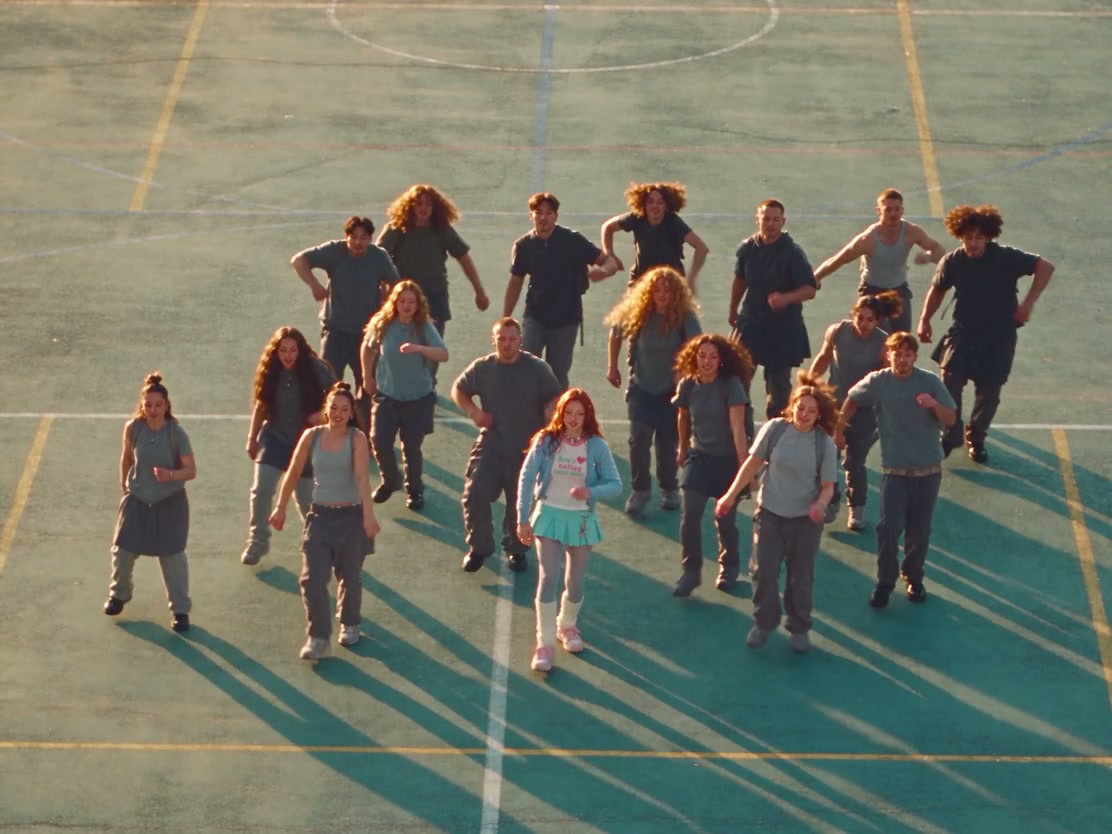
Lonyo Dance AI is a photo-to-video tool for the playground routine in Bakar’s “Lonyo!”, directed by Tom Emmerson. The dance is a high-angle view of a painted outdoor court: a synchronized ensemble, then a front-center lead with two partners behind, then the crowd again. Make your own Bakar Lonyo dance with a prepared community remake and your chosen cast. Your required photo replaces the lead’s complete appearance. Two partner photos are optional and independent. Lonyo Dance AI keeps the hops, steps, arm gestures, timing, court, unassigned dancers and camera. Original follows the full clip. Economy and Standard use a prepared excerpt that starts as the trio appears and continues through the returning crowd.

High-angle schoolyard dance on a painted court, with a synchronized crowd and a front-center lead

How to make a Lonyo Dance AI video

The dance and instructions are already prepared. Start with photos, then review the quote for the mode you picked.

  1. STEP 1

    Add the Lonyo Dance AI cast

    Upload one full-body photo to Front-center lead. Add a partner only if you want to replace that dancer. No motion clip or trim step is required.

  2. STEP 2

    Choose a Lonyo Dance AI mode

    Pick Economy, Standard or Original and an available resolution. Watch that mode’s preview and read the credit quote. Choosing photos does not start a paid task.

  3. STEP 3

    Review the Lonyo Dance AI result

    Open the finished clip in My creations. Check the lead, any partners you assigned, the returning crowd and the sound, then download.

Choose who dances in Lonyo Dance AI

The lead is required. Each partner is optional. The court, crowd and camera stay with the reference.

Bring your whole look into the lead

The lead photo is the only upload Lonyo Dance AI requires. Choose a clear head-to-feet picture showing the hairstyle, clothes and shoes you want in the dance. A relaxed standing pose works; you do not need to perform the choreography. Crop group photos to one person. Small logos and hidden clothing details can change as the body turns.
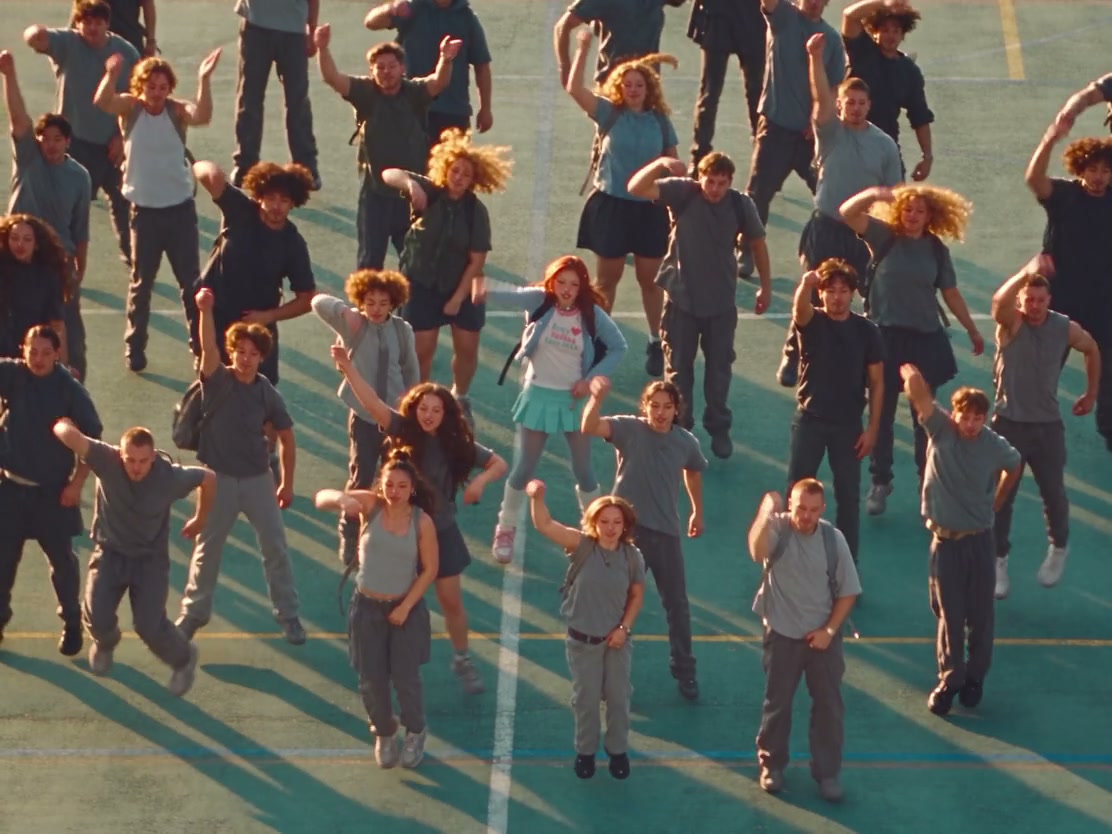
The front-center lead dancing with the synchronized playground ensemble

Add either partner, or skip both

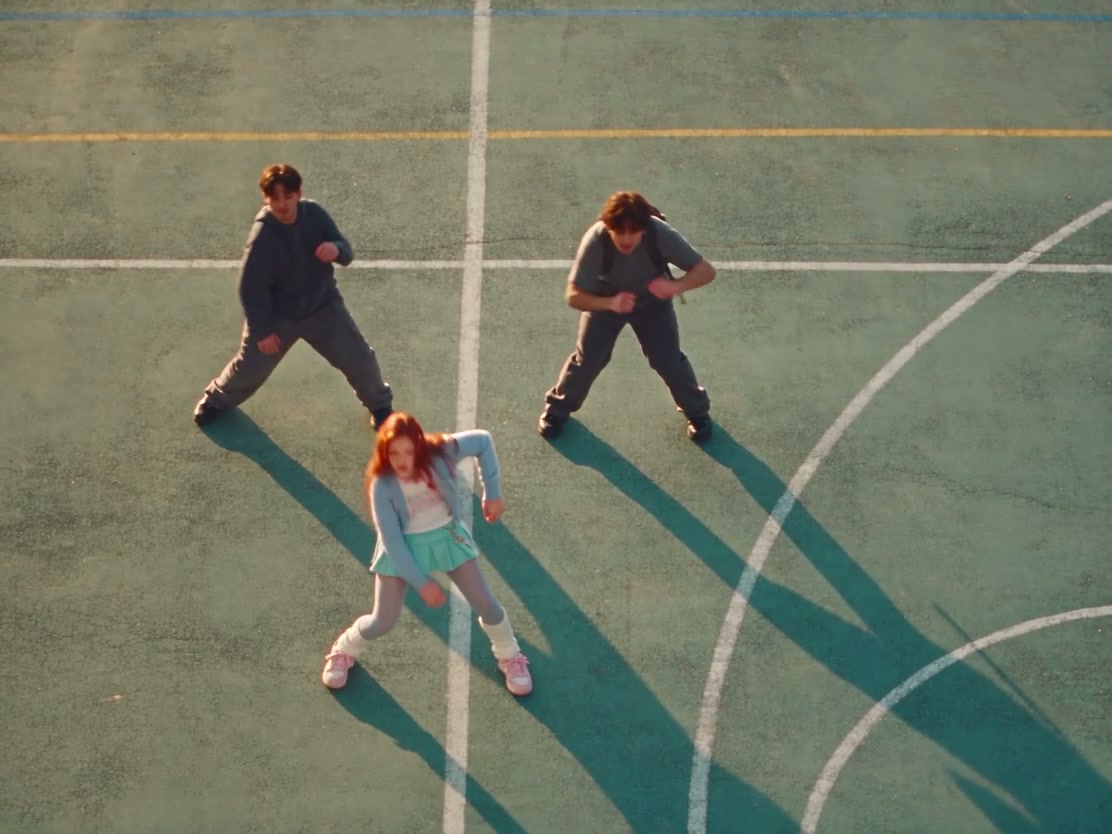
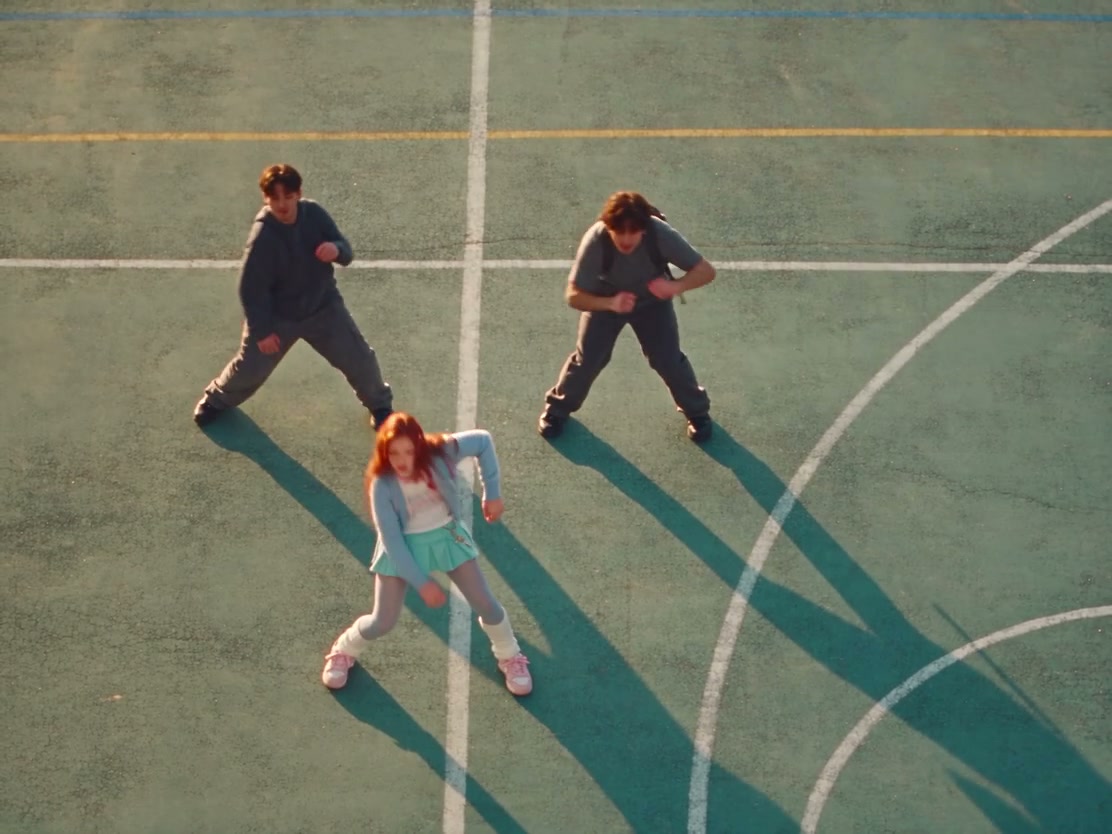
Lonyo Dance AI identifies the partners in the trio: behind the lead on the viewer’s left and right. Add either photo or both; an empty slot preserves that dancer. Each photo supplies a complete person and outfit. The trio defines the roles, and Lonyo Dance AI applies them throughout the opening and returning ensemble. The other crowd members remain unchanged.

The trio on the painted court: a front-center lead with one partner behind on each side

Keep the court, crowd and camera

Lonyo Dance AI follows the high-angle court scene, synchronized group movement and transition into the trio. The reference guides the steps and arm gestures; generated timing can vary. Choose Original for the opening ensemble as well as the trio and returning crowd. Economy and Standard focus on the latter two moments. All modes use the same scene and soundtrack, with no location or camera controls.

The playground crowd returns around the front-center lead after the trio

What you choose in Lonyo Dance AI

Your photos supply people. The prepared video supplies the schoolyard dance.

One required lead

Lonyo Dance AI always needs the front-center lead. That photo defines the full person, including hair, clothing and shoes. There is no separate wardrobe upload.

Two optional partners

The viewer-left and viewer-right partners are independent. Leave either empty to keep the original dancer. A right-only photo is a valid Lonyo Dance AI cast.

Prepared timing and sound

You do not trim the dance or upload your own motion. Original uses the full reference. Economy and Standard use the shorter excerpt from the same video. The reference soundtrack comes back with the result.

Lonyo Dance AI credits and plans

Check the quote on Generate for the mode and resolution you selected. An account and enough credits are required before submit. Plan examples elsewhere on the site can use other models or lengths.

Starter

For your first ideas.

$8.3/month

$100.0 charged yearly

2,400 credits/year

Up to 400 images

GPT Image 2Nano Banana Pro

Up to 133 videos

Seedance 2.5Kling 3.0 Motion Control
  • Up to 4K images and HD videos, depending on the model
  • Image editing, video creation & motion transfer
  • Watermark-free image & video downloads
  • Generation history in your account
Popular40% OFFSave $238.8

Pro

For a steady creative flow.

$30.0/month$49.9/month

$360.0 charged yearly

21,600 credits/year

Up to 3,600 images

GPT Image 2Nano Banana Pro

Up to 1,200 videos

Seedance 2.5Kling 3.0 Motion Control
  • Up to 4K images and HD videos, depending on the model
  • Image editing, video creation & motion transfer
  • Watermark-free image & video downloads
  • Generation history in your account
  • Use credits across image and video models
Best Value50% OFFSave $599.8

Business

For more creations, more often.

$49.9/month$99.9/month

$599.0 charged yearly

48,000 credits/year

Up to 8,000 images

GPT Image 2Nano Banana Pro

Up to 2,666 videos

Seedance 2.5Kling 3.0 Motion Control
  • Up to 4K images and HD videos, depending on the model
  • Image editing, video creation & motion transfer
  • Watermark-free image & video downloads
  • Generation history in your account
  • Use credits across image and video models

Basic

$0

Try before you subscribe

  • 18 one-time signup credits
  • Generation history included
  • Watermarked previews & downloads
  • Up to 3 images or 1 video
  • Watermark-free downloads require payment

Prices in USD; taxes and total shown at checkout. Subscriptions renew automatically; cancel in Billing settings. Subscription credits expire each period; one-time credits never expire.

Refunds: request within 72 hours. Used purchased credits and applicable non-refundable processing costs (up to 6%) are deducted. Terms · Refund Policy

Lonyo Dance AI questions

Photos, partners, timing, sound and what the finished video can and cannot keep.

How do I make a Lonyo Dance AI video?

Upload your lead and any optional partners, choose a mode and resolution, then review the quote and generate. Your Lonyo Dance AI result appears in My creations for playback and download.

What is required for Lonyo Dance AI?

One photo of the front-center lead is required. The two partners are optional. A full-body photo with the face, hair, clothes and shoes visible gives the model more to follow. A tight portrait leaves the outfit and feet to be invented. You do not need to be dancing in the photo.

Can I replace only one Lonyo Dance AI partner?

Yes. Add only the viewer-left photo, only the viewer-right photo, or both. Lonyo Dance AI preserves the dancer in any empty optional slot.

Which moment assigns the three roles?

The trio formation assigns them: the front-center lead, the partner behind on the viewer’s left, and the partner behind on the viewer’s right. Opening positions in the crowd do not. Lonyo Dance AI uses these identities throughout the full sequence, including the opening ensemble. Overlaps can still confuse identity.

Does Lonyo Dance AI replace the whole crowd?

No. Lonyo Dance AI replaces the lead and the partners you assign. The surrounding crowd stays with the reference, along with the court, spacing and camera.

How long is each Lonyo Dance AI mode?

Original follows the full reference, about 25 seconds. Economy and Standard use one excerpt of about 15 seconds from that same video. It starts when the trio appears and includes the returning crowd, so the opening ensemble is not in the short modes. You cannot pick another in-point.

Does Lonyo Dance AI keep the song?

The result includes the reference soundtrack. The model does not write a new score, and this page has no music picker. Listen to the preview first. After download, you can replace the audio in your own editor if you have the right to do so.

Can I trim Lonyo Dance AI or upload my own dance?

No. Both the full clip and the shorter excerpt are prepared. There is no trim control and no motion upload. If you need the opening crowd, choose Original. If you only need the trio and the return, Economy or Standard already use that excerpt.

What should I check in a Lonyo Dance AI result?

Watch the lead through the trio and the returning crowd. If you added partners, check that each photo stayed on the same person. Look for merged shoes, changed hands, or a face that jumps to a nearby dancer. Replay with sound. For another Lonyo Dance AI attempt, try a clearer photo with fewer accessories covering the body.

How many credits does Lonyo Dance AI use?

The quote on Generate follows the current mode and resolution. This page does not publish a fixed credit price. Each new submit spends credits. Replaying the reference or a finished Lonyo Dance AI clip does not start another generation.

Can I use a pet or a face-only crop?

Lonyo Dance AI expects a person whose body and outfit can be seen. A face-only crop leaves the clothes and shoes unspecified. A pet photo is a poor match for this human ensemble and can distort limbs.

Create your Lonyo Dance AI video

Upload the lead, add a partner only if you want one, and keep the schoolyard dance.

High-angle schoolyard dance on a painted court, with a synchronized crowd and a front-center lead