
Toy Car to Real Car AI (Train Window Car): One Photo, Train Ledge to Night Road
A miniature car on a train windowsill goes full-size after the tunnel. That’s Toy Car to Real Car AI. One car photo drives both scales; a short vertical reference supplies the train, tunnel, and drive. Open the Toy Car to Real Car AI tool, or keep reading to DIY.
Create my car transition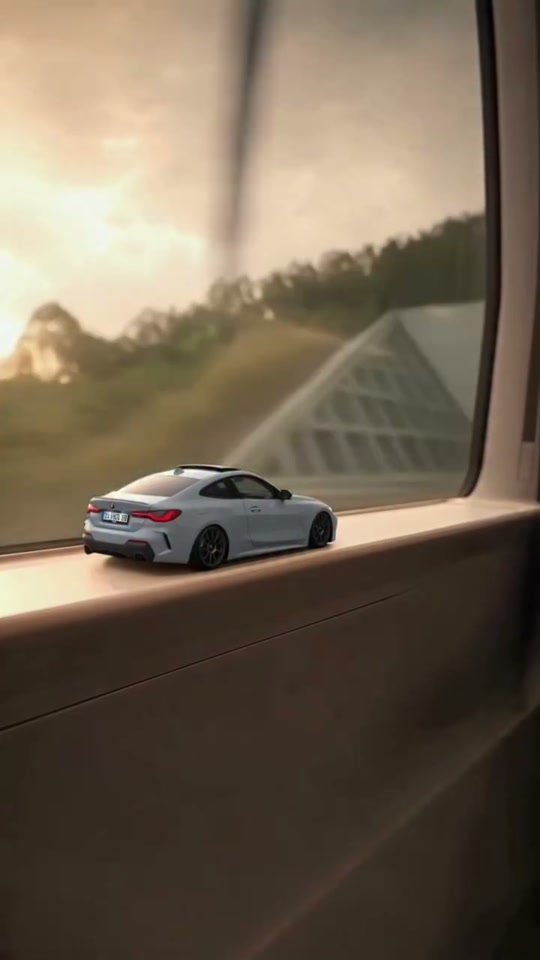
Where it came from
Also searched as Train Window Car AI, train window car, toy car tunnel transition, miniature car train window, oyuncak araba geçişi. This is not Phone Stuck to Train AI (a person running beside a train), not Venom Car AI (liquid → car in a garage), and not older handheld toy→real edits without the train tunnel.
In mid–late October 2026, short-video feeds filled with a train-window scale gag: a diecast-looking car on the ledge, tunnel darkness, then a full-size rear-quarter night drive. A widely cited public candidate is Instagram reel Derkycwue-o (often credited to @umutcancelikis; secondaries place it around 19 Oct 2026). Many remakes run about 10 seconds. Exact “first” posts and view counts disagree, so this guide skips hard numbers. Older toy→real edits without the train window are related creative context, not this sequence.
Motion Transfer’s prepared cut is longer—about 22 seconds vertical: windowsill hold, scale change through the tunnel, then a longer night-road payoff. Economy / Standard modes use a prepared ~15-second highlight from that reference. The product file is not verified as a frame match to any one social reel.
How to make one yourself
You need a short reference video, one car photo, and a tool that accepts image + video reference. On Motion Transfer’s fixed page the model is already chosen (Seedance 2.5 Video Edit).
1. Get the reference clip
Ready-trimmed: Origin trim coming with the guide assets. That file will be a continuous vertical excerpt of the train-window transition—ledge → tunnel lights → scale change → night road. Prefer a cut that covers the payoff you want (~10s viral-style or closer to the ~22s product length). It is not the Motion Transfer template remix, and it is not on this page yet.
Also fine to trim yourself: From a rights-clear public cut you’re allowed to transform—start from the Instagram reel when you can view it—export one continuous vertical take covering:
| Approx (short ~10s viral style) | Beat |
|---|---|
| Opening | Miniature on the train ledge; landscape sliding past |
| Tunnel | Darkness; light streaks; toy still on the ledge |
| Lights | Tail lights come on |
| Scale | Camera pushes through; car grows to full size |
| Exit | Night highway rear-quarter drive |
Only use a clip you’re allowed to transform. This guide does not grant music or commercial soundtrack rights.
2. Pick photos
One slot: a single vehicle photo. The same design is used as both the miniature and the full-size car. There is no second upload for a separate diecast.
What works
Whole car visible, including wheels; sharp and well lit.
Rear three-quarter
angle preferred—the reference spends much of the transition and drive on rear/side views.
Sedans and coupes match the community examples most closely.
Clean background in the still is fine; it will not become the train location.
Weak picks
Tight badge-only or interior-only crops.
Motorcycles, random objects, or heavily cropped partial cars (not validated on this template).
Very tall, long, or unusual shapes that fight the windowsill framing.
Expecting the tool to keep readable plate text or tiny logos perfectly through the scale change—review those details.
3. Light model note for this play
On the fixed Toy Car to Real Car AI page, generation uses Seedance 2.5 Video Edit with restored reference audio. Original follows the full ~22s sequence; Economy / Standard use the prepared ~15s highlight. No prompt to paste on the fixed page. Railway, tunnel, and route are fixed—you cannot upload a different location.
4. Prompt you can paste (DIY workspace)
Image 1 is the only car design. In Video 1, Image 1 appears first as the miniature on the train windowsill, then as the same full-size car after the tunnel scale change and on the night road—same body, paint, wheels, windows, and lights throughout. Keep the train, windowsill, tunnel, night road, lighting, and camera from the reference. Do not introduce another car design or copy the photo’s background into the scene. No captions, no readable plate text inventions.
After a silent DIY render, add soundtrack you’re allowed to use. Motion Transfer restores prepared reference audio automatically; that does not grant separate music rights for posting.
5. Generate and review
Windowsill miniature still reads as your car (color, body, wheels)
Scale change doesn’t swap in a different design
Tail lights / rear shape survive the tunnel
Night-road drive keeps the same vehicle
No second mystery car appears in frame
If badges or wheels drift, try a sharper rear three-quarter photo and re-check at the scale-change frames.
If you’d rather skip the clip hunt and prompting
Open Toy Car to Real Car AI on Motion Transfer. The train-window sequence, tunnel transition, night drive, and soundtrack are already loaded.
1Upload one car photo
(rear three-quarter helps).
2Pick Original (~22s) or Economy/Standard (~15s highlight)
, check the credit quote, then generate.
3Preview with sound and download
from My creations—watch the ledge, the tunnel, and the final drive.
New accounts get starter credits.
Try the train-window car transition with one photoSources
Instagram reel Derkycwue-o — widely cited train-window candidate (often @umutcancelikis; soft on exact first/date).
Creator profile often credited: instagram.com/umutcancelikis.
Motion Transfer product: Toy Car to Real Car AI (~22s vertical template, Seedance 2.5 Edit).
Sibling plays: Phone Stuck to Train AI, Venom Car AI.
FAQ
Is Train Window Car the same as Toy Car to Real Car?
Yes on Motion Transfer. Search aliases often say Train Window Car; the live tool path is /toy-car-to-real-car-ai.
Do I need a real diecast toy photo?
No. One normal car photo is enough. The template supplies the miniature scale and the full-size drive.
Can I change the tunnel or the road?
Not on this fixed page. For a different scene, use the main Motion Transfer workspace with your own reference.
How long is the video?
Original is about 22 seconds. Many viral remakes are nearer 10 seconds; Economy/Standard use a shorter prepared highlight (~15s).
Does the finished clip include sound?
On Motion Transfer, yes—prepared reference audio is restored. DIY elsewhere may be silent until you add audio you’re allowed to use.
Is this Phone Stuck to Train?
No. Phone Stuck puts a person in a subway run. This play transforms a car from windowsill miniature to night-road full size.
Put your car on the train ledge and out on the night road
one clear photo, prepared tunnel transition, full scale-change check.
Create my car transition