
What Is Talk Dirty Dance AI? How to Make the Arena Lead From One Photo
Someone new struts into an arena dance break, crouches in a spotlight, then leads a crew as pyro hits. That’s Talk Dirty Dance AI. One photo takes center; a short concert reference supplies the walk-out, crew, and song. Open the Talk Dirty Dance AI tool for the prepared template, or keep reading to DIY.
Open Talk Dirty Dance AI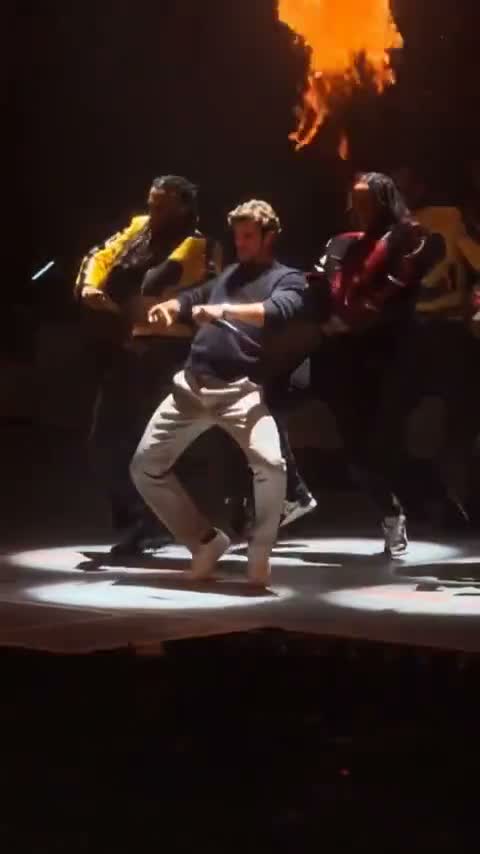
Where it came from
Also searched as Talk Dirty AI dance, Talk Dirty concert AI, Talk Dirty stage remake. They’re usually the same about 15 second vertical arena bit set to Jason Derulo’s “Talk Dirty” (feat. 2 Chainz).
“Talk Dirty” is Jason Derulo’s 2013 single featuring 2 Chainz, built around a Balkan Beat Box sample and released internationally that year (U.S. single early 2014). The meme is not the studio music video alone. It rides a phone-in-crowd arena dance break: a lead walks out, hits a crouch under a spotlight, then works with a colorful-jacket crew while stage fire columns fire on cue.
It blew up as an AI remake wave in mid-October 2026. Chinese short-video feeds circulated one-photo edits first. On October 17, 2026, the same live sound showed up in one-photo templates and promo posts. Exact first-creator IDs and view counts move fast and disagree, so treat viral numbers as soft. What stayed stable: one new lead, same crew, same flames, same short cut.
How to make one yourself
You need three things: a short reference video, one clear photo, and a prompt that says who should change. Drop them into any official build of Seedance 2.5, Kling 4.0 / Kling 3.0 Motion Control, Wan 3.0, or Hailuo H3 (MiniMax) that accepts an image plus a video reference, and generate on that product’s own app.
Get the reference clip
Origin trim coming with the guide assets. That file will be a short cut from the arena performance, about 12–18 seconds of walk-out, crouch, crew dance, and flame columns. It is not the Motion Transfer template, and it is not on this page yet.
Trim your own from a source performance. Credit the track on the “Talk Dirty” song page. Export one continuous 12–18 second vertical take of those same beats from a phone-in-crowd arena dance break you are allowed to transform. Keep the lead readable full-body or waist-up. Don’t stitch the walk-out from one show and the flames from another.
Pick a photo
Lead, required
One clear full-body or waist-up shot. Face, hair, outfit and shoes readable. The clothes and footwear in the photo are what stay on stage. Even light, one person per file. You don’t need to pose the walk-out or hold a mic.
Pets
Head and body visible. A pet can be the center on an app that allows it. For people, describe casting and appearance.
Weak picks
Heavy filters, tiny face crops, group collages, feet cropped off when the dance needs shoes, or arms glued to the sides so the body line disappears.
Choose a model
Seedance 2.5
Holds cuts and stage vibe when you attach a reference video plus a subject image.
Kling 4.0 or Kling 3.0 Motion Control
Locks the lead’s motion to the clip. Start with the center role only.
Wan 3.0
Keep the reference short. Many builds sit around 15 seconds of clip.
Hailuo H3 (MiniMax)
Same image-plus-reference idea. Still name the lead in the prompt.
Use whichever official app you already have credits on. For a first try, change only the center lead and leave the crew, band and pyro alone.
Prompts you can paste
Match the image numbers to your files. Say who moves and who stays. Don’t ask the model to invent a new song.
Lead only
Image 1 is the center lead dancer. In Video 1, Image 1 performs the lead’s walk-out, crouch, arm gestures and crew section—same face, hair, build, outfit and shoes throughout. Keep the colorful-jacket backup dancers, band, stage, spotlights and fire columns unchanged. Keep camera movement and timing. No captions, no extra people.
Seedance, with labeled images
@Image1 is the central lead in Video 1. Transfer complete face, hairstyle, body, clothing, shoes and accessories. Follow choreography, gestures, steps and camera. Preserve backup dancers, band, stage, spotlights and fire columns. Natural hands and grounded feet. No text overlay.
Kling Motion Control
Follow Video 1’s motion. Subject is Image 1 as the center lead only. Hold identity and outfit through walk-out, crouch and flame beats. Do not change the crew or stage.
After a silent render, add a soundtrack you’re allowed to use in any editor. Mouth timing won’t be perfect. That’s normal for this kind of generation.
Generate and review
Upload the reference and the photo, paste the prompt, generate, then watch once for casting and once for feet and hands.
Opening walk-out already looks like your photo
The entrance should already match the lead file.
Crouch and spotlight are the same person
Walk-out and crouch are one role. If only the crouch matches, say that both shots are the same person, or try a clearer full-body photo and generate again.
Crew jackets stay distinct from the lead
Backup dancers and the band stay their own people.
Flames don’t swallow the lead
The fire columns stay in the scene. The lead should still be readable through them.
Final group rhythm still matches
The last crew section should still agree with the lead you set.
If you’d rather skip the clip hunt and prompting
The steps above work on Seedance, Kling, Wan or Hailuo. If writing roles and wiring the project yourself feels like more work than the joke is worth, open Talk Dirty Dance AI on Motion Transfer. The reference, lead slot and soundtrack are already loaded.
1Upload one full-person photo
The center lead needs outfit and shoes in the frame. Empty extra ideas stay with the reference crew.
2Pick a mode and resolution
Original uses the full 15-second portrait reference. Economy and Standard use that same prepared performance, with its original sound. Check the credit quote before you generate.
3Generate, watch it once with sound, download
The finished clip includes the prepared reference soundtrack. Play it once, then download the version you want to keep.
New accounts get starter credits. The idea is the same as above: a photo plus a performance reference, without building the project yourself.
Try the arena dance with one photoSources
Talk Dirty (Jason Derulo song) — Wikipedia. 2013 single featuring 2 Chainz.
Mid-October 2026 one-photo remake wave, widely reported from about October 17, 2026. First-creator IDs and view counts are not audited here.
Motion Transfer — Talk Dirty Dance AI. One lead photo. Original, Economy and Standard use the same 15-second portrait reference and its soundtrack. Crew, band and fire columns stay.
Quick answers
Is one photo enough?
Yes. The center lead is the usual first try.
Is this face swap?
No. A photo plus a performance reference makes a new video. Motion Transfer does not do face swap.
Does the crew change?
No. Backup dancers, the band, the stage and the fire columns stay with the reference.
Does it include the song?
On Motion Transfer, the template includes the prepared reference soundtrack. It does not clone your voice. Elsewhere, add audio yourself.
Can a pet be the lead?
A clear pet photo can work as the lead on an app that allows it. On the Motion Transfer template the slot is one full-person photo.
Is it free?
Official model apps have their own free tiers. Motion Transfer generation uses credits. New accounts get starter credits.
The arena dance is already loaded
Upload a full-person photo, pick a mode, and generate. The reference, lead slot and soundtrack are already on Talk Dirty Dance AI.
Open Talk Dirty Dance AI