
Epic Split AI Video Generator
Make the slow reveal your own with Epic Split AI. One photo puts your complete appearance into the split between two reversing trucks. Keep the prepared 30-second scene, sunrise light and reference sound. Watch the original below.
0:00 / —:—
Epic Split AI video ideas
Explore community remixes of this performance. Open a video for a closer look.
What is Epic Split AI?
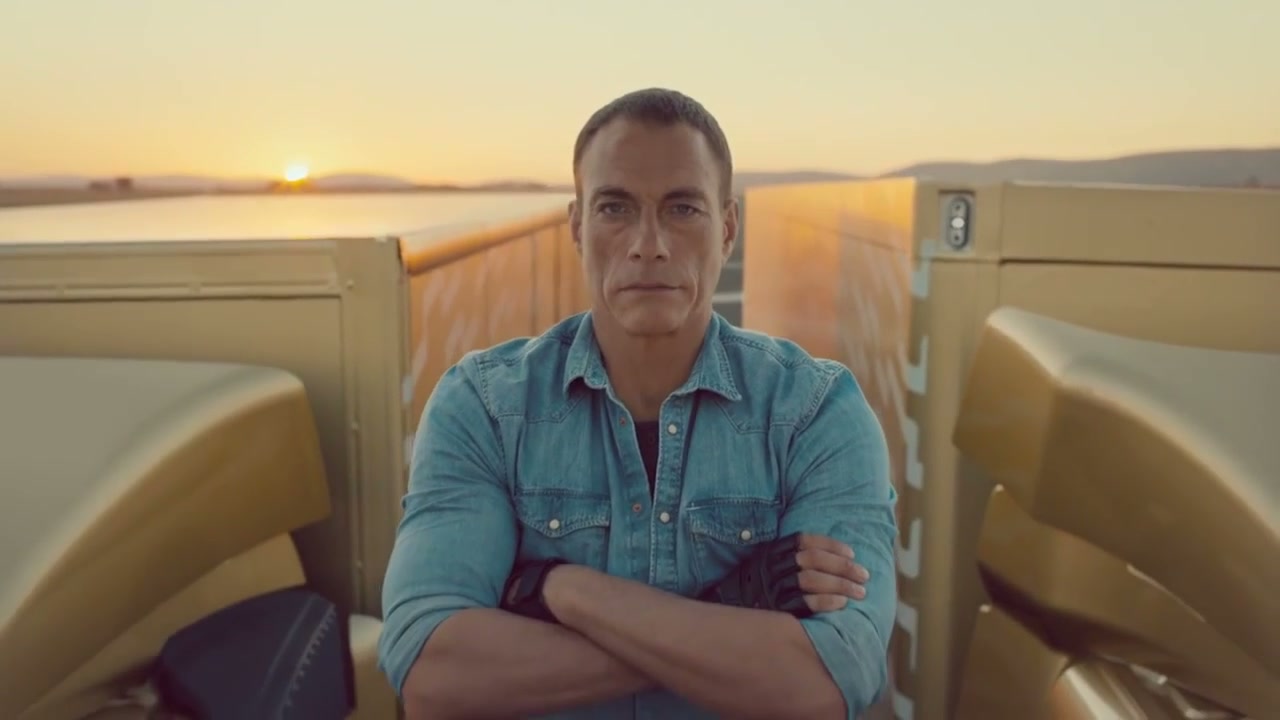
Epic Split AI puts a person from your photo into the familiar split between two reversing trucks. The scene begins close to the performer, then draws back as the vehicles separate and the legs gradually extend. On Motion Transfer, upload one complete-person photo to replace that central performer’s appearance, hair, body proportions, clothing and shoes. Epic Split AI follows the prepared 30-second landscape reference and includes its original soundtrack. Both original trucks, the road and sunrise lighting stay in the scene.
How to make an Epic Split AI video
Choose the performer and let the prepared sequence supply the movement.
STEP 1
Upload the split performer
Add one clear full-person photo to Epic Split AI. Show the face, hair, outfit and both shoes. Use an adult who agreed to the edit. The two trucks come from the reference and need no image upload.
STEP 2
Watch the reference and review the quote
Play the Epic Split AI reference with sound. Check that its 30-second landscape sequence matches your idea. Choose an available resolution in Settings, then review the credit quote and sign in before generating.
STEP 3
Check the support points and save
Open your Epic Split AI result in My creations. Watch each foot throughout the widening gap and check the legs, hands, outfit and identity. Play the soundtrack, then download the completed video.
One person at the center of a widening gap
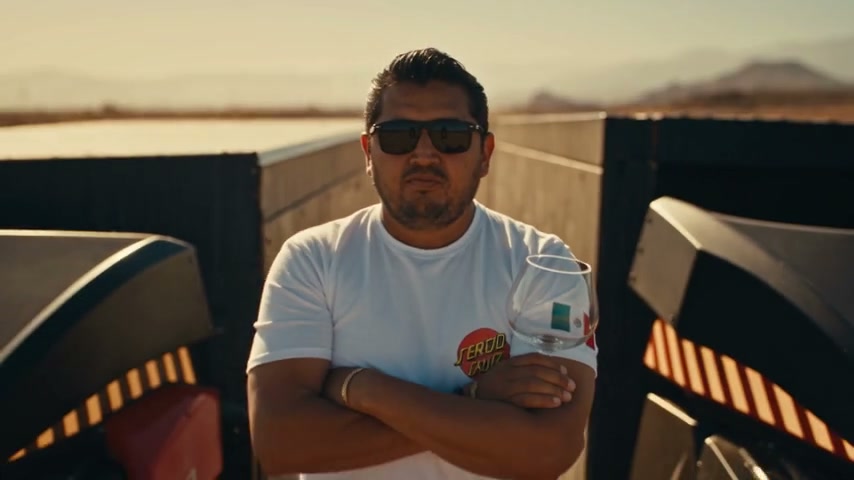
Epic Split AI follows a gradual full-body reveal between two trucks. See the original sequence and a community truck adaptation.
Turn a familiar reveal into a personal moment
Epic Split AI gives the entire sequence one focal character: the person you choose. A clear photo can bring your own look or an agreed adult character into the close opening view and the wide final split. Because the camera moves away gradually, the clothing silhouette matters alongside the face. Epic Split AI carries your everyday look through the changing camera distance. A standing image with visible clothes, arms and shoes provides the details the edit needs.
Keep the slow build from close-up to full split
The effect of Epic Split AI comes from the pace of the reveal. Crossed arms and a steady upper body contrast with the widening space between the trucks. The camera pulls back while the legs extend, giving the viewer time to recognize the scale of the stunt. Epic Split AI uses the prepared movement and timing without asking you to stage a camera move or record a flexibility exercise. This makes the clip suitable for a playful personal introduction or a dramatic AI remix. There is no separate speed control.
Hold the complete two-truck composition together
Epic Split AI keeps both source trucks, so the performer’s two support points remain part of the same visual composition. The road, warm light and growing distance establish the scene while your character stays centered. The completed Epic Split AI clip includes the reference sound, preserving the atmosphere of the slow reveal. Keep both feet and their supporting trucks in frame. A tight portrait crop can remove the relationship that explains the split. The community adaptation uses a different truck setting; your generation follows the original gold-truck reference in the workspace.
What you choose in Epic Split AI
Choose your performer while keeping the prepared trucks and scene.
One complete-person reference
Epic Split AI uses one photo for the central character. Full-body framing shows the trousers, shoes, body proportions and sleeves that remain visible as the camera pulls away. An ordinary standing pose is enough; the video supplies the leg extension.
A fixed 30-second composition
Epic Split AI follows the original two trucks and their relative motion. This page offers no truck-photo input, new vehicle design or background selector.
Resolution and a visible credit quote
Choose an available output resolution in Epic Split AI and check the quote before submitting. Resolution changes output detail. The photo does not create a new soundtrack.
Epic Split AI credits and plans
Previewing the reference does not start a generation. Creating an Epic Split AI video requires an account and enough credits for the current quote. This preset follows a 30-second reference, so compare the displayed quote rather than assuming a shorter plan example has the same cost.
Starter
For your first ideas.
$8.3/month
$100.0 charged yearly
2,400 credits/year
Up to 400 images
GPT Image 2Nano Banana Pro
Up to 133 videos
Seedance 2.5Kling 3.0 Motion Control
- Up to 4K images and HD videos, depending on the model
- Image editing, video creation & motion transfer
- Watermark-free image & video downloads
- Generation history in your account
Popular40% OFFSave $238.8
Pro
For a steady creative flow.
$30.0/month$49.9/month
$360.0 charged yearly
21,600 credits/year
Up to 3,600 images
GPT Image 2Nano Banana Pro
Up to 1,200 videos
Seedance 2.5Kling 3.0 Motion Control
- Up to 4K images and HD videos, depending on the model
- Image editing, video creation & motion transfer
- Watermark-free image & video downloads
- Generation history in your account
- Use credits across image and video models
Best Value50% OFFSave $599.8
Business
For more creations, more often.
$49.9/month$99.9/month
$599.0 charged yearly
48,000 credits/year
Up to 8,000 images
GPT Image 2Nano Banana Pro
Up to 2,666 videos
Seedance 2.5Kling 3.0 Motion Control
- Up to 4K images and HD videos, depending on the model
- Image editing, video creation & motion transfer
- Watermark-free image & video downloads
- Generation history in your account
- Use credits across image and video models
Basic
$0Try before you subscribe
- 18 one-time signup credits
- Generation history included
- Watermarked previews & downloads
- Up to 3 images or 1 video
- Watermark-free downloads require payment
Prices in USD; taxes and total shown at checkout. Subscriptions renew automatically; cancel in Billing settings. Subscription credits expire each period; one-time credits never expire.
Refunds: request within 72 hours. Used purchased credits and applicable non-refundable processing costs (up to 6%) are deducted. Terms · Refund Policy
Epic Split AI questions
Answers about the photo, trucks, timing and completed split.
How many photos does Epic Split AI need?
Epic Split AI requires one complete-person photo for the central performer. A group photo makes the intended person less clear; prepare an individual reference first.
Do I need to be able to do the splits?
No. Epic Split AI uses the movement from its prepared video. Your photo supplies appearance and clothing, so an ordinary standing image is suitable. The result is an AI edit and does not show that you performed the stunt. Do not attempt to recreate the moving-vehicle setup for an input photograph.
Can Epic Split AI replace the trucks?
This Epic Split AI preset preserves both original gold trucks and their movement. It does not accept a truck photograph or vehicle customization. The community truck remix demonstrates a related adaptation in a different setting; the workspace reference shows the vehicles used for your generation.
Does Epic Split AI keep my outfit?
Epic Split AI requests your complete uploaded appearance, including clothing, footwear, hairstyle and accessories. Choose a photo where trouser legs and shoes are easy to distinguish. Dark clothing against a very dark background can hide useful boundaries. Fine logos, fingers and fabric details may vary during generation.
How long is the Epic Split AI result?
Epic Split AI follows the full 30-second landscape reference, including the gradual widening of the trucks and the camera pulling back. There is no duration selector on this preset.
Does Epic Split AI include the reference soundtrack?
The completed Epic Split AI result includes the reference sound. Listen in the preview before generating. There is no music upload or voice recording control here. Public or commercial sharing still requires appropriate rights to the people and sound you use.
What makes a convincing Epic Split AI result?
Check that both feet remain at the original support points as the trucks separate. In Epic Split AI, the hips and legs should extend coherently while the upper body stays steady. Review the changing camera distance for identity and clothing continuity. AI can distort these relationships.
Where do I download my Epic Split AI video?
Find the completed Epic Split AI clip in My creations, where you can play and download it. Available past tasks appear in video history. If you decide to try another photo, submit it as a new generation with its own credit quote. Another attempt does not guarantee a specific correction to the first result.
Step into your Epic Split AI reveal
Choose one full-person photo and watch your character take the center of the two-truck sequence.