
Create a video

Approaching person · Photo 1
Welcoming person · Photo 2

Hug In Heaven Video Generator

Bring two photos into a gentle, imagined embrace with Hug In Heaven. Choose the approaching person and the person welcoming them, with their complete looks and clothing in a warm cloud-stairway scene.

0:00 / —:—

What is Hug In Heaven?

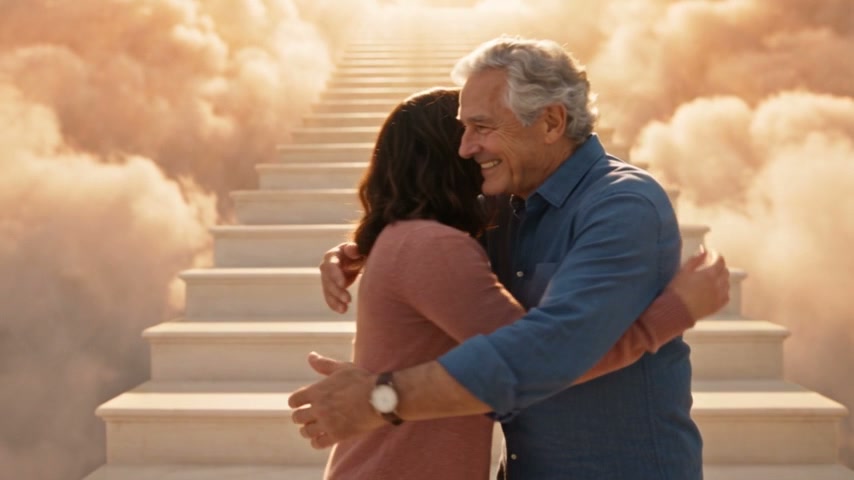
Hug In Heaven is a symbolic reunion video in which two people recognize each other, move closer and share a gentle embrace among clouds and bright steps. On Motion Transfer, upload two separate full-person photos. Photo 1 replaces the person approaching from the opening left; Photo 2 replaces the person welcoming them on the right. Hug In Heaven uses those photos for each person’s complete appearance, hair, body proportions and clothing. The finished clip follows the roughly 12-second landscape scene and reference sound, offering an imagined moment for remembrance or a personal tribute.

Third-party AI demonstration of two people recognizing each other and embracing beside a cloud-lit staircase

How to make a Hug In Heaven video

Choose the two people and assign their roles before generating.

  1. STEP 1

    Add the approaching and welcoming people

    Upload two individual photos to Hug In Heaven. Photo 1 follows the opening left person in the pink cardigan; Photo 2 follows the right person in the blue shirt. Your photos supply the new outfits.

  2. STEP 2

    Preview the embrace and check the quote

    Watch the Hug In Heaven reference with sound. Choose an available resolution in Settings, then review the credit quote on Generate. Sign in and confirm sufficient credits before submitting.

  3. STEP 3

    Review the contact and download

    Open your Hug In Heaven result in My creations. Check both identities, hands and arm contact as the pair embrace and separate. Play the sound, then download the completed clip.

A quiet moment of recognition and connection

Hug In Heaven follows the approach, open arms, embrace and gentle release shown in this third-party AI demonstration.

Bring two separately photographed people together

Hug In Heaven lets you choose both people without needing a photograph of them together. You can pair images taken at different times, keeping the appearance and clothing you associate with each person. The two upload slots assign separate roles throughout the embrace, including the moment when one body partly covers the other. Choose the photographs that feel appropriate for the tribute you want to make; their pictured appearance provides the character reference.
Bring two separately photographed people together

Let the greeting unfold at a gentle pace

The movement in Hug In Heaven gives the scene space to breathe. A glance becomes recognition, open arms invite the approach, and the embrace lasts before the pair gently separate. This restrained sequence suits a quiet tribute without requiring either person to film an interaction. Hug In Heaven follows the prepared gestures and camera movement, so you can focus on choosing the people. The intended motion includes natural arm contact and two separate bodies; review the finished embrace because AI can alter hands or clothing where the figures overlap.

Let the greeting unfold at a gentle pace

Give an imagined memory a clear visual setting

Hug In Heaven places your chosen pair beside softly lit steps surrounded by warm clouds. The landscape composition leaves room for both people’s approach and arm movements, while the reference soundtrack accompanies the scene. A Hug In Heaven video can become a personal keepsake or a clearly labeled AI tribute shared with family. The imagery is symbolic and does not document a real reunion. Consider the feelings of the people who may receive it, and let them know how the clip was made before presenting it as a remembrance.

Give an imagined memory a clear visual setting

What you choose in Hug In Heaven

Two photos define the people; the prepared scene supplies their interaction.

Two full-person references

Hug In Heaven requires one person in each image. Visible hair, body, clothing and shoes give the edit more information than a tightly cropped face. The two photos can come from separate occasions.

An established scene and motion

Hug In Heaven uses the cloud staircase, slow approach and roughly 12-second landscape sequence shown here. For another setting or interaction, bring your own motion reference to the general studio.

Resolution and reference sound

Hug In Heaven offers the available resolution choices shown in Settings. The finished clip includes the reference soundtrack; there is no voice recording or music-upload control on this page.

Hug In Heaven credits and plans

Previewing the scene is free. Creating a Hug In Heaven video requires an account and enough credits for the displayed quote. Resolution affects the estimate; plan examples may describe other models or lengths. Each new submission uses credits separately.

Starter

For your first ideas.

$8.3/month

$100.0 charged yearly

2,400 credits/year

Up to 400 images

GPT Image 2Nano Banana Pro

Up to 133 videos

Seedance 2.5Kling 3.0 Motion Control
  • Up to 4K images and HD videos, depending on the model
  • Image editing, video creation & motion transfer
  • Watermark-free image & video downloads
  • Generation history in your account
Popular40% OFFSave $238.8

Pro

For a steady creative flow.

$30.0/month$49.9/month

$360.0 charged yearly

21,600 credits/year

Up to 3,600 images

GPT Image 2Nano Banana Pro

Up to 1,200 videos

Seedance 2.5Kling 3.0 Motion Control
  • Up to 4K images and HD videos, depending on the model
  • Image editing, video creation & motion transfer
  • Watermark-free image & video downloads
  • Generation history in your account
  • Use credits across image and video models
Best Value50% OFFSave $599.8

Business

For more creations, more often.

$49.9/month$99.9/month

$599.0 charged yearly

48,000 credits/year

Up to 8,000 images

GPT Image 2Nano Banana Pro

Up to 2,666 videos

Seedance 2.5Kling 3.0 Motion Control
  • Up to 4K images and HD videos, depending on the model
  • Image editing, video creation & motion transfer
  • Watermark-free image & video downloads
  • Generation history in your account
  • Use credits across image and video models

Basic

$0

Try before you subscribe

  • 18 one-time signup credits
  • Generation history included
  • Watermarked previews & downloads
  • Up to 3 images or 1 video
  • Watermark-free downloads require payment

Prices in USD; taxes and total shown at checkout. Subscriptions renew automatically; cancel in Billing settings. Subscription credits expire each period; one-time credits never expire.

Refunds: request within 72 hours. Used purchased credits and applicable non-refundable processing costs (up to 6%) are deducted. Terms · Refund Policy

Hug In Heaven questions

Answers about photos, roles and the imagined reunion.

Does Hug In Heaven need two separate photos?

Yes. Hug In Heaven requires two images with one person in each. If you only have a shared photograph, prepare two individual crops with clear faces and as much of each body and outfit as possible. These photos define two people, rather than two views of one person.

Which person belongs in each Hug In Heaven slot?

Photo 1 follows the person who begins on the left in the pink cardigan and moves closer. Photo 2 follows the gray-haired person on the right in the blue shirt, who opens their arms. Hug In Heaven uses the uploads for the new appearances; those source clothes only identify the roles.

Can I use an older photograph for Hug In Heaven?

A sharp scan or evenly lit photograph of a print can serve as a Hug In Heaven reference. Crop away the frame and surrounding objects. Avoid glare, heavy damage and faces that are too small to distinguish. Missing body or clothing details may be inferred and can differ from your expectations.

Does Hug In Heaven preserve both outfits?

Hug In Heaven requests each uploaded person’s full appearance, including hairstyle, body proportions, clothing, footwear and accessories. A standing photo can show these details clearly; no hugging pose is required. Likeness and small details can vary, especially where arms and fabric overlap.

Is Hug In Heaven a real reunion recording?

Hug In Heaven creates an imagined AI scene. It cannot recover an unrecorded event or establish contact with someone who has died. Use photographs you have permission or appropriate rights to use, and consider family members’ wishes when creating or sharing a memorial tribute.

Can I change the Hug In Heaven length or background?

This Hug In Heaven preset follows its roughly 12-second landscape reference and cloud-stairway setting. It has no background, duration or extra-person selector. Keep the full frame when sharing so both people and their arm contact remain visible.

What sound does Hug In Heaven include?

Hug In Heaven includes the reference soundtrack, which you can hear in the preview. The photos do not supply a voice, and the page does not recreate a person’s speech. Check the finished clip with sound and confirm the audio is suitable for your intended use.

Is the Hug In Heaven preview a result from this tool?

The Hug In Heaven preview is a third-party AI motion reference showing the scene and role order. There are no separate generated examples for this page.

Where do I find my Hug In Heaven video?

Play and download the completed Hug In Heaven clip in My creations. Available past tasks appear in video history. If the embrace has distorted hands or mixed clothing, a clearer reference may help another attempt; a new generation uses credits and cannot guarantee a particular correction.

Create your Hug In Heaven tribute

Choose two meaningful photographs and turn them into a gentle, clearly imagined embrace.

Third-party AI demonstration of two people recognizing each other and embracing beside a cloud-lit staircase