
Create a video

Foreground cash thrower · Photo 1

Helicopter Cash AI Video Generator

Take the foreground seat in a short cash-tossing scene. Helicopter Cash AI uses one photo for the person throwing banknotes, including their body, hair and outfit. The helicopter, rear passenger, city view and reference sound stay part of the scene.

0:00 / —:—

What is Helicopter Cash AI?

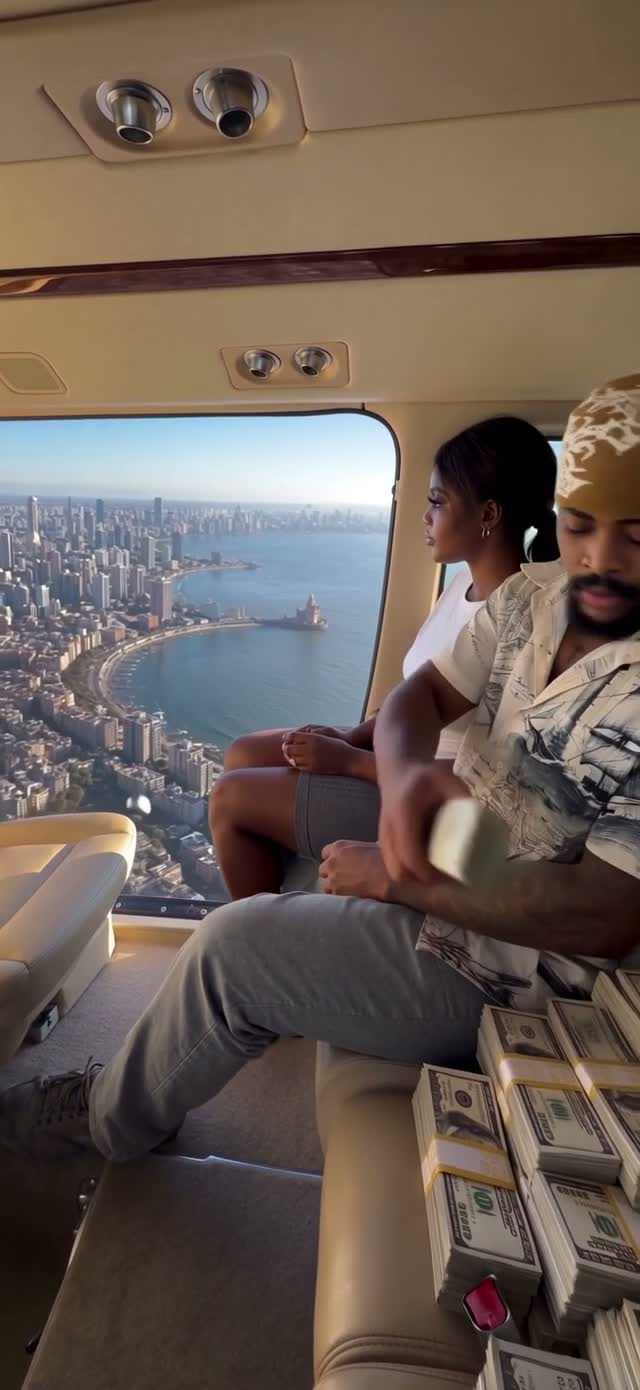
Helicopter Cash AI recreates a short scene in which a seated passenger takes banknotes from a pile and tosses them through a helicopter doorway above a city. On Motion Transfer, upload one person’s photo to define the complete foreground character, including their appearance and clothing. The rear female passenger remains in the reference role. The result is a vertical clip of about six seconds with the supplied sound. Helicopter Cash AI follows the hand movements, cash releases and camera motion shown in the preview, giving your chosen character the lead position in that specific scene.

The foreground passenger tosses cash from a helicopter doorway while the rear passenger stays seated

How to create Helicopter Cash AI

Choose the foreground person and follow the prepared reference.

  1. STEP 1

    Add the foreground person

    Upload one clear photo for Helicopter Cash AI. Show the face, hair, shoulders and outfit, with useful body detail for the seated position.

  2. STEP 2

    Check the prepared scene

    Watch the Helicopter Cash AI reference and listen to its sound. Choose an available resolution in Settings; the rear passenger and action remain fixed.

  3. STEP 3

    Generate and watch

    Sign in with enough credits and check the quote. Review the full Helicopter Cash AI result in My creations, then download the clip you want to keep.

Your Helicopter Cash AI scene

One lead character, the original cabin and a short cash-tossing performance.

Put your chosen character in the foreground seat

The foreground passenger is the visual focus: their posture, hands and outfit stay close to the camera as the money moves. Helicopter Cash AI lets you cast that role from one photo, which can make the scene a personal joke, a character introduction or a fictional celebration. The image defines the whole person rather than only a small part of their appearance. The second passenger provides context without needing another upload. Helicopter Cash AI keeps those roles separate, so your chosen character performs the cash toss while the companion stays behind. Use a photo whose body and clothing provide enough detail for the seated view.
Put your chosen character in the foreground seat

Build the moment around the gesture and city view

Helicopter Cash AI combines a close human action with a much larger setting: banknotes leave the hand while the open doorway reveals the city below. The supplied sequence gives the gesture its timing and keeps the helicopter cabin around it. You do not need to film an aerial scene, arrange props or coordinate the hand movement with a camera. Use Helicopter Cash AI when the throwing action is the point of the clip. It is a different visual idea from holding a fan of cash toward the lens. The scene stays seated inside the cabin; it does not add a takeoff, a jump or a new camera tour.

Build the moment around the gesture and city view

Create a compact fictional celebration

A brief, exaggerated scene can carry a playful caption without needing a long setup. Helicopter Cash AI keeps the original portrait framing and soundtrack, making the gesture readable within a few seconds. You might use the clip for a character’s imaginary windfall, a lighthearted milestone post or a reaction shared with friends. Download the result and add your caption in your usual editor if you want to explain the joke. Before sharing a Helicopter Cash AI result, review the moving banknotes and both passengers. Present it as an AI-created scene so the setting is not mistaken for a record of a real flight or event.

Create a compact fictional celebration

What changes in Helicopter Cash AI

Your photo defines the lead; the reference defines the rest of the encounter.

Foreground appearance

Helicopter Cash AI carries the main person’s complete appearance, body proportions, hair, outfit and visible accessories from the image into the seated performance.

A separate rear passenger

Helicopter Cash AI preserves the companion behind the foreground person. There is no optional photo for that passenger and no control to remove them.

The cabin and cash

Helicopter Cash AI keeps the aircraft interior, open doorway, money stacks, city backdrop and timing. No location, currency, aircraft or music selector is provided.

Helicopter Cash AI credits

You need an account and sufficient credits to generate. Review the quote for the selected resolution before submitting. Plan examples may use a different model or clip length.

Starter

For your first ideas.

$8.3/month

$100.0 charged yearly

2,400 credits/year

Up to 400 images

GPT Image 2Nano Banana Pro

Up to 133 videos

Seedance 2.5Kling 3.0 Motion Control
  • Up to 4K images and HD videos, depending on the model
  • Image editing, video creation & motion transfer
  • Watermark-free image & video downloads
  • Generation history in your account
Popular40% OFFSave $238.8

Pro

For a steady creative flow.

$30.0/month$49.9/month

$360.0 charged yearly

21,600 credits/year

Up to 3,600 images

GPT Image 2Nano Banana Pro

Up to 1,200 videos

Seedance 2.5Kling 3.0 Motion Control
  • Up to 4K images and HD videos, depending on the model
  • Image editing, video creation & motion transfer
  • Watermark-free image & video downloads
  • Generation history in your account
  • Use credits across image and video models
Best Value50% OFFSave $599.8

Business

For more creations, more often.

$49.9/month$99.9/month

$599.0 charged yearly

48,000 credits/year

Up to 8,000 images

GPT Image 2Nano Banana Pro

Up to 2,666 videos

Seedance 2.5Kling 3.0 Motion Control
  • Up to 4K images and HD videos, depending on the model
  • Image editing, video creation & motion transfer
  • Watermark-free image & video downloads
  • Generation history in your account
  • Use credits across image and video models

Basic

$0

Try before you subscribe

  • 18 one-time signup credits
  • Generation history included
  • Watermarked previews & downloads
  • Up to 3 images or 1 video
  • Watermark-free downloads require payment

Prices in USD; taxes and total shown at checkout. Subscriptions renew automatically; cancel in Billing settings. Subscription credits expire each period; one-time credits never expire.

Refunds: request within 72 hours. Used purchased credits and applicable non-refundable processing costs (up to 6%) are deducted. Terms · Refund Policy

Helicopter Cash AI questions

The foreground role, the fixed companion and what to check before sharing.

Which person does Helicopter Cash AI replace?

Photo 1 controls the foreground person nearest the camera, seated beside the banknotes and throwing cash through the doorway. The woman farther back remains unchanged, including when the foreground person turns or briefly overlaps her. Choose the person performing the cash toss.

Can I replace both people in Helicopter Cash AI?

Only the foreground person changes. The rear female passenger stays in the reference role; there is no second image, passenger selector or removal control. Group photos do not assign multiple characters. Choose a multi-role template if you need two performers.

What photo should I use for Helicopter Cash AI?

Use a sharp image of one person showing hair, clothing and enough body detail for their proportions. A tight face crop leaves the seated appearance to interpretation. Avoid blur and objects or people hiding the torso; no helicopter photo is needed.

Can Helicopter Cash AI change the outfit?

The photo supplies the person’s full appearance, visible outfit and accessories. Choose the clothing you want shown; there is no separate wardrobe upload or outfit text field. Check fabric and hidden areas as the character reaches for and throws notes.

How long is a Helicopter Cash AI video?

The reference runs for about six seconds in a narrow vertical frame, including taking banknotes, throwing them and returning to the pile. Settings offers resolution choices. Timing and framing follow the reference, with no length slider or landscape option.

Does Helicopter Cash AI include sound?

The clip includes the displayed reference sound. Listen before generating. There is no voice recording, dialogue script, song upload or custom sound input. Check publication permissions, and avoid presenting the soundtrack as evidence of a real flight involving your chosen person.

Can Helicopter Cash AI change the city or banknotes?

The reference supplies the city, cabin and cash. Your photo controls only the foreground person, with no destination, aircraft, currency or printed-text controls. Banknote details may vary. Treat the clip as a fictional scene, not an accurate depiction of currency or location.

What should I check in a Helicopter Cash AI result?

Check the fingers gathering and releasing notes, the foreground identity during movement and the unchanged rear passenger. Inspect overlaps around the seats, doorway and money pile. Watch the complete download with sound; fast gestures and hidden body parts may vary.

Create your Helicopter Cash AI clip

Choose the foreground person and turn the prepared cash toss into a short character moment.

The foreground passenger tosses cash from a helicopter doorway while the rear passenger stays seated