
Create a video

Birthday driver · Photo 1

Drive-By Birthday AI Video Generator

Make the birthday entrance the surprise. Drive-By Birthday AI puts your complete look and outfit in the driver seat: approach in a blue coupe, lean from the window and blow out the candles. Upload one person photo to use the prepared eight-second scene and sound.

0:00 / —:—

Drive-By Birthday AI video ideas

Explore community remixes of this performance. Open a video for a closer look.

What is Drive-By Birthday AI?

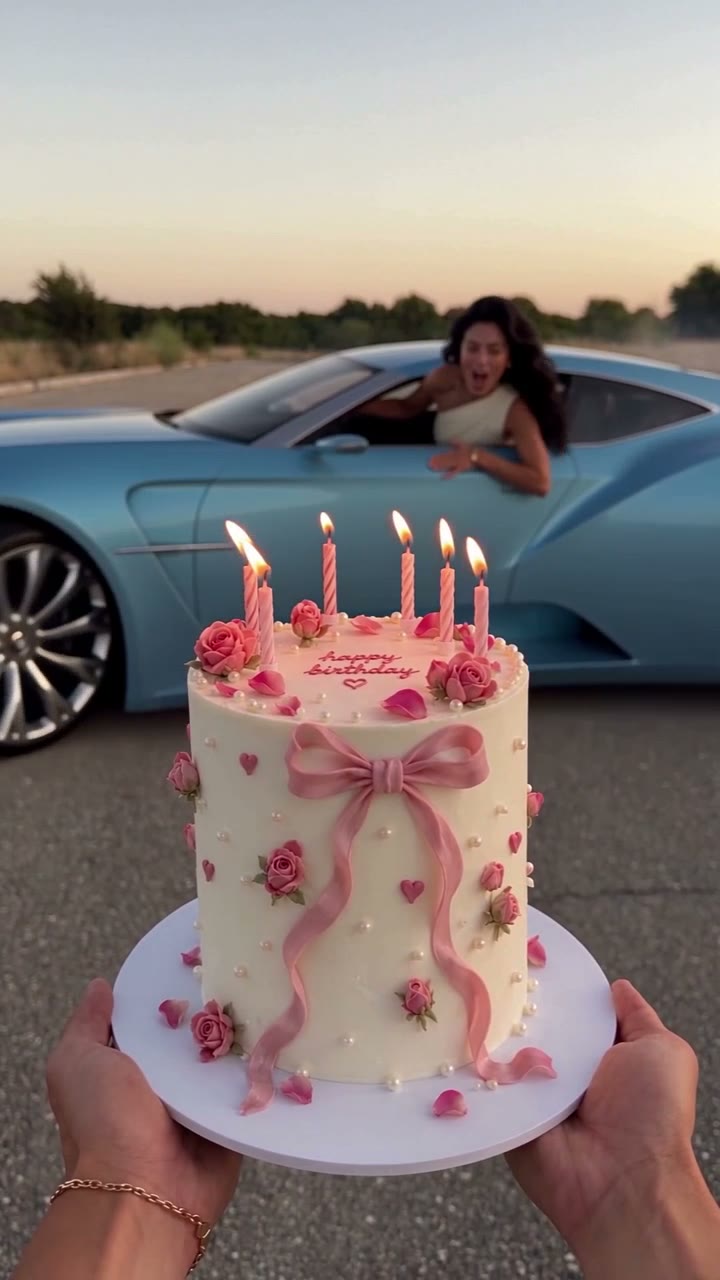
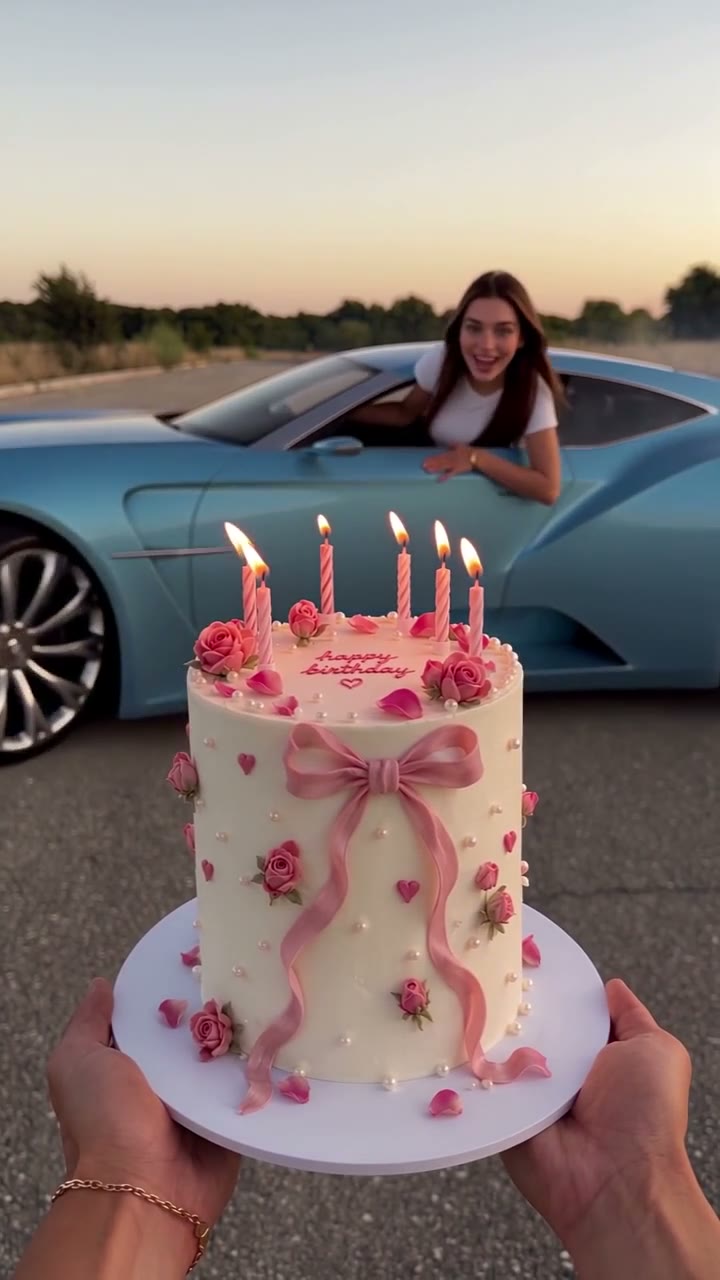
Drive-By Birthday AI is a short birthday video in which a car slides toward a cake and its driver leans out of the window to blow out the candles. On Motion Transfer, one person photo supplies the driver’s full appearance, hair and clothing. The reference supplies the blue coupe, roadside setting, foreground cake and hands, motion and soundtrack. Drive-By Birthday AI produces an eight-second portrait clip that ends with a black-and-white moment. It is a playful way to place yourself or a consenting friend inside a prepared birthday scene without filming a car stunt.

A birthday driver leans from a blue coupe toward a candlelit cake, ending in black and white

How to make Drive-By Birthday AI

Choose the birthday person, review the prepared scene and generate.

  1. STEP 1

    Add one person photo

    Upload a clear picture for Drive-By Birthday AI. Include the person’s hair, upper body and intended clothing, with no other person competing for attention.

  2. STEP 2

    Check the scene and quote

    Preview the Drive-By Birthday AI motion and sound. Choose an available resolution in Settings, then check the displayed credit estimate before generating.

  3. STEP 3

    Review and download

    Sign in and generate with enough credits. Watch the complete Drive-By Birthday AI result in My creations, checking the window approach, candle moment and final frame before downloading.

Drive-By Birthday AI video idea

A community remix of the same car-and-candles scene. Examples illustrate the format; individual results can vary.

Put the birthday person in the driver seat

A familiar person makes the surprise personal. Drive-By Birthday AI uses the appearance and clothing in your photo for the driver, from the first visible window view to the closer candle-blowing moment. You can choose a casual look or a birthday outfit that the person would recognize. There is no need to find a matching car or pose beside a real cake. Drive-By Birthday AI follows the prepared performance, so a relaxed, clear photo can be enough to start. The photograph controls the person; it does not replace the vehicle or the hands holding the cake.
Put the birthday person in the driver seat

Turn an arrival into a birthday punchline

The reveal has a beginning, a turn and a payoff. Drive-By Birthday AI starts with the cake close to the camera and the car farther down the road. As the coupe comes alongside, attention moves to the driver, then back to the candles. That sequence gives a birthday greeting more movement than a still portrait or a text card. Drive-By Birthday AI keeps the original driving path, window interaction and timing as its targets. You do not need to write camera directions or edit separate arrival and cake shots together. Small movements can vary in a generated result.

Turn an arrival into a birthday punchline

Make a short greeting you can finish your way

Use the clip as the visual part of a birthday message, a group-chat surprise or a portrait social post. Drive-By Birthday AI includes the reference sound and the closing black-and-white look, giving the eight-second scene a clear finish. After downloading, add the person’s name, age or your own message in your usual editor. This keeps important words readable instead of relying on generated cake lettering. Drive-By Birthday AI does not have a custom greeting or music field. Review the final video before sharing and choose a caption that makes the playful AI edit clear.

Make a short greeting you can finish your way

What your Drive-By Birthday AI photo changes

Personalize the birthday person while keeping the scene easy to recognize.

One complete appearance

Drive-By Birthday AI uses the photo for the driver’s visible features, hair, body and outfit. It has one person slot, so use a single subject rather than a group photo.

A prepared car and cake

The blue coupe, pink-decorated cake, candle arrangement and roadside are part of the Drive-By Birthday AI reference. This page has no separate vehicle, cake or location uploads.

The original finish

Drive-By Birthday AI retains the reference soundtrack and black-and-white ending. The action length is fixed; resolution is the available output choice in Settings.

Drive-By Birthday AI credits

An account and sufficient credits are required to generate. Check the quote for your selected resolution. Shared plan examples may refer to other models or video lengths.

Starter

For your first ideas.

$8.3/month

$100.0 charged yearly

2,400 credits/year

Up to 400 images

GPT Image 2Nano Banana Pro

Up to 133 videos

Seedance 2.5Kling 3.0 Motion Control
  • Up to 4K images and HD videos, depending on the model
  • Image editing, video creation & motion transfer
  • Watermark-free image & video downloads
  • Generation history in your account
Popular40% OFFSave $238.8

Pro

For a steady creative flow.

$30.0/month$49.9/month

$360.0 charged yearly

21,600 credits/year

Up to 3,600 images

GPT Image 2Nano Banana Pro

Up to 1,200 videos

Seedance 2.5Kling 3.0 Motion Control
  • Up to 4K images and HD videos, depending on the model
  • Image editing, video creation & motion transfer
  • Watermark-free image & video downloads
  • Generation history in your account
  • Use credits across image and video models
Best Value50% OFFSave $599.8

Business

For more creations, more often.

$49.9/month$99.9/month

$599.0 charged yearly

48,000 credits/year

Up to 8,000 images

GPT Image 2Nano Banana Pro

Up to 2,666 videos

Seedance 2.5Kling 3.0 Motion Control
  • Up to 4K images and HD videos, depending on the model
  • Image editing, video creation & motion transfer
  • Watermark-free image & video downloads
  • Generation history in your account
  • Use credits across image and video models

Basic

$0

Try before you subscribe

  • 18 one-time signup credits
  • Generation history included
  • Watermarked previews & downloads
  • Up to 3 images or 1 video
  • Watermark-free downloads require payment

Prices in USD; taxes and total shown at checkout. Subscriptions renew automatically; cancel in Billing settings. Subscription credits expire each period; one-time credits never expire.

Refunds: request within 72 hours. Used purchased credits and applicable non-refundable processing costs (up to 6%) are deducted. Terms · Refund Policy

Drive-By Birthday AI questions

Photo choices, the birthday scene and what to expect from your clip.

What photo works best for Drive-By Birthday AI?

Use a sharp, evenly lit photo showing one person’s face, hair and upper body in the outfit you want. Leave enough detail around the shoulders and neckline for the window view. Avoid heavy filters, obscured features or very dark clothing against a dark background. A driving pose is not required.

Can I make Drive-By Birthday AI for a friend?

Yes, with a photo they have agreed you may use. Their appearance and clothes become the birthday driver’s look, while the prepared scene stays the same. A picture that clearly shows the intended outfit is more useful than a tiny profile avatar. Review the result before sending it as a surprise.

Can Drive-By Birthday AI change the car or cake?

This page changes the driver only. It does not offer car, cake, age, candle-count or background customization. The reference includes a blue coupe and a decorated cake held in the foreground. If a particular name or age matters, add it as a readable caption after downloading rather than expecting the cake to display it.

Does Drive-By Birthday AI include the original sound?

Yes. The workflow creates the visual edit and restores the reference audio to the completed video. It does not record the uploaded person’s voice or provide a separate music upload. Play the reference with sound before starting so you know what accompanies the scene, and check the finished audio before sharing.

Why does Drive-By Birthday AI end in black and white?

The reference deliberately changes to black and white around the candle-blowing finish. That closing look belongs to the template and remains part of the requested result. It is not an output-quality setting, and there is no color-ending switch on this page.

How long is a Drive-By Birthday AI video?

The prepared sequence is eight seconds in a vertical 9:16 frame. It is suited to a short message or portrait post. The page follows that fixed reference length; it does not offer a longer arrival, extra people or a motorcycle version. Use another template for a different action.

Is Drive-By Birthday AI free to generate?

Viewing the reference and examples is free. Generating requires signing in and having enough credits for the displayed quote. Resolution affects the estimate, so review it before submitting. The prices shown in general plan examples do not replace the quote for this particular clip.

What should I check in my Drive-By Birthday AI result?

Watch the driver through the approach, the lean through the window and the closer candle shot. Look for changes in hair or clothing, awkward arms at the window edge and distorted candle or cake details. The model interprets parts of the body that the photo does not show; a consistent appearance is a target, not a guarantee.

Create your Drive-By Birthday AI greeting

Choose the birthday person and give them a memorable arrival, from the drifting coupe to the candle-blowing finish.

A birthday driver leans from a blue coupe toward a candlelit cake, ending in black and white