
Create a video

Central walker · Photo 1

Demolition Walk AI Video Generator

Your look, the walk, the moving crowd. Demolition Walk AI turns one person photo into a cinematic street entrance with the prepared camera movement and reference sound.

0:00 / —:—

Demolition Walk AI video ideas

Explore community remixes of this performance. Open a video for a closer look.

What is Demolition Walk AI?

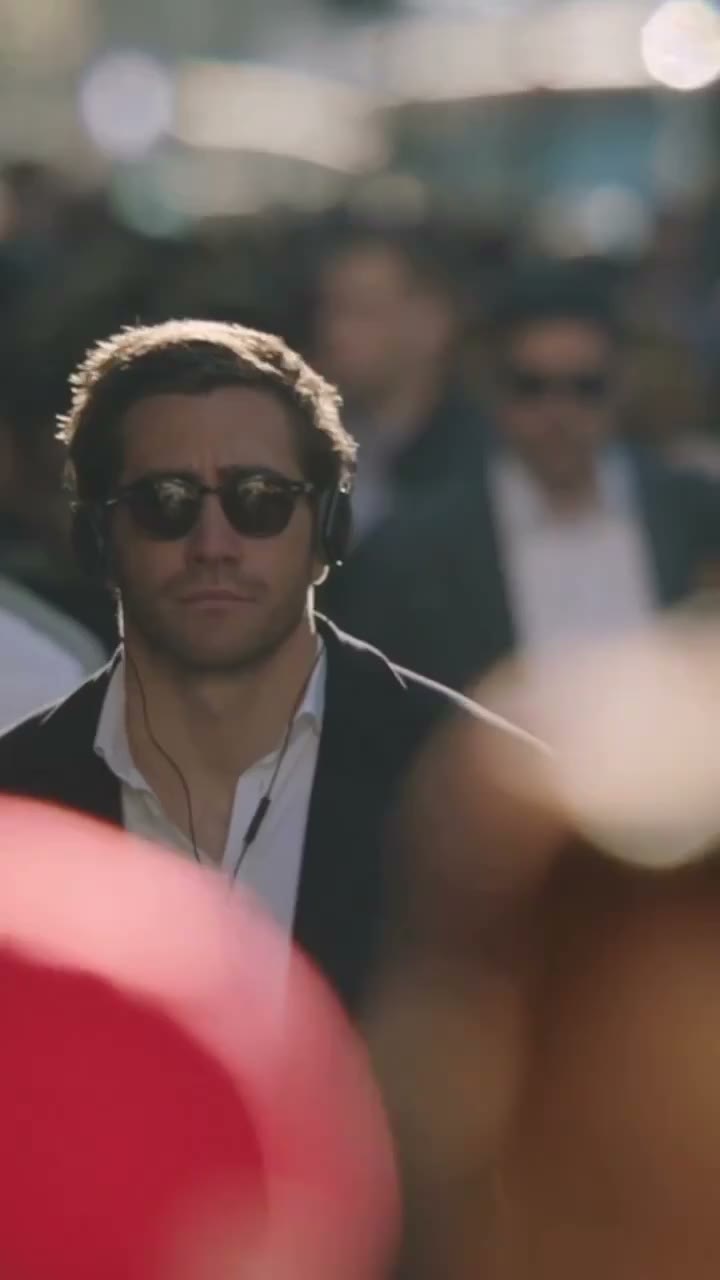
Demolition Walk AI is a cinematic crowd-walking video that places your chosen person at the center of a busy street. The camera tracks backward as the lead walks forward, with passing pedestrians briefly crossing the foreground and sunlight outlining the subject. Upload one person photo on Motion Transfer to replace the central walker's complete appearance and clothing. Demolition Walk AI follows the prepared movement, camera path and scene, producing a portrait clip of roughly sixteen seconds with the reference sound. Your image selects the lead; the crowd remains part of the setting.

A central walker wearing sunglasses and headphones moving through a backlit street crowd

How to make a Demolition Walk AI video

Choose the lead, review the prepared scene and generate.

  1. STEP 1

    Choose your Demolition Walk AI look

    Upload one clear person photo showing the appearance and outfit you want in the central role.

  2. STEP 2

    Generate your Demolition Walk AI clip

    Preview the scene and sound, choose a resolution in Settings, review the quote and sign in to submit.

  3. STEP 3

    Review your Demolition Walk AI result

    Check the lead through foreground overlaps in My creations, then download your finished video.

Demolition Walk AI community example

See a community reinterpretation of the same central walking role. This example illustrates the idea and is not a result generated on this site.

Make yourself the focus of Demolition Walk AI

Demolition Walk AI puts your chosen person at the center of a busy street, creating contrast with the passing crowd. Your image supplies their hair, body, clothing and visible accessories. Choose an everyday look or a styled portrait; the prepared scene supplies the walk and background performers. Use Demolition Walk AI for a personal entrance, character reveal or short visual mood piece.
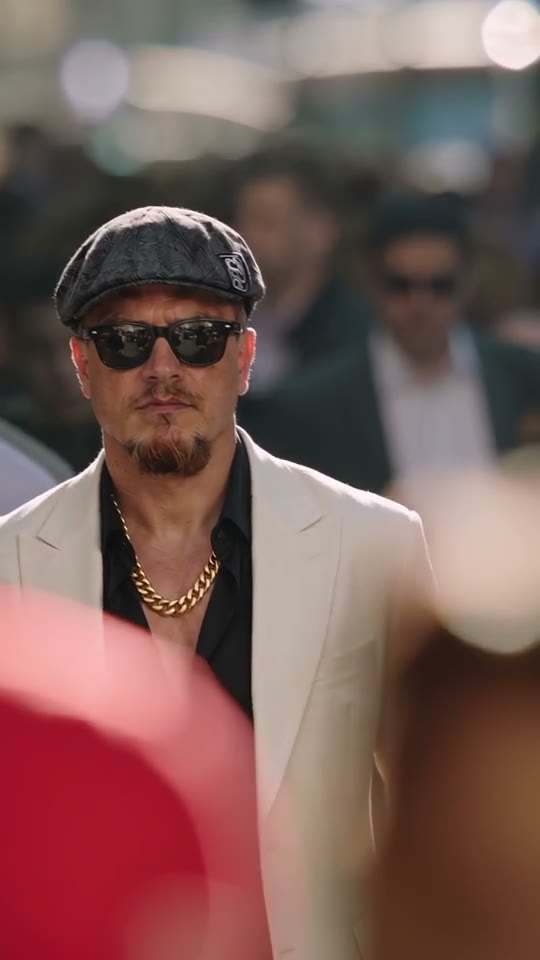
Make yourself the focus of Demolition Walk AI

Keep the crowd and moving camera around you

Demolition Walk AI adds depth through passing pedestrians, soft background focus and a camera tracking the walker from the front. The prepared street and light give your photo a setting without a new location prompt. Demolition Walk AI aims to keep the same person visible after each foreground obstruction; those transitions are worth checking for changes in appearance.

Keep the crowd and moving camera around you

Build a portrait entrance with Demolition Walk AI

Open a personal montage or fictional character edit with a short walking entrance. Demolition Walk AI follows the portrait framing and pace, with the reference soundtrack restored to the finished clip. Download it to trim or add captions in your editor. Demolition Walk AI does not compose music or create a voice from your photo.

Build a portrait entrance with Demolition Walk AI

Is Demolition Walk AI right for your idea?

Choose this sequence when the atmosphere and role fit the edit you want to make.

A single central character

Demolition Walk AI uses one role photo. Choose it for a personal entrance or character introduction where the surrounding people remain part of the original scene.

A cinematic street mood

The tracking camera, backlight and passing crowd create the atmosphere. Demolition Walk AI follows these existing elements without asking you to describe a location or assemble multiple shots.

A prepared portrait sequence

The walking pace and vertical frame are fixed by the reference. Demolition Walk AI fits a short portrait edit; choose another template if your idea depends on a dance, a partner or a different setting.

Demolition Walk AI credits and plans

Check the workspace quote for this reference and your chosen resolution. Generation requires an account and sufficient credits.

Starter

For your first ideas.

$8.3/month

$100.0 charged yearly

2,400 credits/year

Up to 400 images

GPT Image 2Nano Banana Pro

Up to 133 videos

Seedance 2.5Kling 3.0 Motion Control
  • Up to 4K images and HD videos, depending on the model
  • Image editing, video creation & motion transfer
  • Watermark-free image & video downloads
  • Generation history in your account
Popular40% OFFSave $238.8

Pro

For a steady creative flow.

$30.0/month$49.9/month

$360.0 charged yearly

21,600 credits/year

Up to 3,600 images

GPT Image 2Nano Banana Pro

Up to 1,200 videos

Seedance 2.5Kling 3.0 Motion Control
  • Up to 4K images and HD videos, depending on the model
  • Image editing, video creation & motion transfer
  • Watermark-free image & video downloads
  • Generation history in your account
  • Use credits across image and video models
Best Value50% OFFSave $599.8

Business

For more creations, more often.

$49.9/month$99.9/month

$599.0 charged yearly

48,000 credits/year

Up to 8,000 images

GPT Image 2Nano Banana Pro

Up to 2,666 videos

Seedance 2.5Kling 3.0 Motion Control
  • Up to 4K images and HD videos, depending on the model
  • Image editing, video creation & motion transfer
  • Watermark-free image & video downloads
  • Generation history in your account
  • Use credits across image and video models

Basic

$0

Try before you subscribe

  • 18 one-time signup credits
  • Generation history included
  • Watermarked previews & downloads
  • Up to 3 images or 1 video
  • Watermark-free downloads require payment

Prices in USD; taxes and total shown at checkout. Subscriptions renew automatically; cancel in Billing settings. Subscription credits expire each period; one-time credits never expire.

Refunds: request within 72 hours. Used purchased credits and applicable non-refundable processing costs (up to 6%) are deducted. Terms · Refund Policy

Demolition Walk AI questions

Photo choices, the central role, audio and your finished clip.

What photo should I upload for Demolition Walk AI?

Choose a sharp photo of one person with their face, hair and intended outfit visible. A waist-up or wider view gives clothing context. Demolition Walk AI uses this picture for the whole lead role; avoid group images or crops showing only a face.

Does Demolition Walk AI use my clothing too?

Yes. Your image defines the central person's appearance and clothing. Choose the intended look before uploading; there is no separate wardrobe slot. Prints, jewelry and small details may vary, especially when pedestrians briefly block the lead.

Can I replace the crowd in Demolition Walk AI?

Only the central walker is replaced. Pedestrians, their movement and the street belong to the reference. Community experiments that transform the entire crowd go beyond the one-person replacement offered here.

Do I need sunglasses or headphones in my photo?

You can use the appearance and accessories you want the lead to wear. The source scene includes sunglasses and headphones, but your image supplies the selected person's look. Distinct accessories should be visible in the photo if they matter to your version. Review their shape and placement in the result; exact preservation of every small item is not guaranteed.

How long is a Demolition Walk AI video?

The reference is approximately 15.6 seconds and uses a 9:16 portrait frame. The result follows that sequence rather than an adjustable story length. Available resolutions appear in Settings. Increasing resolution does not lengthen the walk, widen the scene or reveal clothing details that are absent from your image.

What happens when someone walks in front of the lead?

Pedestrians briefly obscure the lead. Demolition Walk AI aims to keep the same identity and outfit when they reappear. Check the face, collar and shoulders after each overlap; these layered moments can reveal generation errors.

Does Demolition Walk AI include the original sound?

The reference audio is restored after silent video generation. Listen to the preview before choosing this sequence. There is no new song, speech or voice input; check that you have permission to publish the audio.

Can I change the street or walking direction?

Demolition Walk AI uses a fixed frontal tracking shot, street and crowd. For another setting, angle or route, start with your own permitted motion reference on the Motion Transfer homepage.

How much does Demolition Walk AI cost?

Sign in and make sure your account has enough credits. The workspace displays a quote for the reference duration and selected output resolution before submission. Use that quote for this clip; the plan table may illustrate other models or shorter videos. Uploading a photo and previewing the scene do not themselves submit a generation.

How do I improve a Demolition Walk AI result?

Use a clear photo with distinct hair, clothing and body outlines. Inspect the result after each foreground overlap for changes in appearance or blending with nearby people. A clearer input can help when the original photo hides important details.

Where do I download my Demolition Walk AI video?

Open the result in My creations and use the download action. Watch it with sound first to check walking continuity and crowd overlaps. Add text or combine clips in your preferred editor afterward.

Is this an official Demolition scene generator?

Motion Transfer is an independent tool. The page uses a supplied crowd-walking reference associated with the Demolition scene, and the showcased remix comes from the community. Neither the scene nor its example demonstrates endorsement or a result generated by this site. Use your own or permitted images, and clearly identify an AI-created portrayal when it could be mistaken for a real recording.

Create your Demolition Walk AI video

Choose the person at the center of the crowd.

A central walker wearing sunglasses and headphones moving through a backlit street crowd