
Create a video

Skydiver · Photo 1

Balloon Skydive AI Video Generator

Take your character from the balloon basket to a parachute above the fields. Balloon Skydive AI turns one photo into a roughly 17-second vertical skydiving scene with the reference sound. Your appearance and outfit travel through the sequence; the functional flight equipment stays in place.

0:00 / —:—

What is Balloon Skydive AI?

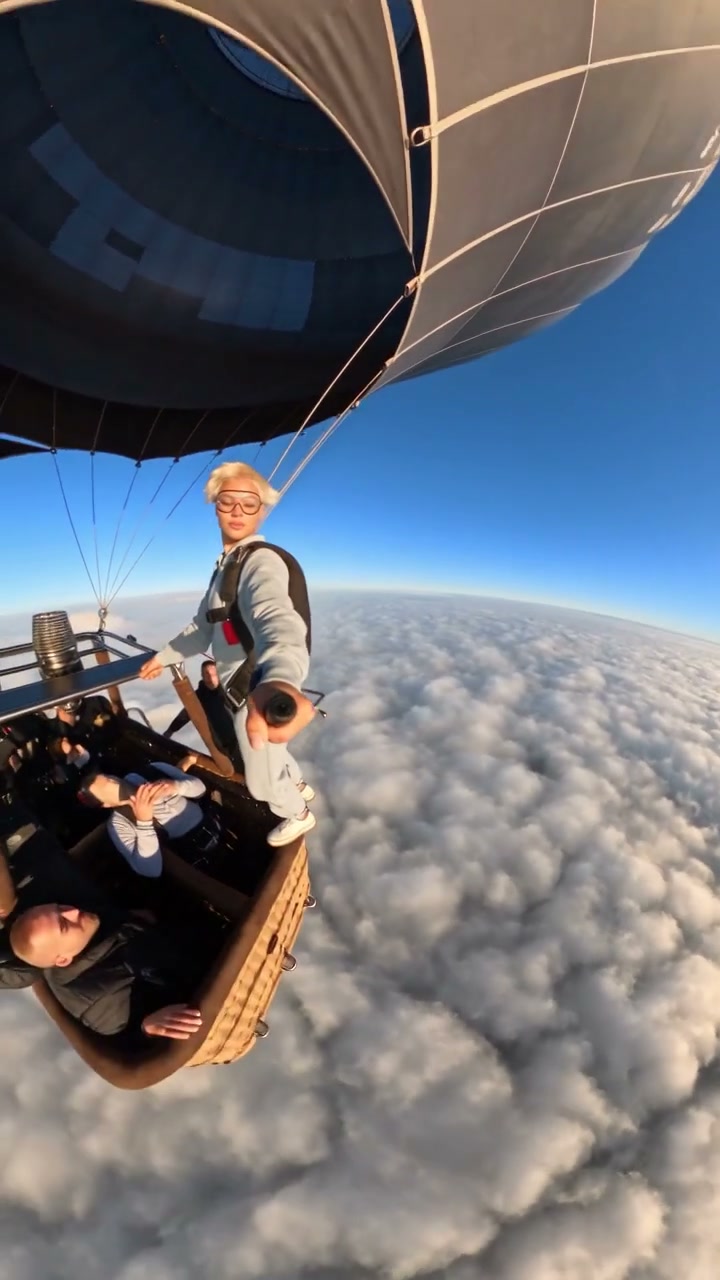
Balloon Skydive AI is a photo-to-video skydiving effect that follows a person leaving a hot-air balloon, rotating above the clouds and opening a parachute. On Motion Transfer, upload one person to define the skydiver's complete appearance and clothing. The prepared reference supplies the balloon exit, changing camera angles, descent and original sound. Your Balloon Skydive AI result follows this short vertical sequence, ending under the open canopy. It gives you an adventure-style character video without filming a jump, assembling separate aerial shots or supplying your own footage.

A skydiver leaves a hot-air balloon above the clouds, rotates through free fall and opens a parachute

How to create a Balloon Skydive AI video

The reference is ready. Choose the character and review the result.

  1. STEP 1

    Choose your Balloon Skydive AI photo

    Upload one clear photo showing the person's face, hair, body and clothing. Use an image you have permission to edit. Balloon Skydive AI has one subject slot; a full-body view gives more information than a tightly cropped selfie.

  2. STEP 2

    Review your Balloon Skydive AI settings

    Choose an available resolution in Settings, check the credit quote on Generate and sign in to submit. The prepared reference supplies the action and sound; you do not need to write a prompt.

  3. STEP 3

    Watch and download your Balloon Skydive AI clip

    Play your Balloon Skydive AI result through the parachute opening. Check the changing angles, limbs and equipment connections with sound, then download the completed clip from My creations.

Balloon Skydive AI in motion

A balloon exit, cloud-level rotation and open-canopy ending, all guided by the same prepared reference.

Cast yourself in an aerial adventure

Balloon Skydive AI puts a recognizable character at the center of the flight. Your photo supplies hair, body proportions and clothing as well as facial appearance, so a familiar look can continue from the basket into the open sky. Use it for a playful personal introduction, an adventurous birthday message or a fictional character edit. The functional harness and parachute remain part of the scene, fitted around the replacement outfit. Balloon Skydive AI aims to keep the subject consistent as the camera turns; distant views and strong perspective can reduce recognizable detail.
Cast yourself in an aerial adventure

Keep the build-up, rotation and canopy reveal

The balloon stays overhead as the subject drops away, the horizon rotates, and the canopy opens near the end. Balloon Skydive AI keeps this progression and wide-angle perspective, saving you from timing separate aerial shots. Preview the movement to see whether it fits your post; the sequence ends under the canopy, with no landing.

Keep the build-up, rotation and canopy reveal

Get a vertical adventure clip with sound

Balloon Skydive AI delivers a portrait clip with the reference audio, ready to download together. It suits a short message or vertical post centered on one character against a changing aerial view. No separate music selection or audio editing is needed. Keep captions clear of the subject during rotation. The community reference illustrates the sequence; generated details may differ.

Get a vertical adventure clip with sound

Is Balloon Skydive AI right for your idea?

Choose the prepared sequence when its particular action fits your intended video.

A character-led adventure

Make a friend, your own portrait or a fictional character the focus of the adventure. Balloon Skydive AI supplies the balloon, cloud layer and terrain.

The prepared flight, from start to finish

Balloon Skydive AI keeps the roughly 17-second sequence and portrait shape. It does not add a landing, choose a new destination or provide a separate balloon passenger slot. Other people in the basket stay as background participants.

Your own footage for a different flight

For another flight or destination, bring a video you can use to the Motion Transfer homepage. This page accepts a character photo and keeps the aerial setting fixed.

Balloon Skydive AI credits and plans

Balloon Skydive AI requires an account and sufficient credits. Generate shows the quote for the selected resolution and reference duration. Plan examples may describe other models or video lengths.

Starter

For your first ideas.

$8.3/month

$100.0 charged yearly

2,400 credits/year

Up to 400 images

GPT Image 2Nano Banana Pro

Up to 133 videos

Seedance 2.5Kling 3.0 Motion Control
  • Up to 4K images and HD videos, depending on the model
  • Image editing, video creation & motion transfer
  • Watermark-free image & video downloads
  • Generation history in your account
Popular40% OFFSave $238.8

Pro

For a steady creative flow.

$30.0/month$49.9/month

$360.0 charged yearly

21,600 credits/year

Up to 3,600 images

GPT Image 2Nano Banana Pro

Up to 1,200 videos

Seedance 2.5Kling 3.0 Motion Control
  • Up to 4K images and HD videos, depending on the model
  • Image editing, video creation & motion transfer
  • Watermark-free image & video downloads
  • Generation history in your account
  • Use credits across image and video models
Best Value50% OFFSave $599.8

Business

For more creations, more often.

$49.9/month$99.9/month

$599.0 charged yearly

48,000 credits/year

Up to 8,000 images

GPT Image 2Nano Banana Pro

Up to 2,666 videos

Seedance 2.5Kling 3.0 Motion Control
  • Up to 4K images and HD videos, depending on the model
  • Image editing, video creation & motion transfer
  • Watermark-free image & video downloads
  • Generation history in your account
  • Use credits across image and video models

Basic

$0

Try before you subscribe

  • 18 one-time signup credits
  • Generation history included
  • Watermarked previews & downloads
  • Up to 3 images or 1 video
  • Watermark-free downloads require payment

Prices in USD; taxes and total shown at checkout. Subscriptions renew automatically; cancel in Billing settings. Subscription credits expire each period; one-time credits never expire.

Refunds: request within 72 hours. Used purchased credits and applicable non-refundable processing costs (up to 6%) are deducted. Terms · Refund Policy

Balloon Skydive AI questions

Photo selection, the fixed sequence, sound and reviewing your result.

How many photos does Balloon Skydive AI need?

Balloon Skydive AI needs one photo of the intended skydiver. A single visible subject gives the tool a clear identity to follow. There is no optional second-person slot, and a group photo does not assign multiple roles.

What photo works best for Balloon Skydive AI?

Use a sharp image with visible hair, face, body shape and clothing. A full-body or generous three-quarter crop gives Balloon Skydive AI more appearance information for the aerial poses. Covered or cropped areas must be inferred, so avoid heavy blur and large obstructions.

Does Balloon Skydive AI replace clothing?

Yes. The photo defines the complete subject and outfit. Balloon Skydive AI preserves the functional harness, straps, parachute and their connections over that look. It does not offer a separate equipment design control, and exact garment details can vary during motion.

Does Balloon Skydive AI include the parachute opening?

The prepared reference includes an opening near the end and finishes with the subject suspended under the canopy. Balloon Skydive AI follows that sequence. It does not show touchdown or offer a longer flight ending at a chosen destination.

Does Balloon Skydive AI include sound?

Yes. Balloon Skydive AI combines the generated picture with the reference audio. Listen using the preview control and check the downloaded result with sound. It does not create your subject's personal voice or offer a music-selection field on this page.

Can I change the Balloon Skydive AI length or framing?

The reference sets the roughly 17-second duration and 9:16 framing. Balloon Skydive AI offers available output resolutions in Settings. A higher resolution changes output size; it does not add new camera angles or recover details missing from your photo.

Why does the Balloon Skydive AI horizon rotate?

The rotation belongs to the supplied skydiving camera movement. Balloon Skydive AI follows it along with the wide-angle perspective. Preview the motion first if you prefer a stable horizon; there is no camera-stabilization switch for this fixed effect.

What should I check in a Balloon Skydive AI result?

Watch the limbs during rotation and the harness connections after the canopy opens. Balloon Skydive AI can reinterpret hands, straps or small facial details, especially in distant views.

Is Balloon Skydive AI free to generate?

You can inspect the reference before submitting. Balloon Skydive AI generation requires signing in and sufficient credits for the displayed quote. Check the chosen resolution and quote on Generate. Uploading a photo alone does not start a paid task; another generation is a separate task.

Can I share a Balloon Skydive AI video?

Download your completed Balloon Skydive AI clip and follow the destination platform's rules for AI content. Use photos you are allowed to edit and check rights to the reference audio for your intended use. Present the result as an AI effect, especially when the subject is a real person.

Give your character a Balloon Skydive AI adventure

Choose one photo, review the prepared reference and make the scene personal.

A skydiver leaves a hot-air balloon above the clouds, rotates through free fall and opens a parachute