
Plug Walk AI Video Generator
Take the cash, point at the camera and step back into the dance. Plug Walk AI puts your complete look into the car-window scene from one person photo, with the prepared reference sound.
0:00 / —:—
Plug Walk AI video ideas
Explore community remixes of this performance. Open a video for a closer look.
What is Plug Walk AI?
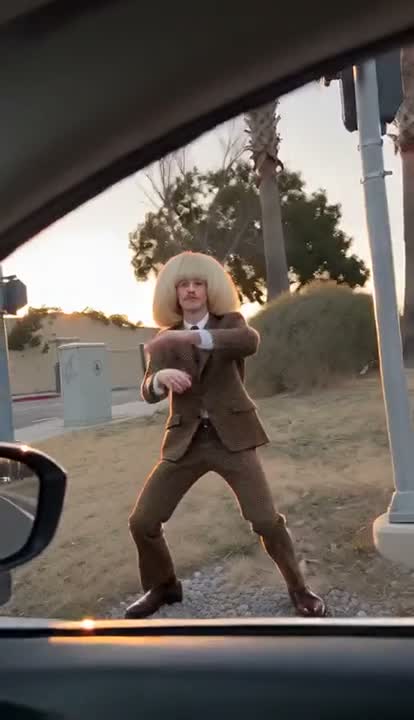
Plug Walk AI is a car-window dance effect: someone outside the car accepts a banknote, points toward the camera, steps back and starts a loose, bent-knee sway. On Motion Transfer, one complete person photo replaces the dancer’s face, hair, body, outfit and accessories throughout that sequence. The hand passing the money, car window, roadside setting and moving viewpoint stay with the prepared reference. Your result is an approximately 12-second portrait video with the reference audio. Plug Walk AI follows the cash handoff and dance shown here, so you can make the scene your own without recording the performance or supplying a second person.
How to create a Plug Walk AI video
One person photo defines the dancer; the car-window sequence is prepared.
STEP 1
Choose your Plug Walk AI dancer
Upload one clear full-person image showing the face, hair, clothing and shoes you want represented. Keep one main subject visible so the outside dancer has a clear identity and outfit.
STEP 2
Preview the sequence and check the quote
Watch Plug Walk AI with sound, select an available resolution in Settings and read the credit quote on Generate. Sign in and submit when ready. Adding a photo alone does not start a paid job.
STEP 3
Review your Plug Walk AI result
Open the result in My creations and play the whole clip. Inspect the cash handoff, pointing hand, backward steps and bent-knee dance, then download the checked video. Replaying a saved result creates no new generation.
See the Plug Walk AI character remake
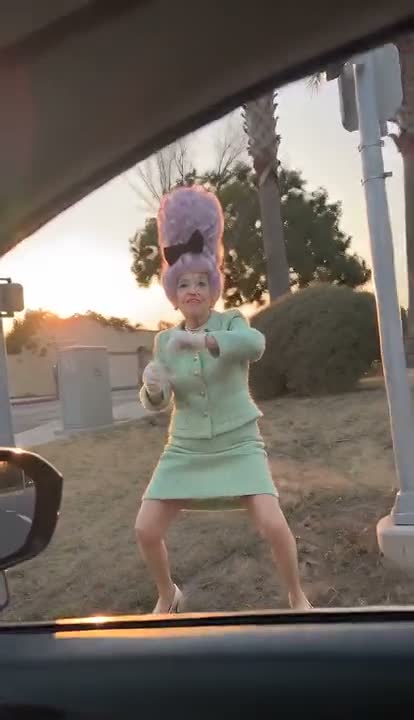
A third-party AI example shows the car-window handoff and dance with a different character.
Give your whole character the starring role
Plug Walk AI moves from a close interaction at the window to a wider view of the dancer, giving both your expression and your outfit time on screen. Use your own look, a costume or a fictional character portrait to turn the familiar cash-and-dance setup into a personal reaction clip. The person in your photo becomes the performer outside the car; you are choosing their whole appearance, including the clothing. Plug Walk AI keeps that role consistent as the character approaches, gestures and moves backward. A clear full-person image gives the scene useful information about the intended silhouette and footwear, while a tight face crop leaves those details unspecified.
Get the handoff and dance in one prepared sequence
The small exchange at the window sets up the larger reaction outside it. Plug Walk AI keeps the offered banknote, accepting gesture, point toward the viewer and backward steps before the low swaying dance. That progression gives your clip a recognizable setup and payoff without arranging a driver, finding a location or learning the movement yourself. The car-side hand remains part of the reference, so one photo is enough for the role you control. Plug Walk AI is useful when that specific interaction carries your joke or character idea. It does not provide a new choreography selector, an extra driver upload or controls for replacing the car.
Make a short reaction clip from the viewer’s seat
The camera stays inside the car while the dancer moves from the window to the roadside, making the viewer part of the exchange. Plug Walk AI preserves that framing and the reference sound, giving the short scene a beginning, interaction and dance ending that you can use together. Share a personal character joke with friends or include the result in a larger creative edit. Plug Walk AI follows the reference’s actual ending, where the dancer keeps moving and gestures toward the camera. Preview the complete clip with sound before generating. Afterward, check the handoff and full-body movement before adding your own caption or combining the result with other footage.
Is Plug Walk AI right for your idea?
Choose the prepared scene when the cash exchange and relaxed dance fit your character.
A personal reaction for friends
Plug Walk AI gives a recognizable person a playful role in a short exchange. Use an image you have permission to use, and present the finished video as an AI edit when you share it.
An outfit-led character moment
The wider dance shows the whole look after the close window interaction. Plug Walk AI can support a costume or character concept when the clothing and silhouette matter as much as the face.
A fixed scene rather than a new shoot
Plug Walk AI follows the prepared roadside sequence. If you need another location, camera angle or movement, use your own reference on the Motion Transfer homepage or choose another entry in AI Trends.
Plug Walk AI credits and plans
Generation requires an account and enough credits for the displayed quote. Resolution and reference duration affect the total. General plan examples may use other models or video lengths.
Starter
For your first ideas.
$8.3/month
$100.0 charged yearly
2,400 credits/year
Up to 400 images
GPT Image 2Nano Banana Pro
Up to 133 videos
Seedance 2.5Kling 3.0 Motion Control
- Up to 4K images and HD videos, depending on the model
- Image editing, video creation & motion transfer
- Watermark-free image & video downloads
- Generation history in your account
Popular40% OFFSave $238.8
Pro
For a steady creative flow.
$30.0/month$49.9/month
$360.0 charged yearly
21,600 credits/year
Up to 3,600 images
GPT Image 2Nano Banana Pro
Up to 1,200 videos
Seedance 2.5Kling 3.0 Motion Control
- Up to 4K images and HD videos, depending on the model
- Image editing, video creation & motion transfer
- Watermark-free image & video downloads
- Generation history in your account
- Use credits across image and video models
Best Value50% OFFSave $599.8
Business
For more creations, more often.
$49.9/month$99.9/month
$599.0 charged yearly
48,000 credits/year
Up to 8,000 images
GPT Image 2Nano Banana Pro
Up to 2,666 videos
Seedance 2.5Kling 3.0 Motion Control
- Up to 4K images and HD videos, depending on the model
- Image editing, video creation & motion transfer
- Watermark-free image & video downloads
- Generation history in your account
- Use credits across image and video models
Basic
$0Try before you subscribe
- 18 one-time signup credits
- Generation history included
- Watermarked previews & downloads
- Up to 3 images or 1 video
- Watermark-free downloads require payment
Prices in USD; taxes and total shown at checkout. Subscriptions renew automatically; cancel in Billing settings. Subscription credits expire each period; one-time credits never expire.
Refunds: request within 72 hours. Used purchased credits and applicable non-refundable processing costs (up to 6%) are deducted. Terms · Refund Policy
Plug Walk AI questions
Input requirements, the role you control and what to check before downloading.
How many photos does Plug Walk AI need?
Plug Walk AI uses one full-person photo for the outside dancer’s face, hair, proportions, clothing and accessories. Choose a single clearly visible subject.
Can I replace the person handing over the money?
Plug Walk AI replaces only the outside dancer. The money-giving hand and inside-car viewpoint remain from the reference; there is no driver photo slot.
Will Plug Walk AI use the clothes from my photo?
Yes. Plug Walk AI takes clothing, body shape and footwear from your photo; the original brown suit and hairstyle are optional. Review small details throughout the dance, as generation can alter them.
Can I change the car, background or dance?
Plug Walk AI follows the prepared cash handoff, pointing gestures, backward steps and bent-knee sway. The car, window and roadside background remain. Use your own motion video on the homepage for a different scene.
How long is a Plug Walk AI video?
Plug Walk AI follows the approximately 12.04-second portrait reference, including the approach, handoff and dance ending. Choose resolution in Settings and add trims or captions after download.
Does Plug Walk AI include the reference sound?
Plug Walk AI includes the reference audio. Enable preview sound to hear it before submitting. Custom music and dialogue controls are unavailable; check the soundtrack permissions for your intended use.
Will a larger output make the reference sharper?
The supplied Plug Walk AI demonstration comes from a low-resolution 414 × 720 video. It has been resized to meet input requirements, which does not recover missing detail. A larger output setting cannot guarantee sharper source details; inspect the face, fingers and banknote in your finished clip.
What should I check in a Plug Walk AI result?
Check that the outside dancer remains recognizable, the inside hand stays separate and the banknote transfers naturally. Watch the pointing fingers, feet and knees through the wider movement. Plug Walk AI targets consistent appearance and motion, but individual results can have distortions that need review before sharing.
Is Plug Walk AI free to generate?
Previewing the scene is free. Creating a Plug Walk AI video requires signing in with enough credits for the quote on Generate. Replaying a completed result uses no generation credits.
Create your Plug Walk AI video
Choose your full-person photo and step into the car-window cash-and-dance scene.