
Create a video

Required photos1
Settings
Mode
Video length6s
Resolution

Bby Wow AI Dance Generator

Your photo, your outfit, that party entrance. Use Bby Wow AI with one picture: walk toward the camera, take a bite and look up as the vertical clip ends.

0:00 / —:—
0:00 / —:—

Bby Wow AI video ideas

Explore examples of this effect. Open a video for a closer look.

What is Bby Wow AI?

Bby Wow AI turns one person’s photo into a playful party-entrance video. Your character walks toward the camera, takes a bite, gives a look and starts turning as the clip ends. The photo defines the lead dancer’s full appearance and clothing; the prepared performance supplies the movement and party setting. Your finished video includes music. You get a short vertical clip without recording a dance yourself.

The lead dancer walking toward the camera and taking a bite at the party

How to make your Bby Wow AI video

Start Bby Wow AI with one photo; the dance reference is ready.

  1. STEP 1

    Upload your photo

    For Bby Wow AI, choose one well-lit person with hair and outfit visible. A full-body or knees-up photo gives useful clothing detail for the walk and turn.

  2. STEP 2

    Generate your Bby Wow AI clip

    Choose an available resolution in Settings, review the quote on Generate and sign in to submit. Selecting a photo alone does not spend credits.

  3. STEP 3

    Watch and download

    Find your Bby Wow AI result in My creations. Check the full sequence with sound, then download the result.

Make the Bby Wow AI dance your own

Choose your lead, join the familiar party entrance and get a short video with music. Community examples illustrate the performance.

Choose your Bby Wow AI lead

Bby Wow AI lets you cast yourself or a consenting friend in the lead role. One photo provides the person’s hair, body and outfit, so your own look becomes part of the performance. The surrounding guests remain in the scene, giving your entrance a ready-made party backdrop without needing a group photo.
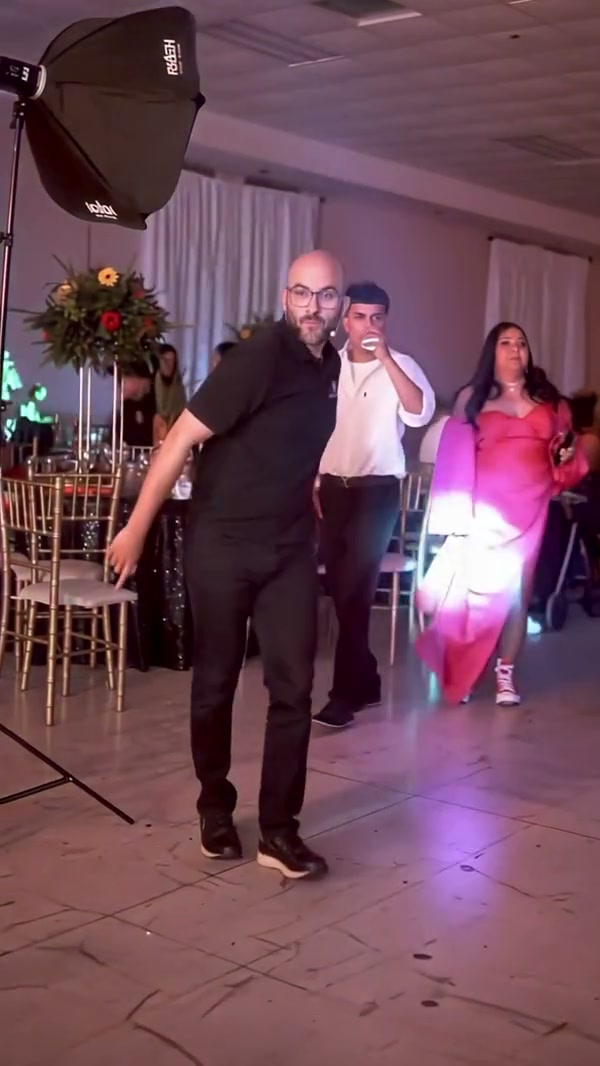
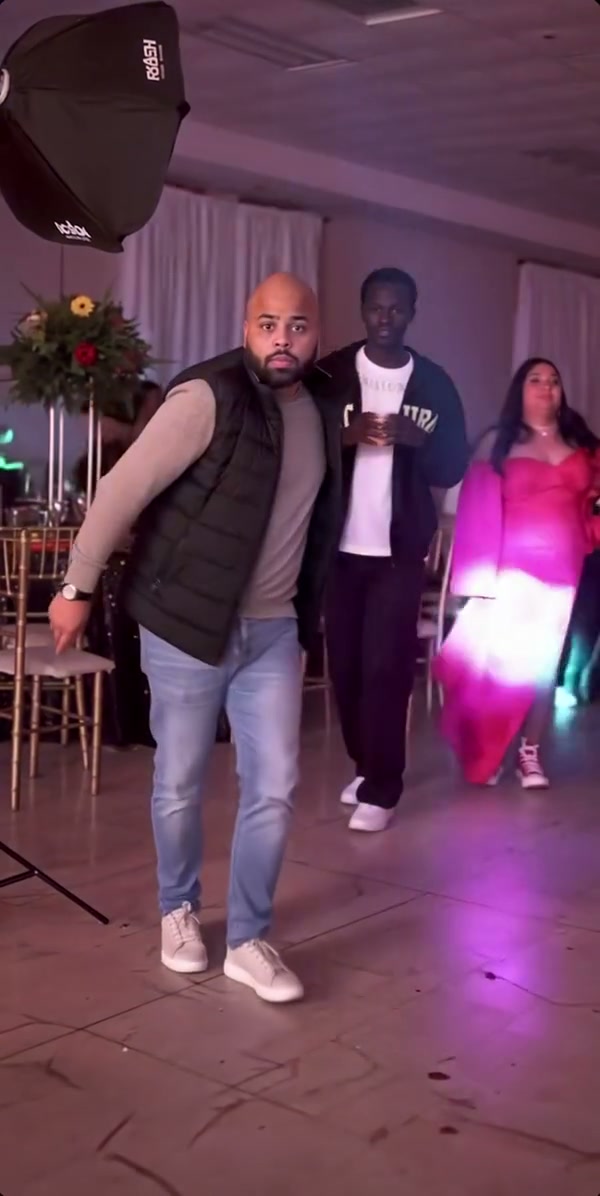
Choose your Bby Wow AI lead

Recreate the walk and bite without learning the dance

The joke comes from the sequence: a casual approach, the hand-to-mouth gesture and a glance at the camera before the clip ends. Bby Wow AI uses the prepared clip for that timing and movement. You can join the trend from a still photo without rehearsing the steps, filming at a party or writing a motion prompt.

Recreate the walk and bite without learning the dance

Share the complete entrance with music

Your Bby Wow AI result follows the roughly six-second vertical performance and restores its reference audio. Preview and download the complete clip for a playful message to friends or your own AI dance post. You do not need to find a separate audio file or assemble the entrance in an editor; check the finished appearance and movement before sharing.

Share the complete entrance with music

What Bby Wow AI changes

Bring your appearance into a prepared party performance.

One lead dancer

Your photo defines the main person’s full appearance and clothing. You do not need to supply pictures of the surrounding guests.

The original dance sequence

Bby Wow AI follows the reference entrance, bite, camera-facing moment and the beginning of the turn. The party, other people and camera movement are preserved by the instructions.

Your dance, complete with music

Your Bby Wow AI video includes music, so you can preview and download the complete dance without adding a separate track.

Bby Wow AI questions

Photo choices, sound and what to expect from this template.

How do I make a Bby Wow AI video with my own photo?

Upload one photo of a person to replace the lead dancer’s complete appearance and outfit. The fixed reference and instructions are already loaded. Check the credits, sign in and generate; you do not need a recording of yourself performing the dance.

Who does my photo replace in Bby Wow AI?

It replaces the lead who walks toward the camera, brings a bite to their mouth and looks up as the clip ends. The same replacement follows the lead throughout the sequence. The surrounding party guests are not photo slots.

What photo works best for Bby Wow AI?

Choose a sharp photo with one person, clear hair and visible clothing. A full-body or knees-up view gives more useful detail than a tightly cropped selfie. Avoid group photos, collages and objects covering the body. Unseen clothing details still have to be inferred.

Does Bby Wow AI include music?

Yes. Your Bby Wow AI video includes music. The preview starts muted; use the sound control to listen. No music upload is needed, and this template does not offer a song picker.

Can Bby Wow AI make a vertical or longer video?

This template follows a roughly 6-second vertical source. All three modes use the same complete reference; choose an available resolution and review the credit estimate. For a different motion clip, use the Motion Transfer homepage.

Will Bby Wow AI keep my appearance and outfit consistent?

The prompt requests the same person and clothing throughout the clip, but AI can change details during motion. Check the hand-to-mouth interaction and clothing edges before sharing. The examples are community interpretations, not a guarantee of a particular result from this tool.

Is Bby Wow AI free to use?

You can watch the reference and examples before creating anything. Video generation requires an account and enough credits for the displayed quote. Each new generation is a separate job; replaying or downloading an existing result does not create another job.

Can I share my Bby Wow AI video?

Download the finished video and use photos you have permission to edit. Check the reference footage and soundtrack rights for your intended use, especially advertising. This page does not grant music rights or imply endorsement by an artist or creator.

Create your Bby Wow AI entrance

Choose a photo with your look and outfit, and let the reference guide the moves.

Bby Wow AI